

Linux 内核模块编程指南-中文版 lkmpg-zh
lkmpg原英文版在线阅读 lkmpg原英文版GitHub仓库
本文档使用deepl机翻+部分人工修正 当前翻译文档处于原仓库commit id 47663d6
[toc]
1 前言
1.1 作者简介
《Linux 内核模块编程指南》最初由 Ori Pomerantz 为 Linux v2.2 编写。随着 Linux 内核的发展,Ori 维护该文档的时间越来越少。因此,Peter Jay Salzman 担任了维护者的角色,并为 Linux v2.4 更新了指南。在跟踪 Linux v2.6 的发展时,Peter 也遇到了类似的限制,因此 Michael Burian 加入了共同维护者的行列,使指南与 Linux v2.6 保持同步。Bob Mottram 更新了 Linux v3.8 及以后版本的示例,为指南做出了贡献。随后,Jim Huang 负责为最新的 Linux 版本(v5.0 及更高版本)更新指南,并修订 LaTeX 文档。
1.2 致谢
以下人员提出了更正或好的建议:
Amit Dhingra, Andy Shevchenko, Arush Sharma, Benno Bielmeier, Bob Lee, Brad Baker, Che-Chia Chang, Cheng-Shian Yeh, Chih-En Lin, Chih-Hsuan Yang, Chih-Yu Chen, Ching-Hua (Vivian) Lin, Chin Yik Ming, cvvletter, Cyril Brulebois, Daniele Paolo Scarpazza, David Porter, demonsome, Dimo Velev, Ekang Monyet, Ethan Chan, Francois Audeon, Gilad Reti, heartofrain, Horst Schirmeier, Hsin-Hsiang Peng, Ignacio Martin, I-Hsin Cheng, Iûnn Kiàn-îng, Jian-Xing Wu, Johan Calle, keytouch, Kohei Otsuka, Kuan-Wei Chiu, manbing, Marconi Jiang, mengxinayan, Meng-Zong Tsai, Peter Lin, Roman Lakeev, Sam Erickson, Shao-Tse Hung, Shih-Sheng Yang, Stacy Prowell, Steven Lung, Tristan Lelong, Tse-Wei Lin, Tucker Polomik, Tyler Fanelli, VxTeemo, Wei-Hsin Yeh, Wei-Lun Tsai, Xatierlike Lee, Yen-Yu Chen, Yin-Chiuan Chen, Yi-Wei Lin, Yo-Jung Lin, Yu-Hsiang Tseng, YYGO.
1.3 什么是内核模块?
参与Linux内核模块的开发,需要有C语言编程的基础和创建用于进程执行的常规程序的记录。在这一领域中,如果忽略了一个不规范的指针,就有可能导致整个文件系统被彻底消除,从而导致系统必须完全重启。
Linux 内核模块的确切定义是,能够根据需要在内核中动态加载和卸载的代码段。这些模块可以增强内核功能,而无需重启系统。设备驱动模块就是一个明显的例子,它有助于内核与连接到系统的硬件组件进行交互。在没有模块的情况下,主流方法倾向于单片内核,要求将新功能直接集成到内核映像中。这种方法会导致内核变大,当需要新功能时,就必须重建内核并随后重启系统。
1.4 内核模块软件包
Linux 发行版在软件包中提供了 modprobe、insmod 和 depmod 命令。
在 Ubuntu/Debian GNU/Linux 上:
sudo apt-get install -y build-essential kmod
在 Arch Linux上:
sudo pacman -S gcc kmod
1.5 我的内核中有哪些模块?
要了解当前内核中已加载了哪些模块,请使用 lsmod 命令
sudo lsmod
模块存储在 /proc/modules 文件中,因此您也可以用以下命令查看它们:
sudo cat /proc/modules
这可能是一个很长的列表,您可能更喜欢搜索一些特定的内容。比如要搜索 fat 模块
sudo lsmod | grep fat
1.6 是否需要下载和编译内核?
要有效地遵循本指南,并不强制要求执行此类操作。不过,谨慎的做法是在虚拟机上的测试发行版中执行示例,从而降低破坏系统的潜在风险。
1.7 开始之前
在深入研究代码之前,需要注意一些事项。每个人的系统都存在差异,个人的方法也不尽相同。要成功编译和加载 “hello world “程序,有时可能会遇到困难。令人欣慰的是,能在第一次尝试中克服了最初的障碍,会为以后的工作顺利进行铺平道路。
模块转换。除非在内核中启用 CONFIG_MODVERSIONS,否则为一个内核编译的模块在启动另一个内核时将无法加载。本指南稍后将讨论模块版本问题。在介绍模块版本控制之前,如果运行的内核开启了模块版本控制,本指南中的示例可能无法正常工作。不过,大多数 Linux 发行版内核都启用了模块版本控制。如果在加载模块时因版本错误而出现困难,请考虑编译一个关闭了 modversioning 的内核。
使用 X Window System。强烈建议在控制台中提取、编译和加载本指南中讨论的所有示例。不建议在 X Window System 中执行这些任务。
模块无法像 printf() 那样直接打印到屏幕上,但可以记录信息和警告,这些信息和警告最终会显示在屏幕上,特别是在控制台中。如果从 xterm 中加载模块,信息和警告会被记录下来,但仅限于 systemd 日志。除非使用 journalctl,否则看不到这些日志。更多信息请参阅第 4 节。要即时访问这些信息,建议从控制台执行所有任务。
安全启动。许多现代电脑在预配置时都启用了 UEFI SecureBoot,这是一项重要的安全标准,可确保仅通过原始设备制造商认可的可信软件启动。某些 Linux 发行版甚至在出厂时就配置了支持 SecureBoot 的默认 Linux 内核。在这种情况下,内核模块需要签名的安全密钥。
如果做不到这一点,尝试插入第一个 “hello world” 模块时就会出现以下信息 “ERROR: could not insert module(错误:无法插入模块)"。如果 dmesg 输出中出现 Lockdown: insmod: unsigned module loading is restricted; see man kernel lockdown.7(锁定:insmod:限制加载无符号模块;参见 man kernel lockdown.7) 这条信息,最简单的方法就是从个人电脑或笔记本电脑的启动菜单中禁用 UEFI SecureBoot,这样就可以成功插入 “hello world” 模块了。当然,另一种方法需要经过复杂的程序,如生成密钥、安装系统密钥和模块签名才能实现功能。不过,这种复杂的过程不太适合初学者。如果有兴趣,可以探索并遵循 SecureBoot 的更详细步骤。
2 头文件
在构建任何程序之前,有必要安装内核的头文件。
在 Ubuntu/Debian GNU/Linux 上:
sudo apt-get update
apt-cache search linux-headers-$(uname -r)
以下命令提供了可用内核头文件的信息。例如:
sudo apt-get install -y kmod linux-headers-5.4.0-80-generic
在 Arch Linux 上:
sudo pacman -S linux-headers
在 Fedora 上:
sudo dnf install kernel-devel kernel-headers
3 示例
本文档中的所有示例均可在 examples 子目录中找到。
如果出现编译错误,可能是因为使用了较新的内核版本,或者需要安装相应的内核头文件。
4 Hello World
4.1 最简单的模块
大多数人在开始编程之旅时,通常都会从某个变体的 hello world example 开始。目前还不清楚偏离这一传统的人会有什么结果,但遵守这一传统似乎是明智之举。学习过程将从一系列 hello world 程序开始,这些程序说明了编写内核模块的各个基本方面。
接下来介绍的是最简单的模块。
创建一个测试目录:
mkdir -p ~/develop/kernel/hello-1
cd ~/develop/kernel/hello-1
将其粘贴到您喜欢的编辑器中,保存为 hello-1.c:
/*
 * hello-1.c - The simplest kernel module.
 */
#include <linux/module.h> /* Needed by all modules */
#include <linux/printk.h> /* Needed for pr_info() */

int init_module(void)
{
    pr_info("Hello world 1.\n");

    /* A non 0 return means init_module failed; module can't be loaded. */
    return 0;
}

void cleanup_module(void)
{
    pr_info("Goodbye world 1.\n");
}

MODULE_LICENSE("GPL");
现在你需要一个 Makefile。如果复制并粘贴,请将缩进改为使用制表符,而不是空格。
obj-m += hell-1.o

PWD := $(CURDIR)

all:
	make -C /lib/modules/$(shell uname -r)/build M=$(PWD) modules

clean:
	make -C /lib/modules/$(shell uname -r)/build M=$(PWD) clean
在 Makefile 中,$(CURDIR) 可以设置为当前工作目录的绝对路径名(如果有的话,在处理完所有 -C 选项之后)。有关 CURDIR 的更多信息,请参阅 GNU make 手册。
最后,直接运行 make 即可。
make
如果 Makefile 中没有 PWD := $(CURDIR) 语句,那么使用 sudo make 可能无法正确编译。因为某些环境变量是由安全策略指定的,所以无法继承。默认的安全策略是 sudoers。在 sudoers 安全策略中,默认启用 env_reset,这限制了环境变量。具体来说,路径变量不会从用户环境中保留,而是设置为默认值(更多信息请参阅:sudoers 手册)。可以通过以下方式查看环境变量设置
$ sudo -s
# sudo -V
下面以一个简单的 Makefile 为例,演示上述问题。
all:
	echo $(PWD)
然后,我们可以使用 -p 标志来打印 Makefile 中的环境变量值。
$ make -p | grep PWD
PWD = /home/ubuntu/temp
OLDPWD = /home/ubuntu
    echo $(PWD)
在使用 sudo 时,PWD 变量不会被继承。
$ sudo make -p | grep PWD
    echo $(PWD)
不过,有三种方法可以解决这个问题。
您可以使用 -E 标志暂时保留它们。
$ sudo -E make -p | grep PWD
PWD = /home/ubuntu/temp
OLDPWD = /home/ubuntu
echo $(PWD)
您可以使用 root 和 visudo 编辑 /etc/sudoers 来禁用 env_reset。
## sudoers file.
##
...
Defaults env_reset
## Change env_reset to !env_reset in previous line to keep all environment variables
然后分别执行 env 和 sudo env。
# disable the env_reset
echo "user:" > non-env_reset.log; env >> non-env_reset.log
echo "root:" >> non-env_reset.log; sudo env >> non-env_reset.log
# enable the env_reset
echo "user:" > env_reset.log; env >> env_reset.log
echo "root:" >> env_reset.log; sudo env >> env_reset.log
您可以查看和比较这些日志,找出 env_reset 和 !env_reset 之间的差异。
将环境变量追加到 /etc/sudoers 中的 env_keep 中,即可保留环境变量。
Defaults env_keep += "PWD"应用上述更改后,您可以通过以下方式检查环境变量设置:
$ sudo -s
# sudo -V
如果一切顺利,您会发现您已经编译了 hello-1.ko 模块。您可以使用以下命令查找相关信息:
modinfo hello-1.ko
此时,命令
sudo lsmod | grep hello
应该什么也不会返回。您可以尝试用以下方法加载您闪亮的新模块:
sudo insmod hello-1.ko
破折号字符将被转换为下划线,因此当您再次尝试时:
sudo lsmod | grep hello
现在应该可以看到已加载的模块了。可以用以下方法再次删除模块:
sudo rmmod hello_1
请注意,破折号已被下划线取代。查看日志中刚刚发生了什么:
sudo journalctl --since "1 hour ago" | grep kernel
现在你已经了解了创建、编译、安装和删除模块的基本知识。现在,我们将进一步介绍该模块的工作原理。
内核模块必须至少有两个函数:一个叫 init_module() 的 “start”(初始化)函数,在模块进入内核时调用;一个叫 cleanup_module() 的 “end”(清理)函数,在模块从内核中删除前调用。实际上,从内核 2.3.13 开始,情况已经发生了变化。现在,你可以为模块的开始和结束函数使用任何你喜欢的名称,你将在第 4.2 节中学习如何做到这一点。事实上,新方法是首选。不过,许多人仍在使用 init_module() 和 cleanup_module() 作为开始和结束函数。
通常情况下,init_module() 要么向内核注册一个处理程序,要么用自己的代码(通常是做一些事情然后调用原来函数的代码)替换一个内核函数。cleanup_module() 函数的作用是撤销 init_module() 所做的一切,以便安全卸载模块。
最后,每个内核模块都需要包含 <linux/module.h>。我们需要包含 <linux/printk.h>,只是为了对 pr_alert() 日志级别进行宏扩展,你将在第 2 节中了解到这一点。
关于编码风格对于内核编程初学者来说,还有一点可能并不明显,那就是代码中的缩进应该使用制表符,而不是空格。这是内核的编码约定之一。你可能不喜欢它,但如果你要向上游提交补丁,就必须习惯它。
打印宏介绍。最初有 printk,通常后面跟一个优先级,如 KERN_INFO 或 KERN_DEBUG。最近,也可以使用一组打印宏(如 pr_info 和 pr_debug)以缩写形式来表示。这样可以省去一些无谓的键盘敲击,看起来也更整洁。您可以在 include/linux/printk.h 中找到这些宏。
关于编译。内核模块的编译方式与普通用户空间应用程序有些不同。以前的内核版本要求我们非常关注这些设置,它们通常存储在 Makefile 中。虽然 Makefile 是分级组织的,但许多冗余设置都积聚在子级 Makefile 中,导致它们变得庞大而难以维护。幸运的是,现在有了一种名为 kbuild 的新方法来完成这些工作,而且外部可加载模块的编译过程现在已完全集成到标准内核编译机制中。要进一步了解如何编译不属于官方内核的模块(例如本指南中的所有示例),请参阅文件 Documentation/kbuild/modules.rst。
有关内核模块 Makefile 的更多详情,请参阅 Documentation/kbuild/makefiles.rst。在开始破解 Makefile 之前,请务必阅读本文件及相关文件。这可能会为你省下不少功夫。
这是给读者的另一个练习。看到 init_module() 中返回语句上方的注释了吗?将返回值改为负值,重新编译并再次加载模块。会发生什么?
4.2 Hello 和 Goodbye
在早期的内核版本中,你必须使用 init_module 和 cleanup_module 函数,就像第一个 hello world 例子中那样,但现在你可以通过使用 module_init 和 module_exit 宏来为这些函数命名。这些宏定义在 include/linux/module.h 中。唯一的要求是,在调用这些宏之前,必须先定义 init 和 cleanup 函数,否则会出现编译错误。下面是这一技术的示例:
/*
 * hello-2.c - Demonstrating the module_init() and module_exit() macros.
 * This is preferred over using init_module() and cleanup_module().
 */
#include <linux/init.h> /* Needed for the macros */
#include <linux/module.h> /* Needed by all modules */
#include <linux/printk.h> /* Needed for pr_info() */

static int __init hello_2_init(void)
{
    pr_info("Hello, world 2\n");
    return 0;
}

static void __exit hello_2_exit(void)
{
    pr_info("Goodbye, world 2\n");
}

module_init(hello_2_init);
module_exit(hello_2_exit);

MODULE_LICENSE("GPL");
现在我们已经有了两个真正的内核模块。添加另一个模块就是这么简单:
obj-m += hello-1.o
obj-m += hello-2.o

PWD := $(CURDIR)

all:
	make -C /lib/modules/$(shell uname -r)/build M=$(PWD) modules

clean:
	make -C /lib/modules/$(shell uname -r)/build M=$(PWD) clean
现在来看看 drivers/char/Makefile 的实际例子。正如你所看到的,有些东西被硬连入了内核(obj-y),但那些 obj-m 都去哪儿了呢?熟悉 shell 脚本的人很容易就能发现它们。对于那些不熟悉的人来说,你随处可见的 obj-$(CONFIG_FOO) 条目会扩展成 obj-y 或 obj-m,这取决于 CONFIG_FOO 变量被设置成了 y 还是 m。说到这里,在执行 make menuconfig 或类似的操作时,在 Linux 内核源代码树顶层目录的 .config 文件中设置的正是这些变量。
4.3 __init 和 __exit 宏
对于内置驱动程序,__init 宏会导致 init 函数被丢弃,并在 init 函数结束后释放其内存,但对于可加载模块则不会。如果考虑一下 init 函数的调用时间,这就完全说得通了。
还有一个 __initdata 宏,它的作用与 __init 类似,但针对的是 init 变量而不是函数。
当模块内置于内核时,__exit 宏会导致函数的省略,和 __init 一样,对可加载模块没有影响。同样,如果考虑到清理函数的运行(调用)时间,这也是完全合理的;内置驱动程序不需要清理函数,而可加载模块需要。
这些宏定义在 include/linux/init.h 中,用于释放内核内存。当你启动内核时,看到类似 Freeing unused kernel memory: 236k freed 的内容,这正是内核正在释放的内存。
/*
 * hello-3.c - Illustrating the __init, __initdata and __exit macros.
 */
#include <linux/init.h> /* Needed for the macros */
#include <linux/module.h> /* Needed by all modules */
#include <linux/printk.h> /* Needed for pr_info() */

static int hello3_data __initdata = 3;

static int __init hello_3_init(void)
{
    pr_info("Hello, world %d\n", hello3_data);
    return 0;
}

static void __exit hello_3_exit(void)
{
    pr_info("Goodbye, world 3\n");
}

module_init(hello_3_init);
module_exit(hello_3_exit);

MODULE_LICENSE("GPL");
4.4 许可证和模块文件
老实说,谁会加载甚至关心专有模块?如果你这样做,那么你可能会看到这样的东西:
$ sudo insmod xxxxxx.ko
loading out-of-tree module taints kernel.
module license 'unspecified' taints kernel.
你可以使用一些宏来表示模块的许可证。例如 “GPL”、“GPL v2”、“GPL and additional rights”、“Dual BSD/GPL”、“Dual MIT/GPL”、“Dual MPL/GPL” 和 “Proprietary”。它们在 include/linux/module.h 中定义。
要参考使用的许可证,可以使用一个名为 MODULE_LICENSE 的宏。该宏和其他一些描述模块的宏在下面的示例中进行了说明。
/*
 * hello-4.c - Demonstrates module documentation.
 */
#include <linux/init.h> /* Needed for the macros */
#include <linux/module.h> /* Needed by all modules */
#include <linux/printk.h> /* Needed for pr_info() */

MODULE_LICENSE("GPL");
MODULE_AUTHOR("LKMPG");
MODULE_DESCRIPTION("A sample driver");

static int __init init_hello_4(void)
{
    pr_info("Hello, world 4\n");
    return 0;
}

static void __exit cleanup_hello_4(void)
{
    pr_info("Goodbye, world 4\n");
}

module_init(init_hello_4);
module_exit(cleanup_hello_4);
4.5 将命令行参数传递给模块
模块可以接收命令行参数,但不是你所习惯的 argc/argv。
要将参数传递给模块,需要将接收命令行参数的变量声明为全局变量,然后使用 module_param() 宏(定义于 include/linux/moduleparam.h)来设置这一机制。运行时,insmod 会用命令行参数填充变量,如 insmod mymodule.ko myvariable=5 。为了清晰起见,变量声明和宏应该放在模块的开头。通过示例代码,我可以清楚地说明我的拙劣解释。
module_param() 宏需要 3 个参数:变量名、变量类型和 sysfs 中相应文件的权限。整数类型可以是有符号的,也可以是无符号的。如果你想使用整数或字符串数组,请参阅 module_param_array() 和 module_param_string()。
int myint = 3;
module_param(myint, int, 0);
也支持数组,但现在的情况与以前有些不同。要跟踪参数的数量,需要在第三个参数中传递一个指向计数变量的指针。你也可以选择忽略计数,传递 NULL。我们将在这里展示这两种可能性:
int myintarray[2];
module_param_array(myintarray, int, NULL, 0); /* not interested in count */

short myshortarray[4];
int count;
module_param_array(myshortarray, short, &count, 0); /* put count into "count" variable */
这样做的一个好处是可以设置模块变量的默认值,如端口或 IO 地址。如果变量包含默认值,则执行自动检测(另有解释)。否则,保留当前值。这一点稍后会说明。
最后,还有一个宏函数 MODULE_PARM_DESC(),用于记录模块可以接受的参数。它需要两个参数:一个变量名和一个描述该变量的自由格式字符串。
/*
 * hello-5.c - Demonstrates command line argument passing to a module.
 */
#include <linux/init.h>
#include <linux/kernel.h> /* for ARRAY_SIZE() */
#include <linux/module.h>
#include <linux/moduleparam.h>
#include <linux/printk.h>
#include <linux/stat.h>

MODULE_LICENSE("GPL");

static short int myshort = 1;
static int myint = 420;
static long int mylong = 9999;
static char *mystring = "blah";
static int myintarray[2] = { 420, 420 };
static int arr_argc = 0;

/* module_param(foo, int, 0000)
 * The first param is the parameter's name.
 * The second param is its data type.
 * The final argument is the permissions bits,
 * for exposing parameters in sysfs (if non-zero) at a later stage.
 */
module_param(myshort, short, S_IRUSR | S_IWUSR | S_IRGRP | S_IWGRP);
MODULE_PARM_DESC(myshort, "A short integer");
module_param(myint, int, S_IRUSR | S_IWUSR | S_IRGRP | S_IROTH);
MODULE_PARM_DESC(myint, "An integer");
module_param(mylong, long, S_IRUSR);
MODULE_PARM_DESC(mylong, "A long integer");
module_param(mystring, charp, 0000);
MODULE_PARM_DESC(mystring, "A character string");

/* module_param_array(name, type, num, perm);
 * The first param is the parameter's (in this case the array's) name.
 * The second param is the data type of the elements of the array.
 * The third argument is a pointer to the variable that will store the number
 * of elements of the array initialized by the user at module loading time.
 * The fourth argument is the permission bits.
 */
module_param_array(myintarray, int, &arr_argc, 0000);
MODULE_PARM_DESC(myintarray, "An array of integers");

static int __init hello_5_init(void)
{
    int i;

    pr_info("Hello, world 5\n=============\n");
    pr_info("myshort is a short integer: %hd\n", myshort);
    pr_info("myint is an integer: %d\n", myint);
    pr_info("mylong is a long integer: %ld\n", mylong);
    pr_info("mystring is a string: %s\n", mystring);

    for (i = 0; i < ARRAY_SIZE(myintarray); i++)
        pr_info("myintarray[%d] = %d\n", i, myintarray[i]);

    pr_info("got %d arguments for myintarray.\n", arr_argc);
    return 0;
}

static void __exit hello_5_exit(void)
{
    pr_info("Goodbye, world 5\n");
}

module_init(hello_5_init);
module_exit(hello_5_exit);
建议试用以下代码:
$ sudo insmod hello-5.ko mystring="bebop" myintarray=-1
$ sudo dmesg -t | tail -7
myshort is a short integer: 1
myint is an integer: 420
mylong is a long integer: 9999
mystring is a string: bebop
myintarray[0] = -1
myintarray[1] = 420
got 1 arguments for myintarray.

$ sudo rmmod hello-5
$ sudo dmesg -t | tail -1
Goodbye, world 5

$ sudo insmod hello-5.ko mystring="supercalifragilisticexpialidocious" myintarray=-1,-1
$ sudo dmesg -t | tail -7
myshort is a short integer: 1
myint is an integer: 420
mylong is a long integer: 9999
mystring is a string: supercalifragilisticexpialidocious
myintarray[0] = -1
myintarray[1] = -1
got 2 arguments for myintarray.

$ sudo rmmod hello-5
$ sudo dmesg -t | tail -1
Goodbye, world 5

$ sudo insmod hello-5.ko mylong=hello
insmod: ERROR: could not insert module hello-5.ko: Invalid parameters
4.6 跨多个文件的模块
有时,将一个内核模块划分到多个源文件中是合理的。
下面就是这样一个内核模块的例子。
/*
 * start.c - Illustration of multi filed modules
 */

#include <linux/kernel.h> /* We are doing kernel work */
#include <linux/module.h> /* Specifically, a module */

int init_module(void)
{
    pr_info("Hello, world - this is the kernel speaking\n");
    return 0;
}

MODULE_LICENSE("GPL");
下一个文件
/*
 * stop.c - Illustration of multi filed modules
 */

#include <linux/kernel.h> /* We are doing kernel work */
#include <linux/module.h> /* Specifically, a module  */

void cleanup_module(void)
{
    pr_info("Short is the life of a kernel module\n");
}

MODULE_LICENSE("GPL");
最后是 makefile:
obj-m += hello-1.o
obj-m += hello-2.o
obj-m += hello-3.o
obj-m += hello-4.o
obj-m += hello-5.o
obj-m += startstop.o
startstop-objs := start.o stop.o

PWD := $(CURDIR)

all:
	make -C /lib/modules/$(shell uname -r)/build M=$(PWD) modules

clean:
	make -C /lib/modules/$(shell uname -r)/build M=$(PWD) clean
这是我们目前看到的所有示例的完整 makefile。前五行没什么特别的,但最后一个例子需要两行。第一行是为我们的组合模块起一个对象名,第二行是告诉 make 该模块包含哪些对象文件。
4.7 为预编译的内核构建模块
显然,我们强烈建议你重新编译内核,这样你就可以启用许多有用的调试功能,例如强制卸载模块(MODULE_FORCE_UNLOAD):启用该选项后,即使内核认为模块不安全,你也可以通过 sudo rmmod -f module 命令强制模块卸载。在模块开发过程中,该选项可以节省大量时间和重启次数。如果不想重新编译内核,可以考虑在虚拟机上运行测试发行版中的示例。如果你弄错了什么,你可以很容易地重启或恢复虚拟机(VM)。
在许多情况下,你可能想将模块加载到预编译的运行内核中,比如常见的 Linux 发行版中的内核,或者你过去编译过的内核。在某些情况下,你可能需要编译一个模块并将其插入一个不允许重新编译的运行内核中,或者在一台你不想重启的机器上。如果你想不出有什么情况会迫使你在预编译的内核中使用模块,你可能会想跳过这一章,把本章剩下的内容当作一个大的脚注。
现在,如果你只是安装了一个内核源代码树,用它来编译你的内核模块,并试图将你的模块插入内核,在大多数情况下,你会得到如下错误信息:
insmod: ERROR: could not insert module poet.ko: Invalid module format
不那么神秘的信息会记录到 systemd 日志中:
kernel: poet: disagrees about version of symbol module_layout
换句话说,内核拒绝接受你的模块是因为版本字符串(更准确地说,是 version magic,参见 include/linux/vermagic.h)不匹配。顺便提一下,version magic 字符串以静态字符串的形式存储在模块对象中,以 vermagic: 开头。版本数据会在模块与 kernel/module.o 文件链接时插入模块。要检查特定模块中存储的 version magics 和其他字符串,请执行命令 modinfo module.ko :
$ modinfo hello-4.ko
description:    A sample driver
author:         LKMPG
license:        GPL
srcversion:     B2AA7FBFCC2C39AED665382
depends:
retpoline:      Y
name:           hello_4
vermagic:       5.4.0-70-generic SMP mod_unload modversions
为了解决这个问题,我们可以使用 –force-vermagic 选项,但这个方案可能不安全,而且在生产模块中无疑是不可接受的。因此,我们需要在与预编译内核相同的环境下编译模块。如何做到这一点,是本章剩余部分的主题。
首先,确保有与当前内核版本完全相同的内核源代码树。然后,找到用于编译预编译内核的配置文件。通常,这个文件可以在当前 boot 目录下找到,文件名是 config-5.14.x。你可能只想把它复制到你的内核源代码树中:cp /boot/config-`uname -r`.config .config 。
让我们再次关注之前的错误信息:仔细观察一下 version magic 字符串就会发现,即使两个配置文件完全相同,version magic 也可能存在细微差别,而这足以阻止将模块插入内核。这种细微差别,即出现在模块 version magic 中而不是内核中的自定义字符串,是由于某些发行版包含的 Makefile 对原始 version magic 进行了修改。然后,检查你的 Makefile,确保指定的版本信息与当前内核使用的版本信息完全一致。例如,你的 Makefile 可以如下开头:
VERSION = 5
PATCHLEVEL = 14
SUBLEVEL = 0
EXTRAVERSION = -rc2
在这种情况下,你需要将符号 EXTRAVERSION 的值恢复为 -rc2。我们建议在 /lib/modules/5.14.0-rc2/build 中保留一份用于编译内核的 makefile 备份。只需执行以下命令即可。
cp /lib/modules/`uname -r`/build/Makefile linux-`uname -r`
这里的 linux-`uname -r` 是你要构建的 Linux 内核源代码。
现在,请运行 make 更新配置、版本头和对象:
$ make
  SYNC    include/config/auto.conf.cmd
  HOSTCC  scripts/basic/fixdep
  HOSTCC  scripts/kconfig/conf.o
  HOSTCC  scripts/kconfig/confdata.o
  HOSTCC  scripts/kconfig/expr.o
  LEX     scripts/kconfig/lexer.lex.c
  YACC    scripts/kconfig/parser.tab.[ch]
  HOSTCC  scripts/kconfig/preprocess.o
  HOSTCC  scripts/kconfig/symbol.o
  HOSTCC  scripts/kconfig/util.o
  HOSTCC  scripts/kconfig/lexer.lex.o
  HOSTCC  scripts/kconfig/parser.tab.o
  HOSTLD  scripts/kconfig/conf
如果不想实际编译内核,可以在 SPLIT 行之后中断编译过程(CTRL-C),因为此时所需的文件已经准备就绪。现在,你可以返回模块目录并编译它:它将完全按照当前的内核设置编译,并且不会出现任何错误。
5 预备知识
5.1 模块如何开始和结束
典型的程序以 main() 函数开始,执行一系列指令,并在完成这些指令后终止。然而,内核模块却遵循不同的模式。模块总是以 init_module 函数或 module_init 调用指定的函数开始。该函数作为模块的入口点,向内核通知模块的功能,并为内核在必要时使用模块的功能做好准备。完成这些任务后,入口函数返回,模块保持非活动状态,直到内核需要它的代码。
最后,所有模块都会调用 cleanup_module 或通过 module_exit 调用指定的函数。该函数作为模块的退出函数,通过注销先前注册的功能来逆转进入函数的操作。
每个模块都必须有入口和出口函数。虽然有多种方法来定义这些功能,但通常使用 “entry function” 和 “exit function” 这两个术语。不过,它们偶尔也会被称为 init_module 和 cleanup_module,这两个词的含义是相同的。
5.2 模块可用的函数
程序员经常使用他们没有定义的函数。printf() 就是一个很好的例子。这些库函数由标准 C 库 libc 提供。这些函数的定义直到链接阶段才会实际进入程序,链接阶段会确保代码(例如 printf())可用,并固定调用指令指向该代码。
内核模块在这里也有所不同。在 hello world 的例子中,你可能注意到我们使用了一个函数 pr_info(),但并没有包含标准 I/O 库。这是因为模块是对象文件,在运行 insmod 或 modprobe 时会解析其符号。符号的定义来自内核本身;你能使用的唯一外部函数就是内核提供的函数。如果你想知道内核导出了哪些符号,请查看 /proc/kallsyms 。
需要牢记的一点是库函数和系统调用之间的区别。库函数的级别较高,完全在用户空间运行,为程序员提供了一个更方便的接口,让他们可以使用真正起作用的函数–系统调用。系统调用在内核模式下代表用户运行,由内核本身提供。库函数 printf() 看起来像是一个非常通用的打印函数,但它真正要做的是将数据格式化为字符串,然后使用底层系统调用 write() 写入字符串数据,并将数据发送到标准输出。
你想知道 printf() 调用了哪些系统调用吗?其实很简单!编译下面的程序:
#include <stdio.h>

int main(void)
{
    printf("hello");
    return 0;
}
用 gcc -Wall -o hello hello.c 编译生成可执行文件,使用 strace ./hello 运行可执行文件。你是否印象深刻?你看到的每一行都对应着一个系统调用。strace 是一个方便的程序,它能为你提供程序正在进行的系统调用的详细信息,包括哪个调用、参数是什么以及返回什么。对于弄清程序试图访问哪些文件等问题,它是一个无价的工具。在结尾处,你会看到一行类似 write(1, “hello”, 5hello) 的内容。就是这样,printf() 背后的调用。你可能不熟悉 write,因为大多数人都使用库函数进行文件 I/O(如 fopen、fputs 和 fclose)。如果是这种情况,请尝试查看 man 2 write。man 的第二章专门介绍系统调用(如 kill() 和 read())。第三章 man 部分专门介绍库调用,你可能对它们更熟悉(如 cosh() 和 random() )。
你甚至可以编写模块来替换内核的系统调用,我们很快就会这样做。破解者通常会利用这类东西制作后门或木马,但你也可以编写自己的模块来做一些更有益的事情,比如每次有人试图删除系统中的文件时,内核都会写上 “Tee hee, that tickles!"(嘻嘻,好痒!
5.3 用户空间与内核空间
内核主要管理对显卡、硬盘或内存等资源的访问。程序经常争夺相同的资源。例如,在保存文档时,updatedb 可能会开始更新定位数据库。像 vim 这样的编辑器会话和 updatedb 这样的进程可以同时使用硬盘。内核的作用是维持秩序,确保用户不会肆意访问资源。
为了实现这一目标,CPU 采用了不同的运行模式,每种模式都提供了不同程度的系统控制。例如,英特尔 80386 架构有四种这样的模式,称为 rings 。而 Unix 只使用其中的两个 rings:最高的 ring(ring 0,也称为 “supervisor mode(特权模式)",允许所有操作)和最低的 ring,称为 “user mode(用户模式)"。
回顾一下关于库函数与系统调用的讨论。通常情况下,在用户模式下使用库函数。库函数调用一个或多个系统调用,这些系统调用以库函数的名义执行,但由于它们是内核本身的一部分,因此是在特权模式下执行的。一旦系统调用完成任务,它就会返回,执行工作也会转回到用户模式。
5.4 命名空间
当你编写一个小的 C 程序时,你会使用方便且对读者有意义的变量。另一方面,如果你编写的例程是更大问题的一部分,那么你所拥有的任何全局变量都是其他人的全局变量社区的一部分;有些变量名可能会冲突。如果一个程序中存在大量全局变量,而这些全局变量又没有足够的区分意义,那么就会产生命名空间污染。在大型项目中,必须努力记住保留的名称,并想方设法开发一种命名独特变量名和符号的方法。
在编写内核代码时,即使是最小的模块也会与整个内核相链接,因此这绝对是一个问题。解决这个问题的最佳方法是将所有变量声明为静态变量,并为符号使用定义明确的前缀。按照惯例,所有内核前缀都是小写的。如果不想将所有变量都声明为静态变量,另一种方法是声明一个符号表并向内核注册。我们稍后将讨论这个问题。
文件 /proc/kallsyms 保存了内核知道的所有符号,因此你的模块可以访问这些符号,因为它们共享内核的代码空间。
5.5 代码空间
内存管理是一个非常复杂的话题,O’Reilly 的《理解 Linux 内核》一书中的大部分内容都是关于内存管理的!我们并不是要成为内存管理专家,但我们确实需要了解一些事实,才能开始考虑如何编写真正的模块。
如果你还没有思考过 segfault 的真正含义,你可能会惊讶地发现指针实际上并不指向内存位置。总之不是真正的指针。当创建一个进程时,内核会预留一部分真正的物理内存,并将其交给进程用于执行代码、变量、堆栈、堆以及其他计算机科学家会知道的东西。该内存从 0x00000000 开始,一直延伸到所需的任何地方。由于任何两个进程的内存空间都不会重叠,因此每个可以访问内存地址(例如 0xbffff978)的进程都在访问实际物理内存中的不同位置!这些进程将访问一个名为 0xbffff978 的索引,该索引指向为特定进程预留的内存区域中的某种偏移。在大多数情况下,像我们的 “Hello, World” 程序这样的进程是无法访问另一个进程的空间的,不过有一些方法,我们稍后会讨论。
内核也有自己的内存空间。由于模块是可以在内核中动态插入和移除的代码(与半自主对象不同),它共享内核的代码空间,而不是拥有自己的代码空间。因此,如果你的模块发生 segfaults,内核也会发生 segfaults。如果你因为偏移错误而开始写入数据,那么你就是在践踏内核数据(或代码)。这比听起来更糟糕,所以要尽量小心。
需要注意的是,上述讨论适用于任何使用单片内核的操作系统。这一概念与 “将所有模块构建到内核中” 略有不同,但基本原理是相似的。相反,在微内核中,模块被分配了自己的代码空间。微内核的两个著名例子包括 GNU Hurd 和谷歌 Fuchsia 的 Zircon 内核。
5.6 设备驱动程序
设备驱动程序是一类模块,它为串行端口等硬件提供功能。在 Unix 系统中,每个硬件都由一个位于 /dev 的文件表示,该文件被命名为设备文件,它提供了与硬件通信的方法。设备驱动程序代表用户程序进行通信。因此,es1370.ko 声卡设备驱动程序可以将 /dev/sound 设备文件连接到 Ensoniq IS1370 声卡。像 mp3blaster 这样的用户空间程序可以使用 /dev/sound,而无需知道安装的是哪种声卡。
让我们来看看一些设备文件。这些设备文件代表主 IDE 硬盘的前三个分区:
$ ls -l /dev/hda[1-3]
brw-rw----  1 root  disk  3, 1 Jul  5  2000 /dev/hda1
brw-rw----  1 root  disk  3, 2 Jul  5  2000 /dev/hda2
brw-rw----  1 root  disk  3, 3 Jul  5  2000 /dev/hda3
注意用逗号分隔的数字列。第一个数字是主设备号。第二个数字是次设备号。主设备号告诉你哪个驱动程序用于访问硬件。每个驱动程序都有一个唯一的主编号;主设备号相同的所有设备文件都由同一个驱动程序控制。上述所有主设备号都是 3,因为它们都由同一个驱动程序控制。
次设备号被驱动程序用来区分它所控制的各种硬件。回到上面的例子,虽然所有三个设备都由同一个驱动程序处理,但它们的次设备号都是唯一的,因为驱动程序将它们视为不同的硬件。
设备分为两种:字符设备和块设备。区别在于,块设备有一个请求缓冲区,因此可以选择响应请求的最佳顺序。这对于存储设备来说非常重要,因为读取或写入相邻的扇区比读取或写入相距较远的扇区更快。另一个区别是,块设备只能以块为单位接受输入和返回输出(其大小因设备而异),而字符设备则可以使用任意多或任意少的字节。世界上大多数设备都是字符设备,因为它们不需要这种缓冲,也不使用固定的块大小。你可以通过 ls -l 输出中的第一个字符来判断一个设备文件是用于块设备还是字符设备。如果是 “b”,则是块设备;如果是 “c”,则是字符设备。上面看到的设备都是块设备。下面是一些字符设备(串行端口):
crw-rw----  1 root  dial 4, 64 Feb 18 23:34 /dev/ttyS0
crw-r-----  1 root  dial 4, 65 Nov 17 10:26 /dev/ttyS1
crw-rw----  1 root  dial 4, 66 Jul  5  2000 /dev/ttyS2
crw-rw----  1 root  dial 4, 67 Jul  5  2000 /dev/ttyS3
如果想查看已分配的主设备号,可以查看 Documentation/admin-guide/devices.txt。
安装系统时,所有这些设备文件都是通过 mknod 命令创建的。要创建一个名为 coffee 的新字符设备(主/次设备号分别为 12 和 2),只需执行 mknod /dev/coffee c 12 2 命令即可。你不必把设备文件放在 /dev,但这是惯例。Linus 将他的设备文件放在 /dev,你也应该这样做。不过,在为测试目的创建设备文件时,将其放在编译内核模块的工作目录下也未尝不可。只要确保在编写完设备驱动程序后将其放在正确的位置即可。
最后还有几点,虽然在前面的讨论中已经隐含,但为了清楚起见,还是值得明确指出。当访问设备文件时,内核利用文件的主编号来识别处理访问的适当驱动程序。这表明内核并不一定依赖或需要知道次要编号。驱动程序才会关注次要编号,用它来区分不同的硬件。
需要注意的是,在提及 “hardware(硬件)” 时,该术语比拿在手里的物理 PCI 卡稍微抽象一些。请看下面两个设备文件:
$ ls -l /dev/sda /dev/sdb
brw-rw---- 1 root disk 8,  0 Jan  3 09:02 /dev/sda
brw-rw---- 1 root disk 8, 16 Jan  3 09:02 /dev/sdb
现在,你只要看一下这两个设备文件,就能立即知道它们是块设备,并由同一个驱动程序处理(块主设备号 8)。有时,主设备相同但次设备号不同的两个设备文件实际上可以代表同一块物理硬件。因此,请注意在我们的讨论中,“hardware” 一词可能意味着非常抽象的东西。
6 字符设备驱动程序
6.1 file_operations 结构
file_operations 结构定义于 include/linux/fs.h,它持有指向驱动程序定义的函数的指针,这些函数在设备上执行各种操作。该结构的每个字段都与驱动程序为处理请求操作而定义的函数地址相对应。
例如,每个字符驱动程序都需要定义一个从设备读取数据的函数。file_operations 结构保存了执行该操作的模块函数地址。下面是内核 5.4 的定义:
struct file_operations {
    struct module *owner;
    loff_t (*llseek) (struct file *, loff_t, int);
    ssize_t (*read) (struct file *, char __user *, size_t, loff_t *);
    ssize_t (*write) (struct file *, const char __user *, size_t, loff_t *);
    ssize_t (*read_iter) (struct kiocb *, struct iov_iter *);
    ssize_t (*write_iter) (struct kiocb *, struct iov_iter *);
    int (*iopoll)(struct kiocb *kiocb, bool spin);
    int (*iterate) (struct file *, struct dir_context *);
    int (*iterate_shared) (struct file *, struct dir_context *);
    __poll_t (*poll) (struct file *, struct poll_table_struct *);
    long (*unlocked_ioctl) (struct file *, unsigned int, unsigned long);
    long (*compat_ioctl) (struct file *, unsigned int, unsigned long);
    int (*mmap) (struct file *, struct vm_area_struct *);
    unsigned long mmap_supported_flags;
    int (*open) (struct inode *, struct file *);
    int (*flush) (struct file *, fl_owner_t id);
    int (*release) (struct inode *, struct file *);
    int (*fsync) (struct file *, loff_t, loff_t, int datasync);
    int (*fasync) (int, struct file *, int);
    int (*lock) (struct file *, int, struct file_lock *);
    ssize_t (*sendpage) (struct file *, struct page *, int, size_t, loff_t *, int);
    unsigned long (*get_unmapped_area)(struct file *, unsigned long, unsigned long, unsigned long, unsigned long);
    int (*check_flags)(int);
    int (*flock) (struct file *, int, struct file_lock *);
    ssize_t (*splice_write)(struct pipe_inode_info *, struct file *, loff_t *, size_t, unsigned int);
    ssize_t (*splice_read)(struct file *, loff_t *, struct pipe_inode_info *, size_t, unsigned int);
    int (*setlease)(struct file *, long, struct file_lock **, void **);
    long (*fallocate)(struct file *file, int mode, loff_t offset,
        loff_t len);
    void (*show_fdinfo)(struct seq_file *m, struct file *f);
    ssize_t (*copy_file_range)(struct file *, loff_t, struct file *,
        loff_t, size_t, unsigned int);
    loff_t (*remap_file_range)(struct file *file_in, loff_t pos_in,
             struct file *file_out, loff_t pos_out,
             loff_t len, unsigned int remap_flags);
    int (*fadvise)(struct file *, loff_t, loff_t, int);
} __randomize_layout;
有些操作不是由驱动程序实现的。例如,处理视频卡的驱动程序不需要从目录结构中读取数据。文件操作结构(file_operations)中的相应条目应设置为 NULL。
有一个 gcc 扩展可以让对结构体的赋值更加方便。你会在现代驱动程序中看到它,可能会让你大吃一惊。这就是新的结构体赋值方式:
struct file_operations fops = {
    read: device_read,
    write: device_write,
    open: device_open,
    release: device_release
};
不过,也有一种 C99 方法可以为结构体元素赋值,即指定初始化器,与使用 GNU 扩展相比,这种方法无疑更为可取。如果有人想移植你的驱动程序,你应该使用这种语法。这将有助于提高兼容性:
struct file_operations fops = {
    .read = device_read,
    .write = device_write,
    .open = device_open,
    .release = device_release
};
意思很清楚,你应该知道,任何没有明确分配的结构成员都会被 gcc 初始化为 NULL。
struct file_operations 的实例包含指向用于实现读、写、打开等系统调用的函数的指针,通常被命名为 fops。
自 Linux v3.14 起,读、写和寻道操作通过使用 f_pos 特定锁来保证线程安全,这使得文件位置更新成为互斥。因此,我们可以安全地执行这些操作,而无需进行不必要的加锁。
此外,自 Linux v5.6 起,在注册 proc 处理程序时,引入了 proc_ops 结构来替代 file_operations 结构。更多信息,请参见 7.1 部分。
6.2 文件结构(file structure)
内核中的每个设备都由文件结构表示,文件结构在 include/linux/fs.h 中定义。它与 FILE 不同,后者由 glibc 定义,绝不会出现在内核函数中。此外,它的名字有点误导;它代表的是抽象的开放 “文件”,而不是磁盘上的文件,后者由名为 inode 的结构来表示。
struct file 的实例通常被命名为 filp 。你也会看到它被称为 struct file 对象。抵制诱惑。
继续查看 file 的定义。你看到的大多数条目,如 struct dentry,都不是设备驱动程序使用的,你可以忽略它们。这是因为驱动程序不会直接填充 file;它们只会使用 file 中包含的结构,而这些结构是在其他地方创建的。
6.3 注册设备
如前所述,字符设备是通过设备文件访问的,通常位于 /dev。这是惯例。编写驱动程序时,可以将设备文件放在当前目录下。对于生产驱动程序,请确保将其放在 /dev 目录中。主设备号告诉你哪个驱动程序处理哪个设备文件。次设备号仅用于驱动程序本身,以区分它在哪个设备上运行,以防驱动程序处理多个设备。
在系统中添加驱动程序意味着向内核注册。这等同于在模块初始化过程中给它分配一个主设备号。使用 include/linux/fs.h 中定义的 register_chrdev 函数就可以做到这一点。
int register_chrdev(unsigned int major, const char *name, struct file_operations *fops);
其中,unsigned int major 是您要申请的主设备号,const char *name 是设备的名称,将显示在 /proc/devices 中,struct file_operations *fops 是指向驱动程序的 file_operations 表的指针。负返回值表示注册失败。请注意,我们没有向 register_chrdev 传递 minor 编号。这是因为内核并不关心 minor 编号,只有我们的驱动程序才会使用它。
现在的问题是,如何在不劫持已在使用的主设备号的情况下获得主设备号?最简单的方法是查看 Documentation/admin-guide/devices.txt,然后选择一个未使用的主设备号。这种方法很糟糕,因为你永远无法确定你选中的编号以后是否会被分配。答案是,你可以要求内核为你分配一个动态主设备号。
如果向 register_chrdev 传递 0 的主号码,返回值将是动态分配的主设备号。这样做的缺点是无法提前创建设备文件,因为不知道主设备号是多少。有几种方法可以做到这一点。首先,驱动程序本身可以打印新分配的编号,我们可以手动创建设备文件。其次,新注册的设备会在 /proc/devices 中有一个条目,我们可以手动创建设备文件,或者编写 shell 脚本读取文件并创建设备文件。第三种方法是,在注册成功后,我们可以让驱动程序使用 device_create 函数创建设备文件,并在调用 cleanup_module 时使用 device_destroy 函数销毁设备文件。
不过,register_chrdev() 会占用与给定主控相关的一系列次要编号。为减少字符设备注册的浪费,推荐使用 cdev 接口。
新接口分两个步骤完成字符设备注册。首先,我们应该注册一个设备编号范围,这可以通过 register_chrdev_region 或 alloc_chrdev_region 来完成。
int register_chrdev_region(dev_t from, unsigned count, const char *name);
int alloc_chrdev_region(dev_t *dev, unsigned baseminor, unsigned count, const char *name);
在两个不同函数之间做出选择,取决于是否知道主设备号。如果知道主设备号,请使用 register_chrdev_region;如果想分配一个动态分配的主设备号,请使用 alloc_chrdev_region。
其次,我们应该为字符设备初始化数据结构 struct cdev,并将其与设备编号关联起来。要初始化 struct cdev,我们可以通过以下代码的类似序列来实现。
struct cdev *my_dev = cdev_alloc();
my_cdev->ops = &my_fops;
不过,常见的使用方式是将 struct cdev 嵌入到自己的特定设备结构中。在这种情况下,我们需要 cdev_init 进行初始化。
void cdev_init(struct cdev *cdev, const struct file_operations *fops);
完成初始化后,我们就可以使用 cdev_add 将字符设备添加到系统中。
int cdev_add(struct cdev *p, dev_t dev, unsigned count);
要查找使用该接口的示例,请参见第 9 节中描述的 ioctl.c。
6.4 取消注册设备
我们不能允许内核模块在 root 觉得合适的时候被 rmmod。如果设备文件被进程打开,然后我们删除了内核模块,那么使用该文件将导致调用相应函数(读/写)的内存位置。如果幸运的话,那里没有加载其他代码,我们就会收到一条难看的错误信息。如果我们运气不好,另一个内核模块被加载到同一位置,这就意味着会跳转到内核中另一个函数的中间位置。这样做的结果是无法预测的,但也不会很乐观。
通常情况下,如果你不想允许某件事情发生,就会从函数中返回一个错误代码(负数)。对于 cleanup_module,这是不可能的,因为它是一个 void 函数。不过,有一个计数器可以记录有多少进程在使用你的模块。使用 cat /proc/modules 或 sudo lsmod 命令查看第 3 个字段,就能知道它的值是多少。如果数值不为零,rmmod 就会失败。请注意,你不必在 cleanup_module 中检查计数器,因为系统调用 sys_delete_module 会为你进行检查,该调用定义在 include/linux/syscalls.h 中。你不应直接使用该计数器,但 include/linux/module.h 中定义的函数可以让您增加、减少和显示该计数器:
- try_module_get(THIS_MODULE) :增加当前模块的引用计数。
- module_put(THIS_MODULE) : 减少当前模块的引用计数。
- module_refcount(THIS_MODULE) :返回当前模块的引用计数值。
保持计数器的准确性非常重要;如果一旦失去了正确的使用计数,就永远无法卸载模块,那就是重启系统的时候了。在模块开发过程中,这种情况迟早会发生。
6.5 chardev.c
下一段代码示例创建了一个名为 chardev 的字符设备驱动程序。您可以转储它的设备文件。
cat /proc/devices
(或用程序打开文件),驱动程序会将设备文件被读取的次数记录到文件中。我们不支持向文件写入(如 echo “hi” > /dev/hello ),但会捕捉这些尝试,并告诉用户不支持该操作。如果你不知道我们如何处理读入缓冲区的数据,也不用担心,我们不会做什么。我们只是读入数据并打印一条确认收到数据的信息。
在多线程环境中,如果没有任何保护措施,并发访问同一内存可能会导致竞赛条件,无法保证性能。在内核模块中,由于多个实例访问共享资源,可能会出现这种问题。因此,一种解决方案是强制执行独占访问。我们使用原子比较和交换(CAS)来维持 CDEV_NOT_USED 和 CDEV_EXCLUSIVE_OPEN 两种状态,以确定文件当前是否被某个人打开。CAS 将内存位置的内容与预期值进行比较,只有当两者相同时,才会将内存位置的内容修改为预期值。更多并发详情,请参阅第 12 节。
/*
 * chardev.c: Creates a read-only char device that says how many times
 * you have read from the dev file
 */

#include <linux/atomic.h>
#include <linux/cdev.h>
#include <linux/delay.h>
#include <linux/device.h>
#include <linux/fs.h>
#include <linux/init.h>
#include <linux/kernel.h> /* for sprintf() */
#include <linux/module.h>
#include <linux/printk.h>
#include <linux/types.h>
#include <linux/uaccess.h> /* for get_user and put_user */
#include <linux/version.h>

#include <asm/errno.h>

/*  Prototypes - this would normally go in a .h file */
static int device_open(struct inode *, struct file *);
static int device_release(struct inode *, struct file *);
static ssize_t device_read(struct file *, char __user *, size_t, loff_t *);
static ssize_t device_write(struct file *, const char __user *, size_t,
                            loff_t *);

#define SUCCESS 0
#define DEVICE_NAME "chardev" /* Dev name as it appears in /proc/devices   */
#define BUF_LEN 80 /* Max length of the message from the device */

/* Global variables are declared as static, so are global within the file. */

static int major; /* major number assigned to our device driver */

enum {
    CDEV_NOT_USED = 0,
    CDEV_EXCLUSIVE_OPEN = 1,
};

/* Is device open? Used to prevent multiple access to device */
static atomic_t already_open = ATOMIC_INIT(CDEV_NOT_USED);

static char msg[BUF_LEN + 1]; /* The msg the device will give when asked */

static struct class *cls;

static struct file_operations chardev_fops = {
    .read = device_read,
    .write = device_write,
    .open = device_open,
    .release = device_release,
};

static int __init chardev_init(void)
{
    major = register_chrdev(0, DEVICE_NAME, &chardev_fops);

    if (major < 0) {
        pr_alert("Registering char device failed with %d\n", major);
        return major;
    }

    pr_info("I was assigned major number %d.\n", major);

#if LINUX_VERSION_CODE >= KERNEL_VERSION(6, 4, 0)
    cls = class_create(DEVICE_NAME);
#else
    cls = class_create(THIS_MODULE, DEVICE_NAME);
#endif
    device_create(cls, NULL, MKDEV(major, 0), NULL, DEVICE_NAME);

    pr_info("Device created on /dev/%s\n", DEVICE_NAME);

    return SUCCESS;
}

static void __exit chardev_exit(void)
{
    device_destroy(cls, MKDEV(major, 0));
    class_destroy(cls);

    /* Unregister the device */
    unregister_chrdev(major, DEVICE_NAME);
}

/* Methods */

/* Called when a process tries to open the device file, like
 * "sudo cat /dev/chardev"
 */
static int device_open(struct inode *inode, struct file *file)
{
    static int counter = 0;

    if (atomic_cmpxchg(&already_open, CDEV_NOT_USED, CDEV_EXCLUSIVE_OPEN))
        return -EBUSY;

    sprintf(msg, "I already told you %d times Hello world!\n", counter++);
    try_module_get(THIS_MODULE);

    return SUCCESS;
}

/* Called when a process closes the device file. */
static int device_release(struct inode *inode, struct file *file)
{
    /* We're now ready for our next caller */
    atomic_set(&already_open, CDEV_NOT_USED);

    /* Decrement the usage count, or else once you opened the file, you will
     * never get rid of the module.
     */
    module_put(THIS_MODULE);

    return SUCCESS;
}

/* Called when a process, which already opened the dev file, attempts to
 * read from it.
 */
static ssize_t device_read(struct file *filp, /* see include/linux/fs.h   */
                           char __user *buffer, /* buffer to fill with data */
                           size_t length, /* length of the buffer     */
                           loff_t *offset)
{
    /* Number of bytes actually written to the buffer */
    int bytes_read = 0;
    const char *msg_ptr = msg;

    if (!*(msg_ptr + *offset)) { /* we are at the end of message */
        *offset = 0; /* reset the offset */
        return 0; /* signify end of file */
    }

    msg_ptr += *offset;

    /* Actually put the data into the buffer */
    while (length && *msg_ptr) {
        /* The buffer is in the user data segment, not the kernel
         * segment so "*" assignment won't work.  We have to use
         * put_user which copies data from the kernel data segment to
         * the user data segment.
         */
        put_user(*(msg_ptr++), buffer++);
        length--;
        bytes_read++;
    }

    *offset += bytes_read;

    /* Most read functions return the number of bytes put into the buffer. */
    return bytes_read;
}

/* Called when a process writes to dev file: echo "hi" > /dev/hello */
static ssize_t device_write(struct file *filp, const char __user *buff,
                            size_t len, loff_t *off)
{
    pr_alert("Sorry, this operation is not supported.\n");
    return -EINVAL;
}

module_init(chardev_init);
module_exit(chardev_exit);

MODULE_LICENSE("GPL");
6.6 为多个内核版本编写模块
系统调用是内核向进程提供的主要接口,通常在不同版本之间保持不变。可能会添加新的系统调用,但通常旧的系统调用的行为与过去完全一样。这对于向后兼容性是必要的–新版本的内核不应该破坏常规进程。在大多数情况下,设备文件也会保持不变。另一方面,内核的内部接口在不同版本之间会发生变化。
不同内核版本之间存在差异,如果要支持多个内核版本,就必须编写条件编译指令。这样做的方法是将宏 LINUX_VERSION_CODE 与宏 KERNEL_VERSION 进行比较。在 a.b.c 版本的内核中,该宏的值为 $2^{16}a+2^{8}b+c$ 。
7 /proc 文件系统
在Linux中,内核和内核模块还有一个向进程发送信息的机制 – /proc 文件系统。该文件系统最初是为了方便访问进程信息而设计的(因此得名),现在内核的每一个部分都会使用它来报告一些有趣的信息,例如提供模块列表的 /proc/modules 和收集内存使用统计信息的 /proc/meminfo。
使用 proc 文件系统的方法与使用设备驱动程序的方法非常相似,即创建一个结构,其中包含 /proc 文件所需的所有信息,包括指向任何处理函数的指针(在我们的例子中只有一个,即当有人试图从 /proc 文件读取数据时调用的函数)。然后,init_module 向内核注册该结构,cleanup_module 取消注册。
正常的文件系统位于磁盘上,而不只是在内存中(即 /proc),在这种情况下,索引节点(简称 inode)编号是指向文件 inode 所在磁盘位置的指针。inode 包含文件的相关信息,例如文件的权限,以及指向文件数据所在磁盘位置的指针。
由于我们不会在文件打开或关闭时被调用,所以我们没有地方可以在这个模块中放置 try_module_get 和 module_put。
下面是一个使用 /proc 文件的简单示例。这是 /proc 文件系统的 HelloWorld。其中包括三个部分:在函数 init_module 中创建文件 /proc/helloworld;在回调函数 procfile_read 中读取文件 /proc/helloworld 时返回一个值(和一个缓冲区);在函数 cleanup_module 中删除文件 /proc/helloworld。
当使用函数 proc_create 加载模块时,会创建 /proc/helloworld 文件。返回值是指向 struct proc_dir_entry 的指针,用于配置文件 /proc/helloworld(例如,文件的所有者)。如果返回值为空,则表示创建失败。
每次读取 /proc/helloworld 文件时,都会调用 procfile_read 函数。该函数的两个参数非常重要:缓冲区(第二个参数)和偏移量(第四个参数)。缓冲区的内容将返回给读取它的应用程序(例如 cat 命令)。偏移量是文件中的当前位置。如果函数的返回值不是空值,则会再次调用该函数。因此要小心使用该函数,如果它的返回值一直为零,那么读取函数就会被无休止地调用。
$ cat /proc/helloworld
HelloWorld!
/*
 * procfs1.c
 */

#include <linux/kernel.h>
#include <linux/module.h>
#include <linux/proc_fs.h>
#include <linux/uaccess.h>
#include <linux/version.h>

#if LINUX_VERSION_CODE >= KERNEL_VERSION(5, 6, 0)
#define HAVE_PROC_OPS
#endif

#define procfs_name "helloworld"

static struct proc_dir_entry *our_proc_file;

static ssize_t procfile_read(struct file *file_pointer, char __user *buffer,
                             size_t buffer_length, loff_t *offset)
{
    char s[13] = "HelloWorld!\n";
    int len = sizeof(s);
    ssize_t ret = len;

    if (*offset >= len || copy_to_user(buffer, s, len)) {
        pr_info("copy_to_user failed\n");
        ret = 0;
    } else {
        pr_info("procfile read %s\n", file_pointer->f_path.dentry->d_name.name);
        *offset += len;
    }

    return ret;
}

#ifdef HAVE_PROC_OPS
static const struct proc_ops proc_file_fops = {
    .proc_read = procfile_read,
};
#else
static const struct file_operations proc_file_fops = {
    .read = procfile_read,
};
#endif

static int __init procfs1_init(void)
{
    our_proc_file = proc_create(procfs_name, 0644, NULL, &proc_file_fops);
    if (NULL == our_proc_file) {
        proc_remove(our_proc_file);
        pr_alert("Error:Could not initialize /proc/%s\n", procfs_name);
        return -ENOMEM;
    }

    pr_info("/proc/%s created\n", procfs_name);
    return 0;
}

static void __exit procfs1_exit(void)
{
    proc_remove(our_proc_file);
    pr_info("/proc/%s removed\n", procfs_name);
}

module_init(procfs1_init);
module_exit(procfs1_exit);

MODULE_LICENSE("GPL");
7.1 proc_ops 结构体
在 Linux v5.6+ 中,proc_ops 结构是在 include/linux/proc_fs.h 中定义的。在较早的内核中,它使用 file_operations 为 /proc 文件系统中的自定义钩子服务,但其中包含的一些成员在 VFS 中是不必要的,而且每次 VFS 扩展 file_operations 设置时,/proc 代码都会变得臃肿。另一方面,该结构不仅节省了空间,还节省了一些操作,从而提高了性能。例如,在 /proc 中永不消失的文件可以将 proc_flag 设置为 PROC_ENTRY_PERMANENT,这样就可以在每次 open/read/close 序列中节省 2 个原子操作、1 个分配操作和 1 个释放操作。
7.2 读写 /proc 文件
我们已经看过一个非常简单的 /proc 文件示例,其中我们只读取了 /proc/helloworld 文件。也可以在 /proc 文件中写入。它的工作方式与读取相同,在写入 /proc 文件时会调用一个函数。但与读取有一点不同,数据来自用户,因此必须将数据从用户空间导入内核空间(使用 copy_from_user 或 get_user )。
使用 copy_from_user 或 get_user 的原因是,Linux 内存(在英特尔架构下,在其他处理器下可能有所不同)是分段的。这意味着指针本身并不引用内存中的唯一位置,而只是引用内存段中的一个位置,因此需要知道它是哪个内存段的,才能使用它。内核有一个内存段,每个进程也有一个内存段。
进程能访问的唯一内存段就是它自己的内存段,因此在编写作为进程运行的常规程序时,无需担心内存段的问题。编写内核模块时,通常需要访问内核内存段,系统会自动处理该内存段。不过,当需要在当前运行的进程和内核之间传递内存缓冲区的内容时,内核函数会收到一个指向进程段中内存缓冲区的指针。通过 put_user 和 get_user 宏可以访问该内存。这些函数只能处理一个字符,而使用 copy_to_user 和 copy_from_user 可以处理多个字符。由于缓冲区(在 read 或 write 函数中)位于内核空间,因此写入函数需要导入数据,因为数据来自用户空间,而读取函数则不需要,因为数据已经位于内核空间。
/*
 * procfs2.c -  create a "file" in /proc
 */

#include <linux/kernel.h> /* We're doing kernel work */
#include <linux/module.h> /* Specifically, a module */
#include <linux/proc_fs.h> /* Necessary because we use the proc fs */
#include <linux/uaccess.h> /* for copy_from_user */
#include <linux/version.h>

#if LINUX_VERSION_CODE >= KERNEL_VERSION(5, 6, 0)
#define HAVE_PROC_OPS
#endif

#define PROCFS_MAX_SIZE 1024
#define PROCFS_NAME "buffer1k"

/* This structure hold information about the /proc file */
static struct proc_dir_entry *our_proc_file;

/* The buffer used to store character for this module */
static char procfs_buffer[PROCFS_MAX_SIZE];

/* The size of the buffer */
static unsigned long procfs_buffer_size = 0;

/* This function is called then the /proc file is read */
static ssize_t procfile_read(struct file *file_pointer, char __user *buffer,
                             size_t buffer_length, loff_t *offset)
{
    char s[13] = "HelloWorld!\n";
    int len = sizeof(s);
    ssize_t ret = len;

    if (*offset >= len || copy_to_user(buffer, s, len)) {
        pr_info("copy_to_user failed\n");
        ret = 0;
    } else {
        pr_info("procfile read %s\n", file_pointer->f_path.dentry->d_name.name);
        *offset += len;
    }

    return ret;
}

/* This function is called with the /proc file is written. */
static ssize_t procfile_write(struct file *file, const char __user *buff,
                              size_t len, loff_t *off)
{
    procfs_buffer_size = len;
    if (procfs_buffer_size > PROCFS_MAX_SIZE)
        procfs_buffer_size = PROCFS_MAX_SIZE;

    if (copy_from_user(procfs_buffer, buff, procfs_buffer_size))
        return -EFAULT;

    procfs_buffer[procfs_buffer_size & (PROCFS_MAX_SIZE - 1)] = '\0';
    *off += procfs_buffer_size;
    pr_info("procfile write %s\n", procfs_buffer);

    return procfs_buffer_size;
}

#ifdef HAVE_PROC_OPS
static const struct proc_ops proc_file_fops = {
    .proc_read = procfile_read,
    .proc_write = procfile_write,
};
#else
static const struct file_operations proc_file_fops = {
    .read = procfile_read,
    .write = procfile_write,
};
#endif

static int __init procfs2_init(void)
{
    our_proc_file = proc_create(PROCFS_NAME, 0644, NULL, &proc_file_fops);
    if (NULL == our_proc_file) {
        pr_alert("Error:Could not initialize /proc/%s\n", PROCFS_NAME);
        return -ENOMEM;
    }

    pr_info("/proc/%s created\n", PROCFS_NAME);
    return 0;
}

static void __exit procfs2_exit(void)
{
    proc_remove(our_proc_file);
    pr_info("/proc/%s removed\n", PROCFS_NAME);
}

module_init(procfs2_init);
module_exit(procfs2_exit);

MODULE_LICENSE("GPL");
7.3 使用标准文件系统管理 /proc 文件
我们已经了解了如何使用 /proc 接口读写 /proc 文件。但使用 inodes 管理 /proc 文件也是可行的。我们主要关注的是如何使用权限等高级功能。
在 Linux 中,有一种文件系统注册的标准机制。由于每个文件系统都必须有自己的函数来处理 inode 和文件操作,因此有一个特殊的结构来保存指向所有这些函数的指针,即 struct inode_operations,其中包括指向 struct proc_ops 的指针。
文件操作和 inode 操作的区别在于,文件操作处理的是文件本身,而 inode 操作处理的是引用文件的方式,例如创建指向文件的链接。
在 /proc 中,每当我们注册一个新文件时,都可以指定使用哪些 inode_operations 结构来访问该文件。这就是我们使用的机制:inode_operations 结构包含指向 proc_ops 结构的指针,而 proc_ops 结构则包含指向 procfs_read 和 procfs_write 函数的指针。
另一个有趣的地方是 module_permission 函数。每当有进程试图对 /proc 文件进行操作时,该函数就会被调用,并决定是否允许访问。现在,它只基于操作和当前用户的 uid(在 current 中可用,这是一个指向包含当前运行进程信息的结构的指针),但它也可以基于任何我们喜欢的东西,比如其他进程正在对同一文件做什么、一天中的时间或我们收到的最后一次输入。
需要注意的是,内核中读取和写入的标准角色是相反的。读取函数用于输出,而写入函数用于输入。原因是读和写指的是用户的观点–如果一个进程从内核读取了某些东西,那么内核就需要将其输出;如果一个进程向内核写入了某些东西,那么内核就会将其作为输入接收。
/*
 * procfs3.c
 */

#include <linux/kernel.h>
#include <linux/module.h>
#include <linux/proc_fs.h>
#include <linux/sched.h>
#include <linux/uaccess.h>
#include <linux/version.h>
#if LINUX_VERSION_CODE >= KERNEL_VERSION(5, 10, 0)
#include <linux/minmax.h>
#endif

#if LINUX_VERSION_CODE >= KERNEL_VERSION(5, 6, 0)
#define HAVE_PROC_OPS
#endif

#define PROCFS_MAX_SIZE 2048UL
#define PROCFS_ENTRY_FILENAME "buffer2k"

static struct proc_dir_entry *our_proc_file;
static char procfs_buffer[PROCFS_MAX_SIZE];
static unsigned long procfs_buffer_size = 0;

static ssize_t procfs_read(struct file *filp, char __user *buffer,
                           size_t length, loff_t *offset)
{
    if (*offset || procfs_buffer_size == 0) {
        pr_debug("procfs_read: END\n");
        *offset = 0;
        return 0;
    }
    procfs_buffer_size = min(procfs_buffer_size, length);
    if (copy_to_user(buffer, procfs_buffer, procfs_buffer_size))
        return -EFAULT;
    *offset += procfs_buffer_size;

    pr_debug("procfs_read: read %lu bytes\n", procfs_buffer_size);
    return procfs_buffer_size;
}
static ssize_t procfs_write(struct file *file, const char __user *buffer,
                            size_t len, loff_t *off)
{
    procfs_buffer_size = min(PROCFS_MAX_SIZE, len);
    if (copy_from_user(procfs_buffer, buffer, procfs_buffer_size))
        return -EFAULT;
    *off += procfs_buffer_size;

    pr_debug("procfs_write: write %lu bytes\n", procfs_buffer_size);
    return procfs_buffer_size;
}
static int procfs_open(struct inode *inode, struct file *file)
{
    try_module_get(THIS_MODULE);
    return 0;
}
static int procfs_close(struct inode *inode, struct file *file)
{
    module_put(THIS_MODULE);
    return 0;
}

#ifdef HAVE_PROC_OPS
static struct proc_ops file_ops_4_our_proc_file = {
    .proc_read = procfs_read,
    .proc_write = procfs_write,
    .proc_open = procfs_open,
    .proc_release = procfs_close,
};
#else
static const struct file_operations file_ops_4_our_proc_file = {
    .read = procfs_read,
    .write = procfs_write,
    .open = procfs_open,
    .release = procfs_close,
};
#endif

static int __init procfs3_init(void)
{
    our_proc_file = proc_create(PROCFS_ENTRY_FILENAME, 0644, NULL,
                                &file_ops_4_our_proc_file);
    if (our_proc_file == NULL) {
        pr_debug("Error: Could not initialize /proc/%s\n",
                 PROCFS_ENTRY_FILENAME);
        return -ENOMEM;
    }
    proc_set_size(our_proc_file, 80);
    proc_set_user(our_proc_file, GLOBAL_ROOT_UID, GLOBAL_ROOT_GID);

    pr_debug("/proc/%s created\n", PROCFS_ENTRY_FILENAME);
    return 0;
}

static void __exit procfs3_exit(void)
{
    remove_proc_entry(PROCFS_ENTRY_FILENAME, NULL);
    pr_debug("/proc/%s removed\n", PROCFS_ENTRY_FILENAME);
}

module_init(procfs3_init);
module_exit(procfs3_exit);

MODULE_LICENSE("GPL");
还想了解 procfs 的示例吗?首先,请记住,有传言称 procfs 即将退出历史舞台,请考虑使用 sysfs 代替它。如果你想亲自记录与内核相关的内容,可以考虑使用这种机制。
7.4 使用 seq_file 管理 /proc 文件
正如我们所见,编写 /proc 文件可能相当 “复杂”。因此,为了帮助人们编写 /proc 文件,有一个名为 seq_file 的 API 可以帮助格式化输出的 /proc 文件。它基于 sequence,由 3 个函数组成:start() 、next() 和 stop()。当用户读取 /proc 文件时,seq_file API 会启动一个序列。
一个序列从调用 start() 函数开始。如果返回值为非空值,则调用函数 next();否则直接调用函数 stop()。该函数是一个迭代器,目标是遍历所有数据。每次调用 next() 函数时,也会调用 show() 函数。它会在用户读取的缓冲区中写入数据值。函数 next() 一直被调用,直到返回 NULL。当 next() 返回 NULL 时,序列结束,然后调用 stop() 函数。
注意:当一个序列结束时,另一个序列也会开始。这意味着在函数 stop() 结束时,会再次调用函数 start()。当函数 start() 返回 NULL 时,循环结束。如图 1 所示。
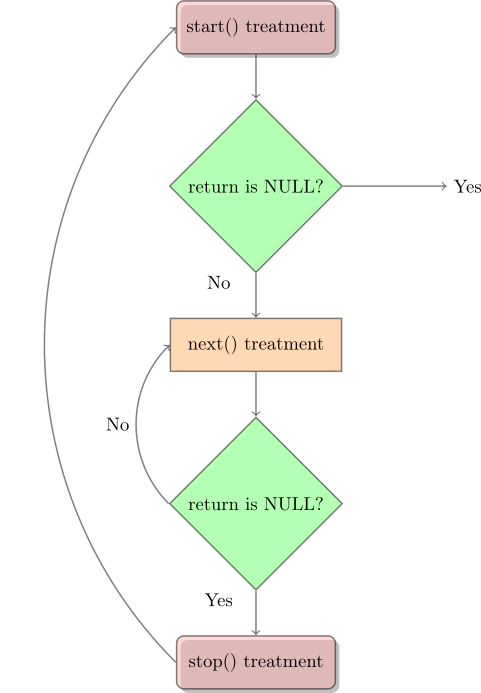
seq_file 提供了 proc_ops 的基本函数,如 seq_read 、seq_lseek 和其他一些函数。但没有什么可以写入 /proc 文件。当然,你仍然可以使用与上例相同的方法。
/*
 * procfs4.c -  create a "file" in /proc
 * This program uses the seq_file library to manage the /proc file.
 */

#include <linux/kernel.h> /* We are doing kernel work */
#include <linux/module.h> /* Specifically, a module */
#include <linux/proc_fs.h> /* Necessary because we use proc fs */
#include <linux/seq_file.h> /* for seq_file */
#include <linux/version.h>

#if LINUX_VERSION_CODE >= KERNEL_VERSION(5, 6, 0)
#define HAVE_PROC_OPS
#endif

#define PROC_NAME "iter"

/* This function is called at the beginning of a sequence.
 * ie, when:
 *   - the /proc file is read (first time)
 *   - after the function stop (end of sequence)
 */
static void *my_seq_start(struct seq_file *s, loff_t *pos)
{
    static unsigned long counter = 0;

    /* beginning a new sequence? */
    if (*pos == 0) {
        /* yes => return a non null value to begin the sequence */
        return &counter;
    }

    /* no => it is the end of the sequence, return end to stop reading */
    *pos = 0;
    return NULL;
}

/* This function is called after the beginning of a sequence.
 * It is called until the return is NULL (this ends the sequence).
 */
static void *my_seq_next(struct seq_file *s, void *v, loff_t *pos)
{
    unsigned long *tmp_v = (unsigned long *)v;
    (*tmp_v)++;
    (*pos)++;
    return NULL;
}

/* This function is called at the end of a sequence. */
static void my_seq_stop(struct seq_file *s, void *v)
{
    /* nothing to do, we use a static value in start() */
}

/* This function is called for each "step" of a sequence. */
static int my_seq_show(struct seq_file *s, void *v)
{
    loff_t *spos = (loff_t *)v;

    seq_printf(s, "%Ld\n", *spos);
    return 0;
}

/* This structure gather "function" to manage the sequence */
static struct seq_operations my_seq_ops = {
    .start = my_seq_start,
    .next = my_seq_next,
    .stop = my_seq_stop,
    .show = my_seq_show,
};

/* This function is called when the /proc file is open. */
static int my_open(struct inode *inode, struct file *file)
{
    return seq_open(file, &my_seq_ops);
};

/* This structure gather "function" that manage the /proc file */
#ifdef HAVE_PROC_OPS
static const struct proc_ops my_file_ops = {
    .proc_open = my_open,
    .proc_read = seq_read,
    .proc_lseek = seq_lseek,
    .proc_release = seq_release,
};
#else
static const struct file_operations my_file_ops = {
    .open = my_open,
    .read = seq_read,
    .llseek = seq_lseek,
    .release = seq_release,
};
#endif

static int __init procfs4_init(void)
{
    struct proc_dir_entry *entry;

    entry = proc_create(PROC_NAME, 0, NULL, &my_file_ops);
    if (entry == NULL) {
        pr_debug("Error: Could not initialize /proc/%s\n", PROC_NAME);
        return -ENOMEM;
    }

    return 0;
}

static void __exit procfs4_exit(void)
{
    remove_proc_entry(PROC_NAME, NULL);
    pr_debug("/proc/%s removed\n", PROC_NAME);
}

module_init(procfs4_init);
module_exit(procfs4_exit);

MODULE_LICENSE("GPL");
如果你想了解更多信息,可以阅读此网页:
你还可以阅读 Linux 内核中 fs/seq_file.c 的代码。
8 sysfs:与模块交互
sysfs 允许你通过读取或设置模块内的变量,从用户空间与运行中的内核交互。这对于调试或作为应用程序或脚本的接口都很有用。你可以在系统的 /sys 目录下找到 sysfs 目录和文件。
ls -l /sys
属性可以以文件系统中普通文件的形式导出。Sysfs 将文件 I/O 操作转发给为属性定义的方法,从而提供了一种读写内核属性的方法。
简单来说,属性定义可以用
struct attribute {
    char *name;
    struct module *owner;
    umode_t mode;
};

int sysfs_create_file(struct kobject * kobj, const struct attribute * attr);
void sysfs_remove_file(struct kobject * kobj, const struct attribute * attr);
例如,驱动程序模型对 struct device_attribute 的定义如下:
struct device_attribute {
    struct attribute attr;
    ssize_t (*show)(struct device *dev, struct device_attribute *attr,
                    char *buf);
    ssize_t (*store)(struct device *dev, struct device_attribute *attr,
                    const char *buf, size_t count);
};

int device_create_file(struct device *, const struct device_attribute *);
void device_remove_file(struct device *, const struct device_attribute *);
要读取或写入属性,必须在声明属性时指定 show() 或 store() 方法。对于常见的情况,include/linux/sysfs.h 提供了方便宏(__ATTR , __ATTR_RO , __ATTR_WO 等)来简化属性的定义,并使代码更加简洁易读。
下面是一个 hello world 模块的示例,其中包括创建一个通过 sysfs 访问的变量。
/*
 * hello-sysfs.c sysfs example
 */
#include <linux/fs.h>
#include <linux/init.h>
#include <linux/kobject.h>
#include <linux/module.h>
#include <linux/string.h>
#include <linux/sysfs.h>

static struct kobject *mymodule;

/* the variable you want to be able to change */
static int myvariable = 0;

static ssize_t myvariable_show(struct kobject *kobj,
                               struct kobj_attribute *attr, char *buf)
{
    return sprintf(buf, "%d\n", myvariable);
}

static ssize_t myvariable_store(struct kobject *kobj,
                                struct kobj_attribute *attr, char *buf,
                                size_t count)
{
    sscanf(buf, "%du", &myvariable);
    return count;
}

static struct kobj_attribute myvariable_attribute =
    __ATTR(myvariable, 0660, myvariable_show, (void *)myvariable_store);

static int __init mymodule_init(void)
{
    int error = 0;

    pr_info("mymodule: initialized\n");

    mymodule = kobject_create_and_add("mymodule", kernel_kobj);
    if (!mymodule)
        return -ENOMEM;

    error = sysfs_create_file(mymodule, &myvariable_attribute.attr);
    if (error) {
        pr_info("failed to create the myvariable file "
                "in /sys/kernel/mymodule\n");
    }

    return error;
}

static void __exit mymodule_exit(void)
{
    pr_info("mymodule: Exit success\n");
    kobject_put(mymodule);
}

module_init(mymodule_init);
module_exit(mymodule_exit);

MODULE_LICENSE("GPL");
编译并安装模块:
make
sudo insmod hello-sysfs.ko
检查它是否存在:
sudo lsmod | grep hello_sysfs
myvariable 的当前值是多少?
sudo cat /sys/kernel/mymodule/myvariable
设置 myvariable 的值并检查其是否发生变化
echo "32" | sudo tee /sys/kernel/mymodule/myvariable
sudo cat /sys/kernel/mymodule/myvariable
最后,卸载测试模块:
sudo rmmod hello_sysfs
在上面的例子中,我们使用一个简单的 kobject 在 sysfs 下创建一个目录,并与其属性通信。自 Linux v2.6.0 起,kobject 结构开始出现。它最初是作为统一内核代码的一种简单方法,用来管理引用计数对象。在经历了一段时间的任务变化之后,现在它已成为将大部分设备模型及其 sysfs 接口粘合在一起的粘合剂。有关 kobject 和 sysfs 的更多信息,请参阅 Documentation/driver-api/driver-model/driver.rst 和 https://lwn.net/Articles/51437/。
9 与设备文件对话
设备文件应该代表物理设备。大多数物理设备都用于输出和输入,因此内核中的设备驱动程序必须有某种机制来从进程中获取要发送到设备的输出。具体做法是打开用于输出的设备文件并向其写入内容,就像向文件写入内容一样。在下面的例子中,就是通过 device_write 来实现的。
这并不总是足够的。想象一下,你有一个连接调制解调器的串行端口(即使你有一个内部调制解调器,从 CPU 的角度来看,它仍然是一个连接调制解调器的串行端口,因此你不必过于费力地发挥想象力)。自然的做法是使用设备文件向调制解调器写入内容(调制解调器命令或通过电话线发送的数据),并从调制解调器读取内容(对命令的响应或通过电话线接收的数据)。然而,这就留下了一个问题:当你需要与串行端口本身对话时该怎么办,例如配置发送和接收数据的速率。
在 Unix 中,答案是使用一种名为 ioctl(Input Output ConTroL 的缩写)的特殊函数。每个设备都有自己的ioctl命令,可以是读取ioctl(从进程向内核发送信息),也可以是写入ioctl(向进程返回信息),也可以两者兼而有之。请注意,这里读和写的角色又颠倒了,所以在ioctl中,读是向内核发送信息,而写是从内核接收信息。
ioctl函数在调用时有三个参数:相应设备文件的文件描述符、ioctl编号和一个参数,其中参数的类型为long,因此可以通过转换来传递任何信息。这种方式无法传递结构体,但可以传递结构体指针。下面是一个示例:
/*
 * ioctl.c
 */
#include <linux/cdev.h>
#include <linux/fs.h>
#include <linux/init.h>
#include <linux/ioctl.h>
#include <linux/module.h>
#include <linux/slab.h>
#include <linux/uaccess.h>
#include <linux/version.h>

struct ioctl_arg {
    unsigned int val;
};

/* Documentation/userspace-api/ioctl/ioctl-number.rst */
#define IOC_MAGIC '\x66'

#define IOCTL_VALSET _IOW(IOC_MAGIC, 0, struct ioctl_arg)
#define IOCTL_VALGET _IOR(IOC_MAGIC, 1, struct ioctl_arg)
#define IOCTL_VALGET_NUM _IOR(IOC_MAGIC, 2, int)
#define IOCTL_VALSET_NUM _IOW(IOC_MAGIC, 3, int)

#define IOCTL_VAL_MAXNR 3
#define DRIVER_NAME "ioctltest"

static unsigned int test_ioctl_major = 0;
static unsigned int num_of_dev = 1;
static struct cdev test_ioctl_cdev;
static int ioctl_num = 0;

struct test_ioctl_data {
    unsigned char val;
    rwlock_t lock;
};

static long test_ioctl_ioctl(struct file *filp, unsigned int cmd,
                             unsigned long arg)
{
    struct test_ioctl_data *ioctl_data = filp->private_data;
    int retval = 0;
    unsigned char val;
    struct ioctl_arg data;
    memset(&data, 0, sizeof(data));

    switch (cmd) {
    case IOCTL_VALSET:
        if (copy_from_user(&data, (int __user *)arg, sizeof(data))) {
            retval = -EFAULT;
            goto done;
        }

        pr_alert("IOCTL set val:%x .\n", data.val);
        write_lock(&ioctl_data->lock);
        ioctl_data->val = data.val;
        write_unlock(&ioctl_data->lock);
        break;

    case IOCTL_VALGET:
        read_lock(&ioctl_data->lock);
        val = ioctl_data->val;
        read_unlock(&ioctl_data->lock);
        data.val = val;

        if (copy_to_user((int __user *)arg, &data, sizeof(data))) {
            retval = -EFAULT;
            goto done;
        }

        break;

    case IOCTL_VALGET_NUM:
        retval = __put_user(ioctl_num, (int __user *)arg);
        break;

    case IOCTL_VALSET_NUM:
        ioctl_num = arg;
        break;

    default:
        retval = -ENOTTY;
    }

done:
    return retval;
}

static ssize_t test_ioctl_read(struct file *filp, char __user *buf,
                               size_t count, loff_t *f_pos)
{
    struct test_ioctl_data *ioctl_data = filp->private_data;
    unsigned char val;
    int retval;
    int i = 0;

    read_lock(&ioctl_data->lock);
    val = ioctl_data->val;
    read_unlock(&ioctl_data->lock);

    for (; i < count; i++) {
        if (copy_to_user(&buf[i], &val, 1)) {
            retval = -EFAULT;
            goto out;
        }
    }

    retval = count;
out:
    return retval;
}

static int test_ioctl_close(struct inode *inode, struct file *filp)
{
    pr_alert("%s call.\n", __func__);

    if (filp->private_data) {
        kfree(filp->private_data);
        filp->private_data = NULL;
    }

    return 0;
}

static int test_ioctl_open(struct inode *inode, struct file *filp)
{
    struct test_ioctl_data *ioctl_data;

    pr_alert("%s call.\n", __func__);
    ioctl_data = kmalloc(sizeof(struct test_ioctl_data), GFP_KERNEL);

    if (ioctl_data == NULL)
        return -ENOMEM;

    rwlock_init(&ioctl_data->lock);
    ioctl_data->val = 0xFF;
    filp->private_data = ioctl_data;

    return 0;
}

static struct file_operations fops = {
#if LINUX_VERSION_CODE < KERNEL_VERSION(6, 4, 0)
    .owner = THIS_MODULE,
#endif
    .open = test_ioctl_open,
    .release = test_ioctl_close,
    .read = test_ioctl_read,
    .unlocked_ioctl = test_ioctl_ioctl,
};

static int __init ioctl_init(void)
{
    dev_t dev;
    int alloc_ret = -1;
    int cdev_ret = -1;
    alloc_ret = alloc_chrdev_region(&dev, 0, num_of_dev, DRIVER_NAME);

    if (alloc_ret)
        goto error;

    test_ioctl_major = MAJOR(dev);
    cdev_init(&test_ioctl_cdev, &fops);
    cdev_ret = cdev_add(&test_ioctl_cdev, dev, num_of_dev);

    if (cdev_ret)
        goto error;

    pr_alert("%s driver(major: %d) installed.\n", DRIVER_NAME,
             test_ioctl_major);
    return 0;
error:
    if (cdev_ret == 0)
        cdev_del(&test_ioctl_cdev);
    if (alloc_ret == 0)
        unregister_chrdev_region(dev, num_of_dev);
    return -1;
}

static void __exit ioctl_exit(void)
{
    dev_t dev = MKDEV(test_ioctl_major, 0);

    cdev_del(&test_ioctl_cdev);
    unregister_chrdev_region(dev, num_of_dev);
    pr_alert("%s driver removed.\n", DRIVER_NAME);
}

module_init(ioctl_init);
module_exit(ioctl_exit);

MODULE_LICENSE("GPL");
MODULE_DESCRIPTION("This is test_ioctl module");
在 test_ioctl_ioctl() 函数中有一个名为 cmd 的参数。它是 ioctl 编号。ioctl 编号编码了主设备号、ioctl 类型、命令和参数类型。ioctl 编号通常由头文件中的宏调用(_IO、_IOR、_IOW 或 _IOWR –取决于类型)创建。使用 ioctl 的程序(以便生成相应的 ioctl)和内核模块(以便理解 ioctl)都应包含该头文件。在下面的例子中,头文件是 chardev.h,使用它的程序是 userspace_ioctl.c。
如果你想在自己的内核模块中使用 ioctl,最好接收官方的 ioctl 分配,这样如果你不小心获取了别人的 ioctl,或者别人获取了你的 ioctl,你就会知道出了问题。更多信息,请查阅内核源代码树 Documentation/userspace-api/ioctl/ioctl-number.rst 。
此外,我们还需要注意,并发访问共享资源会导致竞争条件。解决方法是使用 6.5 节中提到的原子比较和交换(CAS)来强制执行独占访问。
/*
 * chardev2.c - Create an input/output character device
 */

#include <linux/atomic.h>
#include <linux/cdev.h>
#include <linux/delay.h>
#include <linux/device.h>
#include <linux/fs.h>
#include <linux/init.h>
#include <linux/module.h> /* Specifically, a module */
#include <linux/printk.h>
#include <linux/types.h>
#include <linux/uaccess.h> /* for get_user and put_user */
#include <linux/version.h>

#include <asm/errno.h>

#include "chardev.h"
#define SUCCESS 0
#define DEVICE_NAME "char_dev"
#define BUF_LEN 80

enum {
    CDEV_NOT_USED = 0,
    CDEV_EXCLUSIVE_OPEN = 1,
};

/* Is the device open right now? Used to prevent concurrent access into
 * the same device
 */
static atomic_t already_open = ATOMIC_INIT(CDEV_NOT_USED);

/* The message the device will give when asked */
static char message[BUF_LEN + 1];

static struct class *cls;

/* This is called whenever a process attempts to open the device file */
static int device_open(struct inode *inode, struct file *file)
{
    pr_info("device_open(%p)\n", file);

    try_module_get(THIS_MODULE);
    return SUCCESS;
}

static int device_release(struct inode *inode, struct file *file)
{
    pr_info("device_release(%p,%p)\n", inode, file);

    module_put(THIS_MODULE);
    return SUCCESS;
}

/* This function is called whenever a process which has already opened the
 * device file attempts to read from it.
 */
static ssize_t device_read(struct file *file, /* see include/linux/fs.h   */
                           char __user *buffer, /* buffer to be filled  */
                           size_t length, /* length of the buffer     */
                           loff_t *offset)
{
    /* Number of bytes actually written to the buffer */
    int bytes_read = 0;
    /* How far did the process reading the message get? Useful if the message
     * is larger than the size of the buffer we get to fill in device_read.
     */
    const char *message_ptr = message;

    if (!*(message_ptr + *offset)) { /* we are at the end of message */
        *offset = 0; /* reset the offset */
        return 0; /* signify end of file */
    }

    message_ptr += *offset;

    /* Actually put the data into the buffer */
    while (length && *message_ptr) {
        /* Because the buffer is in the user data segment, not the kernel
         * data segment, assignment would not work. Instead, we have to
         * use put_user which copies data from the kernel data segment to
         * the user data segment.
         */
        put_user(*(message_ptr++), buffer++);
        length--;
        bytes_read++;
    }

    pr_info("Read %d bytes, %ld left\n", bytes_read, length);

    *offset += bytes_read;

    /* Read functions are supposed to return the number of bytes actually
     * inserted into the buffer.
     */
    return bytes_read;
}

/* called when somebody tries to write into our device file. */
static ssize_t device_write(struct file *file, const char __user *buffer,
                            size_t length, loff_t *offset)
{
    int i;

    pr_info("device_write(%p,%p,%ld)", file, buffer, length);

    for (i = 0; i < length && i < BUF_LEN; i++)
        get_user(message[i], buffer + i);

    /* Again, return the number of input characters used. */
    return i;
}

/* This function is called whenever a process tries to do an ioctl on our
 * device file. We get two extra parameters (additional to the inode and file
 * structures, which all device functions get): the number of the ioctl called
 * and the parameter given to the ioctl function.
 *
 * If the ioctl is write or read/write (meaning output is returned to the
 * calling process), the ioctl call returns the output of this function.
 */
static long
device_ioctl(struct file *file, /* ditto */
             unsigned int ioctl_num, /* number and param for ioctl */
             unsigned long ioctl_param)
{
    int i;
    long ret = SUCCESS;

    /* We don't want to talk to two processes at the same time. */
    if (atomic_cmpxchg(&already_open, CDEV_NOT_USED, CDEV_EXCLUSIVE_OPEN))
        return -EBUSY;

    /* Switch according to the ioctl called */
    switch (ioctl_num) {
    case IOCTL_SET_MSG: {
        /* Receive a pointer to a message (in user space) and set that to
         * be the device's message. Get the parameter given to ioctl by
         * the process.
         */
        char __user *tmp = (char __user *)ioctl_param;
        char ch;

        /* Find the length of the message */
        get_user(ch, tmp);
        for (i = 0; ch && i < BUF_LEN; i++, tmp++)
            get_user(ch, tmp);

        device_write(file, (char __user *)ioctl_param, i, NULL);
        break;
    }
    case IOCTL_GET_MSG: {
        loff_t offset = 0;

        /* Give the current message to the calling process - the parameter
         * we got is a pointer, fill it.
         */
        i = device_read(file, (char __user *)ioctl_param, 99, &offset);

        /* Put a zero at the end of the buffer, so it will be properly
         * terminated.
         */
        put_user('\0', (char __user *)ioctl_param + i);
        break;
    }
    case IOCTL_GET_NTH_BYTE:
        /* This ioctl is both input (ioctl_param) and output (the return
         * value of this function).
         */
        ret = (long)message[ioctl_param];
        break;
    }

    /* We're now ready for our next caller */
    atomic_set(&already_open, CDEV_NOT_USED);

    return ret;
}

/* Module Declarations */

/* This structure will hold the functions to be called when a process does
 * something to the device we created. Since a pointer to this structure
 * is kept in the devices table, it can't be local to init_module. NULL is
 * for unimplemented functions.
 */
static struct file_operations fops = {
    .read = device_read,
    .write = device_write,
    .unlocked_ioctl = device_ioctl,
    .open = device_open,
    .release = device_release, /* a.k.a. close */
};

/* Initialize the module - Register the character device */
static int __init chardev2_init(void)
{
    /* Register the character device (atleast try) */
    int ret_val = register_chrdev(MAJOR_NUM, DEVICE_NAME, &fops);

    /* Negative values signify an error */
    if (ret_val < 0) {
        pr_alert("%s failed with %d\n",
                 "Sorry, registering the character device ", ret_val);
        return ret_val;
    }

#if LINUX_VERSION_CODE >= KERNEL_VERSION(6, 4, 0)
    cls = class_create(DEVICE_FILE_NAME);
#else
    cls = class_create(THIS_MODULE, DEVICE_FILE_NAME);
#endif
    device_create(cls, NULL, MKDEV(MAJOR_NUM, 0), NULL, DEVICE_FILE_NAME);

    pr_info("Device created on /dev/%s\n", DEVICE_FILE_NAME);

    return 0;
}

/* Cleanup - unregister the appropriate file from /proc */
static void __exit chardev2_exit(void)
{
    device_destroy(cls, MKDEV(MAJOR_NUM, 0));
    class_destroy(cls);

    /* Unregister the device */
    unregister_chrdev(MAJOR_NUM, DEVICE_NAME);
}

module_init(chardev2_init);
module_exit(chardev2_exit);

MODULE_LICENSE("GPL");
/*
 * chardev.h - the header file with the ioctl definitions.
 *
 * The declarations here have to be in a header file, because they need
 * to be known both to the kernel module (in chardev2.c) and the process
 * calling ioctl() (in userspace_ioctl.c).
 */

#ifndef CHARDEV_H
#define CHARDEV_H

#include <linux/ioctl.h>

/* The major device number. We can not rely on dynamic registration
 * any more, because ioctls need to know it.
 */
#define MAJOR_NUM 100

/* Set the message of the device driver */
#define IOCTL_SET_MSG _IOW(MAJOR_NUM, 0, char *)
/* _IOW means that we are creating an ioctl command number for passing
 * information from a user process to the kernel module.
 *
 * The first arguments, MAJOR_NUM, is the major device number we are using.
 *
 * The second argument is the number of the command (there could be several
 * with different meanings).
 *
 * The third argument is the type we want to get from the process to the
 * kernel.
 */

/* Get the message of the device driver */
#define IOCTL_GET_MSG _IOR(MAJOR_NUM, 1, char *)
/* This IOCTL is used for output, to get the message of the device driver.
 * However, we still need the buffer to place the message in to be input,
 * as it is allocated by the process.
 */

/* Get the n'th byte of the message */
#define IOCTL_GET_NTH_BYTE _IOWR(MAJOR_NUM, 2, int)
/* The IOCTL is used for both input and output. It receives from the user
 * a number, n, and returns message[n].
 */

/* The name of the device file */
#define DEVICE_FILE_NAME "char_dev"
#define DEVICE_PATH "/dev/char_dev"

#endif
/*  userspace_ioctl.c - the process to use ioctl's to control the kernel module
 *
 *  Until now we could have used cat for input and output.  But now
 *  we need to do ioctl's, which require writing our own process.
 */

/* device specifics, such as ioctl numbers and the
 * major device file. */
#include "../chardev.h"

#include <stdio.h> /* standard I/O */
#include <fcntl.h> /* open */
#include <unistd.h> /* close */
#include <stdlib.h> /* exit */
#include <sys/ioctl.h> /* ioctl */

/* Functions for the ioctl calls */

int ioctl_set_msg(int file_desc, char *message)
{
    int ret_val;

    ret_val = ioctl(file_desc, IOCTL_SET_MSG, message);

    if (ret_val < 0) {
        printf("ioctl_set_msg failed:%d\n", ret_val);
    }

    return ret_val;
}

int ioctl_get_msg(int file_desc)
{
    int ret_val;
    char message[100] = { 0 };

    /* Warning - this is dangerous because we don't tell
   * the kernel how far it's allowed to write, so it
   * might overflow the buffer. In a real production
   * program, we would have used two ioctls - one to tell
   * the kernel the buffer length and another to give
   * it the buffer to fill
   */
    ret_val = ioctl(file_desc, IOCTL_GET_MSG, message);

    if (ret_val < 0) {
        printf("ioctl_get_msg failed:%d\n", ret_val);
    }
    printf("get_msg message:%s", message);

    return ret_val;
}

int ioctl_get_nth_byte(int file_desc)
{
    int i, c;

    printf("get_nth_byte message:");

    i = 0;
    do {
        c = ioctl(file_desc, IOCTL_GET_NTH_BYTE, i++);

        if (c < 0) {
            printf("\nioctl_get_nth_byte failed at the %d'th byte:\n", i);
            return c;
        }

        putchar(c);
    } while (c != 0);

    return 0;
}

/* Main - Call the ioctl functions */
int main(void)
{
    int file_desc, ret_val;
    char *msg = "Message passed by ioctl\n";

    file_desc = open(DEVICE_PATH, O_RDWR);
    if (file_desc < 0) {
        printf("Can't open device file: %s, error:%d\n", DEVICE_PATH,
               file_desc);
        exit(EXIT_FAILURE);
    }

    ret_val = ioctl_set_msg(file_desc, msg);
    if (ret_val)
        goto error;
    ret_val = ioctl_get_nth_byte(file_desc);
    if (ret_val)
        goto error;
    ret_val = ioctl_get_msg(file_desc);
    if (ret_val)
        goto error;

    close(file_desc);
    return 0;
error:
    close(file_desc);
    exit(EXIT_FAILURE);
}
10 系统调用
到目前为止,我们所做的唯一一件事就是使用定义明确的内核机制来注册 /proc 文件和设备处理程序。如果你想做内核程序员认为你会想做的事,比如编写设备驱动程序,那么这很好。但如果你想做一些不寻常的事情,以某种方式改变系统的行为呢?那就只能靠自己了。
如果不使用虚拟机,内核编程就会有风险。例如,在编写代码时,open() 系统调用不慎中断。这导致无法打开任何文件、运行程序或关闭系统,从而必须重启虚拟机。幸运的是,这次没有丢失任何关键文件。但是,如果在运行中的关键任务系统上进行此类修改,后果可能会很严重。为了降低文件丢失的风险,即使是在测试环境中,也建议在使用 insmod 和 rmmod 之前立即执行同步。
忘掉 /proc 文件,忘掉设备文件。它们只是一些微不足道的细节。在浩瀚无垠的宇宙中,这些都是细枝末节。真正的进程与内核通信机制,也就是所有进程都会使用的机制,是系统调用。当进程请求内核提供服务(如打开文件、fork 到新进程或请求更多内存)时,使用的就是这种机制。如果你想以有趣的方式改变内核的行为,就可以在这里实现。顺便说一句,如果你想知道程序使用了哪些系统调用,可以运行 strace <arguments> 。
一般来说,进程不能访问内核。它不能访问内核内存,也不能调用内核函数。CPU 的硬件会强制执行这一点(这就是它被称为 “保护模式 “或 “页面保护 “的原因)。
系统调用是这一一般规则的例外。具体做法是,进程用适当的值填充寄存器,然后调用一条特殊指令,跳转到内核中先前定义的位置(当然,用户进程可以读取该位置,但不能写入)。在英特尔 CPU 中,这是通过中断 0x80 完成的。硬件知道,一旦跳转到这个位置,就不再是在受限用户模式下运行,而是作为操作系统内核运行,因此可以为所欲为。
进程可以跳转到的内核位置称为 system_call。位于该位置的程序会检查系统调用号,系统调用号会告诉内核进程请求的服务是什么。然后,它会查看系统调用表(sys_call_table),找出要调用的内核函数地址。然后调用函数,返回后进行一些系统检查,然后返回进程(如果进程时间用完,则返回另一个进程)。如果你想阅读这段代码,可在源文件 arch/$(architecture)/kernel/entry.S 中的 ENTRY(system_call) 行之后找到。
因此,如果我们想改变某个系统调用的工作方式,我们需要做的就是编写自己的函数来实现它(通常是添加一些自己的代码,然后调用原来的函数),然后修改 sys_call_table 的指针,使其指向我们的函数。因为我们以后可能会被移除,而且我们不想让系统处于不稳定的状态,所以让 cleanup_module 恢复表的原始状态非常重要。
要修改 sys_call_table 的内容,我们需要考虑控制寄存器。控制寄存器是一种处理器寄存器,用于改变或控制 CPU 的一般行为。在 x86 架构中,cr0 寄存器具有各种控制标志,可以修改处理器的基本操作。cr0 中的 WP 标志代表写保护。因此,在修改 sys_call_table 之前,我们必须禁用 WP 标志。自 Linux v5.3 起,由于安全问题导致敏感的 cr0 位被锁定,因此不能使用 write_cr0 函数,攻击者可能会写入 CPU 控制寄存器,从而禁用 CPU 保护(如写保护)。因此,我们必须提供自定义汇编例程来绕过它。
不过,为了防止滥用,sys_call_table 符号是未导出的。但有几种方法可以获取符号:手动符号查找和 kallsyms_lookup_name。这里我们根据内核版本使用这两种方法。
因为控制流完整性是一种防止攻击者重定向执行代码的技术,用于确保间接调用到预期的地址,并且返回地址不会被更改。自Linux v5.7以来,内核为 x86 打上了一系列控制流强制执行(CET)的补丁,GCC的某些配置,如Ubuntu Linux 中的 GCC 9 和 10 版本,会在内核中默认添加 CET(-fcf-protection选项)。在关闭 retpoline 的情况下使用该 GCC 编译内核,可能会导致内核中启用 CET。你可以使用以下命令检查 -fcf-protection 选项是否启用:
$ gcc -v -Q -O2 --help=target | grep protection
Using built-in specs.
COLLECT_GCC=gcc
COLLECT_LTO_WRAPPER=/usr/lib/gcc/x86_64-linux-gnu/9/lto-wrapper
...
gcc version 9.3.0 (Ubuntu 9.3.0-17ubuntu1~20.04)
COLLECT_GCC_OPTIONS='-v' '-Q' '-O2' '--help=target' '-mtune=generic' '-march=x86-64'
 /usr/lib/gcc/x86_64-linux-gnu/9/cc1 -v ... -fcf-protection ...
 GNU C17 (Ubuntu 9.3.0-17ubuntu1~20.04) version 9.3.0 (x86_64-linux-gnu)
...
但 CET 不应在内核中启用,否则可能会破坏 Kprobes 和 bpf。因此,自 v5.11 版起,CET 已被禁用。为了保证手动符号查找的有效性,我们只使用了 v5.4 以下的版本。
不幸的是,自 Linux v5.7 起,kallsyms_lookup_name 也是未导出的,因此需要一些技巧来获取 kallsyms_lookup_name 的地址。如果启用了 CONFIG_KPROBES,我们就可以通过 Kprobes 来获取函数地址,从而动态地进入特定的内核例程。Kprobes 通过替换探测指令的第一个字节,在函数入口处插入一个断点。当 CPU 遇到断点时,寄存器将被存储,控制权将转移到 Kprobes。它将保存的寄存器地址和 Kprobe 结构传递给你定义的处理程序,然后执行它。Kprobes 可以通过符号名或地址注册。在符号名内,地址将由内核处理。
否则,请在 sym 参数中指定 /proc/kallsyms 和 /boot/System.map 中的 sys_call_table 地址。以下是 /proc/kallsyms 的示例用法:
$ sudo grep sys_call_table /proc/kallsyms
ffffffff82000280 R x32_sys_call_table
ffffffff820013a0 R sys_call_table
ffffffff820023e0 R ia32_sys_call_table
$ sudo insmod syscall-steal.ko sym=0xffffffff820013a0
使用 /boot/System.map 中的地址时,请注意 KASLR(内核地址空间布局随机化)。KASLR 可能会在每次启动时随机化内核代码和数据的地址,比如 /boot/System.map 中列出的静态地址会被一些熵抵消。KASLR 的目的是保护内核空间不受攻击。如果没有 KASLR,攻击者可能会很容易在固定地址中找到目标地址。然后,攻击者就可以使用面向返回的编程方式插入一些恶意代码,通过篡改指针来执行或接收目标数据。KASLR 可减轻这类攻击,因为攻击者无法立即知道目标地址,但暴力破解攻击仍可奏效。如果 /proc/kallsyms 中的符号地址与 /boot/System.map 中的地址不同,则表明 KASLR 已在系统运行的内核中启用。
$ grep GRUB_CMDLINE_LINUX_DEFAULT /etc/default/grub
GRUB_CMDLINE_LINUX_DEFAULT="quiet splash"
$ sudo grep sys_call_table /boot/System.map-$(uname -r)
ffffffff82000300 R sys_call_table
$ sudo grep sys_call_table /proc/kallsyms
ffffffff820013a0 R sys_call_table
# Reboot
$ sudo grep sys_call_table /boot/System.map-$(uname -r)
ffffffff82000300 R sys_call_table
$ sudo grep sys_call_table /proc/kallsyms
ffffffff86400300 R sys_call_table
如果启用了 KASLR,每次重启机器时都必须使用 /proc/kallsyms 中的地址。为了使用 /boot/System.map 中的地址,请确保禁用 KASLR。您可以添加 nokaslr 以在下次启动时禁用 KASLR:
$ grep GRUB_CMDLINE_LINUX_DEFAULT /etc/default/grub
GRUB_CMDLINE_LINUX_DEFAULT="quiet splash"
$ sudo perl -i -pe 'm/quiet/ and s//quiet nokaslr/' /etc/default/grub
$ grep quiet /etc/default/grub
GRUB_CMDLINE_LINUX_DEFAULT="quiet nokaslr splash"
$ sudo update-grub
如需了解更多信息,请查阅以下内容:
这里的源代码就是这样一个内核模块的例子。我们希望 “监视” 某个用户,并在该用户打开文件时使用 pr_info() 向其发送一条信息。为此,我们用自己的函数 our_sys_openat 代替了打开文件的系统调用。该函数会检查当前进程的 uid(用户 ID),如果与我们监视的 uid 相同,就会调用 pr_info(),显示要打开的文件名。然后,无论采用哪种方式,它都会调用带有相同参数的原始 openat() 函数,以实际打开文件。
init_module 函数会替换 sys_call_table 中的相应位置,并在变量中保留原来的指针。cleanup_module 函数调用后该变量将一切恢复正常。这种方法很危险,因为可能会有两个内核模块改变同一个系统调用。试想一下,我们有两个内核模块 A 和 B,A 的 openat 系统调用是 A_openat,B 的是 B_openat。现在,当 A 被插入内核时,系统调用被替换为 A_openat,完成后将调用原来的 sys_openat。接下来,B 被插入内核,系统调用被替换为 B_openat,完成后将调用它认为是原始系统调用的 A_openat。
现在,如果先删除 B,一切都会好起来–它会简单地恢复对 A_openat 的系统调用,而 A_openat 会调用原来的系统调用。但是,如果先删除 A,然后再删除 B,系统就会崩溃。删除 A 会将系统调用恢复为原来的 sys_openat,从而将 B 从循环中删除。然后,当删除 B 时,系统会将系统调用恢复到它认为是原始的 A_openat,而 A_openat 已经不在内存中了。乍一看,我们似乎可以通过检查系统调用是否等于我们的 open 函数来解决这个特殊的问题,如果是的话,就完全不改变系统调用(这样 B 被移除时就不会改变系统调用),但这会导致更严重的问题。当 A 被移除时,它会发现系统调用被改为 B_openat,因此它不再指向 A_openat,所以它不会在从内存中移除之前将其还原为 sys_openat。不幸的是,B_openat 仍会尝试调用已不存在的 A_openat,因此即使不删除 B,系统也会崩溃。
对于 x86 架构,自 v6.9 版本起,在提交 1e3ad78 之后,系统调用表不能用于调用系统调用。此提交已回传至长期稳定内核,如 v5.15.154+、v6.1.85+、v6.6.26+ 和 v6.8.5+,详情请参见本解答。在这种情况下,由于使用了 Kprobes,可以在系统调用入口处使用钩子来拦截系统调用。
请注意,所有相关问题都会导致系统调用的窃取功能无法在生产中使用。为了防止人们做出可能有害的事情,我们不再导出 sys_call_table。这就意味着,如果你想对本例进行更多的尝试,就必须对当前的内核打补丁,以便导出 sys_call_table。
/*
 * syscall-steal.c
 *
 * System call "stealing" sample.
 *
 * Disables page protection at a processor level by changing the 16th bit
 * in the cr0 register (could be Intel specific).
 */

#include <linux/delay.h>
#include <linux/kernel.h>
#include <linux/module.h>
#include <linux/moduleparam.h> /* which will have params */
#include <linux/unistd.h> /* The list of system calls */
#include <linux/cred.h> /* For current_uid() */
#include <linux/uidgid.h> /* For __kuid_val() */
#include <linux/version.h>

/* For the current (process) structure, we need this to know who the
 * current user is.
 */
#include <linux/sched.h>
#include <linux/uaccess.h>

/* The way we access "sys_call_table" varies as kernel internal changes.
 * - Prior to v5.4 : manual symbol lookup
 * - v5.5 to v5.6  : use kallsyms_lookup_name()
 * - v5.7+         : Kprobes or specific kernel module parameter
 */

/* The in-kernel calls to the ksys_close() syscall were removed in Linux v5.11+.
 */
#if (LINUX_VERSION_CODE < KERNEL_VERSION(5, 7, 0))

#if LINUX_VERSION_CODE <= KERNEL_VERSION(5, 4, 0)
#define HAVE_KSYS_CLOSE 1
#include <linux/syscalls.h> /* For ksys_close() */
#else
#include <linux/kallsyms.h> /* For kallsyms_lookup_name */
#endif

#else

#if defined(CONFIG_KPROBES)
#define HAVE_KPROBES 1
#if defined(CONFIG_X86_64)
/* If you have tried to use the syscall table to intercept syscalls and it
 * doesn't work, you can try to use Kprobes to intercept syscalls.
 * Set USE_KPROBES_PRE_HANDLER_BEFORE_SYSCALL to 1 to register a pre-handler
 * before the syscall.
 */
#define USE_KPROBES_PRE_HANDLER_BEFORE_SYSCALL 0
#endif
#include <linux/kprobes.h>
#else
#define HAVE_PARAM 1
#include <linux/kallsyms.h> /* For sprint_symbol */
/* The address of the sys_call_table, which can be obtained with looking up
 * "/boot/System.map" or "/proc/kallsyms". When the kernel version is v5.7+,
 * without CONFIG_KPROBES, you can input the parameter or the module will look
 * up all the memory.
 */
static unsigned long sym = 0;
module_param(sym, ulong, 0644);
#endif /* CONFIG_KPROBES */

#endif /* Version < v5.7 */

/* UID we want to spy on - will be filled from the command line. */
static uid_t uid = -1;
module_param(uid, int, 0644);

#if USE_KPROBES_PRE_HANDLER_BEFORE_SYSCALL

/* syscall_sym is the symbol name of the syscall to spy on. The default is
 * "__x64_sys_openat", which can be changed by the module parameter. You can
 * look up the symbol name of a syscall in /proc/kallsyms.
 */
static char *syscall_sym = "__x64_sys_openat";
module_param(syscall_sym, charp, 0644);

static int sys_call_kprobe_pre_handler(struct kprobe *p, struct pt_regs *regs)
{
    if (__kuid_val(current_uid()) != uid) {
        return 0;
    }

    pr_info("%s called by %d\n", syscall_sym, uid);
    return 0;
}

static struct kprobe syscall_kprobe = {
    .symbol_name = "__x64_sys_openat",
    .pre_handler = sys_call_kprobe_pre_handler,
};
#else

static unsigned long **sys_call_table_stolen;

/* A pointer to the original system call. The reason we keep this, rather
 * than call the original function (sys_openat), is because somebody else
 * might have replaced the system call before us. Note that this is not
 * 100% safe, because if another module replaced sys_openat before us,
 * then when we are inserted, we will call the function in that module -
 * and it might be removed before we are.
 *
 * Another reason for this is that we can not get sys_openat.
 * It is a static variable, so it is not exported.
 */
#ifdef CONFIG_ARCH_HAS_SYSCALL_WRAPPER
static asmlinkage long (*original_call)(const struct pt_regs *);
#else
static asmlinkage long (*original_call)(int, const char __user *, int, umode_t);
#endif

/* The function we will replace sys_openat (the function called when you
 * call the open system call) with. To find the exact prototype, with
 * the number and type of arguments, we find the original function first
 * (it is at fs/open.c).
 *
 * In theory, this means that we are tied to the current version of the
 * kernel. In practice, the system calls almost never change (it would
 * wreck havoc and require programs to be recompiled, since the system
 * calls are the interface between the kernel and the processes).
 */
#ifdef CONFIG_ARCH_HAS_SYSCALL_WRAPPER
static asmlinkage long our_sys_openat(const struct pt_regs *regs)
#else
static asmlinkage long our_sys_openat(int dfd, const char __user *filename,
                                      int flags, umode_t mode)
#endif
{
    int i = 0;
    char ch;

    if (__kuid_val(current_uid()) != uid)
        goto orig_call;

    /* Report the file, if relevant */
    pr_info("Opened file by %d: ", uid);
    do {
#ifdef CONFIG_ARCH_HAS_SYSCALL_WRAPPER
        get_user(ch, (char __user *)regs->si + i);
#else
        get_user(ch, (char __user *)filename + i);
#endif
        i++;
        pr_info("%c", ch);
    } while (ch != 0);
    pr_info("\n");

orig_call:
    /* Call the original sys_openat - otherwise, we lose the ability to
     * open files.
     */
#ifdef CONFIG_ARCH_HAS_SYSCALL_WRAPPER
    return original_call(regs);
#else
    return original_call(dfd, filename, flags, mode);
#endif
}

static unsigned long **acquire_sys_call_table(void)
{
#ifdef HAVE_KSYS_CLOSE
    unsigned long int offset = PAGE_OFFSET;
    unsigned long **sct;

    while (offset < ULLONG_MAX) {
        sct = (unsigned long **)offset;

        if (sct[__NR_close] == (unsigned long *)ksys_close)
            return sct;

        offset += sizeof(void *);
    }

    return NULL;
#endif

#ifdef HAVE_PARAM
    const char sct_name[15] = "sys_call_table";
    char symbol[40] = { 0 };

    if (sym == 0) {
        pr_alert("For Linux v5.7+, Kprobes is the preferable way to get "
                 "symbol.\n");
        pr_info("If Kprobes is absent, you have to specify the address of "
                "sys_call_table symbol\n");
        pr_info("by /boot/System.map or /proc/kallsyms, which contains all the "
                "symbol addresses, into sym parameter.\n");
        return NULL;
    }
    sprint_symbol(symbol, sym);
    if (!strncmp(sct_name, symbol, sizeof(sct_name) - 1))
        return (unsigned long **)sym;

    return NULL;
#endif

#ifdef HAVE_KPROBES
    unsigned long (*kallsyms_lookup_name)(const char *name);
    struct kprobe kp = {
        .symbol_name = "kallsyms_lookup_name",
    };

    if (register_kprobe(&kp) < 0)
        return NULL;
    kallsyms_lookup_name = (unsigned long (*)(const char *name))kp.addr;
    unregister_kprobe(&kp);
#endif

    return (unsigned long **)kallsyms_lookup_name("sys_call_table");
}

#if LINUX_VERSION_CODE >= KERNEL_VERSION(5, 3, 0)
static inline void __write_cr0(unsigned long cr0)
{
    asm volatile("mov %0,%%cr0" : "+r"(cr0) : : "memory");
}
#else
#define __write_cr0 write_cr0
#endif

static void enable_write_protection(void)
{
    unsigned long cr0 = read_cr0();
    set_bit(16, &cr0);
    __write_cr0(cr0);
}

static void disable_write_protection(void)
{
    unsigned long cr0 = read_cr0();
    clear_bit(16, &cr0);
    __write_cr0(cr0);
}
#endif

static int __init syscall_steal_start(void)
{
#if USE_KPROBES_PRE_HANDLER_BEFORE_SYSCALL

    int err;
    /* use symbol name from the module parameter */
    syscall_kprobe.symbol_name = syscall_sym;
    err = register_kprobe(&syscall_kprobe);
    if (err) {
        pr_err("register_kprobe() on %s failed: %d\n", syscall_sym, err);
        pr_err("Please check the symbol name from 'syscall_sym' parameter.\n");
        return err;
    }

#else
    if (!(sys_call_table_stolen = acquire_sys_call_table()))
        return -1;

    disable_write_protection();

    /* keep track of the original open function */
    original_call = (void *)sys_call_table_stolen[__NR_openat];

    /* use our openat function instead */
    sys_call_table_stolen[__NR_openat] = (unsigned long *)our_sys_openat;

    enable_write_protection();

#endif

    pr_info("Spying on UID:%d\n", uid);
    return 0;
}

static void __exit syscall_steal_end(void)
{
#if USE_KPROBES_PRE_HANDLER_BEFORE_SYSCALL
    unregister_kprobe(&syscall_kprobe);
#else
    if (!sys_call_table_stolen)
        return;

    /* Return the system call back to normal */
    if (sys_call_table_stolen[__NR_openat] != (unsigned long *)our_sys_openat) {
        pr_alert("Somebody else also played with the ");
        pr_alert("open system call\n");
        pr_alert("The system may be left in ");
        pr_alert("an unstable state.\n");
    }

    disable_write_protection();
    sys_call_table_stolen[__NR_openat] = (unsigned long *)original_call;
    enable_write_protection();
#endif

    msleep(2000);
}

module_init(syscall_steal_start);
module_exit(syscall_steal_end);

MODULE_LICENSE("GPL");
11 进程和线程的阻塞
11.1 Sleep
当有人要求你做一些你不能马上做的事情时,你会怎么做?如果你是一个人,而你被一个人打扰了 你唯一能说的就是:“现在不行,我很忙。走开!"。但如果你是一个内核模块,你被一个进程所困扰,你还有另一种可能。你可以让进程休眠,直到你能为它提供服务。毕竟,进程一直都在被内核休眠并唤醒(这就是多个进程在单个 CPU 上同时运行的原因)。
这个内核模块就是一个例子。该文件(名为 /proc/sleep)一次只能由一个进程打开。如果文件已经打开,内核模块会调用 wait_event_interruptible。保持文件打开状态的最简单方法是用
tail -f
该函数将任务的状态(任务是一种内核数据结构,它保存了进程的信息以及进程所处的系统调用(如果有))更改为 TASK_INTERRUPTIBLE,这意味着任务在被唤醒之前不会运行,并将其添加到 WaitQ(等待访问文件的任务队列)中。然后,函数调用调度程序将任务切换到另一个进程,一个对 CPU 有一定用途的进程。
当一个进程处理完文件后,它会关闭文件,并调用 module_close。该函数会唤醒队列中的所有进程(没有只唤醒其中一个进程的机制)。然后它返回,刚刚关闭文件的进程可以继续运行。随着时间的推移,调度程序会认为该进程已经运行足够时间了,并将 CPU 的控制权交给另一个进程。最终,调度程序会将队列中的一个进程的 CPU 控制权交给另一个进程。这个过程从调用 wait_event_interruptible 之后的时刻开始。
这意味着该进程仍处于内核模式–就该进程而言,它发出了 open 系统调用,而系统调用尚未返回。从发出调用到调用返回的大部分时间内,进程并不知道有其他人使用了 CPU。
于是,它可以继续设置一个全局变量,告诉所有其他进程该文件仍处于打开状态,然后继续运行。当其他进程使用 CPU 时,它们会看到该全局变量,然后继续休眠。
因此,我们将使用 tail -f 使文件在后台保持打开状态,同时尝试用另一个进程(也是在后台,这样我们就不需要切换到不同的 vt)来访问文件。一旦第一个后台进程被 kill %1 杀掉,第二个进程就会被唤醒,能够访问文件并最终终止。
为了让我们的生活更有趣,module_close 并不是唯一一个可以唤醒等待访问文件的进程的函数。Ctrl + c (SIGINT) 等信号也可以唤醒进程。这是因为我们使用了 wait_event_interruptible 。我们本可以使用 wait_event 来代替,但这样做会让用户非常生气,因为他们的 Ctrl+c 会被忽略。
在这种情况下,我们希望立即返回 -EINTR。这一点很重要,例如,这样用户就可以在进程收到文件之前将其杀死。
还有一点要记住。有些时候进程并不想休眠,它们要么想立即得到想要的东西,要么想被告知无法完成。这类进程在打开文件时会使用 O_NONBLOCK 标志。内核应该通过返回错误代码 -EAGAIN 来响应本来会阻塞的操作,比如本例中的打开文件。可以使用 examples/other 目录中的 cat_nonblock 程序,以 O_NONBLOCK 打开文件。
$ sudo insmod sleep.ko
$ cat_nonblock /proc/sleep
Last input:
$ tail -f /proc/sleep &
Last input:
Last input:
Last input:
Last input:
Last input:
Last input:
Last input:
tail: /proc/sleep: file truncated
[1] 6540
$ cat_nonblock /proc/sleep
Open would block
$ kill %1
[1]+  Terminated              tail -f /proc/sleep
$ cat_nonblock /proc/sleep
Last input:
$
/*
 * sleep.c - create a /proc file, and if several processes try to open it
 * at the same time, put all but one to sleep.
 */

#include <linux/atomic.h>
#include <linux/fs.h>
#include <linux/kernel.h> /* for sprintf() */
#include <linux/module.h> /* Specifically, a module */
#include <linux/printk.h>
#include <linux/proc_fs.h> /* Necessary because we use proc fs */
#include <linux/types.h>
#include <linux/uaccess.h> /* for get_user and put_user */
#include <linux/version.h>
#include <linux/wait.h> /* For putting processes to sleep and
                                   waking them up */

#include <asm/current.h>
#include <asm/errno.h>

#if LINUX_VERSION_CODE >= KERNEL_VERSION(5, 6, 0)
#define HAVE_PROC_OPS
#endif

/* Here we keep the last message received, to prove that we can process our
 * input.
 */
#define MESSAGE_LENGTH 80
static char message[MESSAGE_LENGTH];

static struct proc_dir_entry *our_proc_file;
#define PROC_ENTRY_FILENAME "sleep"

/* Since we use the file operations struct, we can't use the special proc
 * output provisions - we have to use a standard read function, which is this
 * function.
 */
static ssize_t module_output(struct file *file, /* see include/linux/fs.h   */
                             char __user *buf, /* The buffer to put data to
                                                   (in the user segment)    */
                             size_t len, /* The length of the buffer */
                             loff_t *offset)
{
    static int finished = 0;
    int i;
    char output_msg[MESSAGE_LENGTH + 30];

    /* Return 0 to signify end of file - that we have nothing more to say
     * at this point.
     */
    if (finished) {
        finished = 0;
        return 0;
    }

    sprintf(output_msg, "Last input:%s\n", message);
    for (i = 0; i < len && output_msg[i]; i++)
        put_user(output_msg[i], buf + i);

    finished = 1;
    return i; /* Return the number of bytes "read" */
}

/* This function receives input from the user when the user writes to the
 * /proc file.
 */
static ssize_t module_input(struct file *file, /* The file itself */
                            const char __user *buf, /* The buffer with input */
                            size_t length, /* The buffer's length */
                            loff_t *offset) /* offset to file - ignore */
{
    int i;

    /* Put the input into Message, where module_output will later be able
     * to use it.
     */
    for (i = 0; i < MESSAGE_LENGTH - 1 && i < length; i++)
        get_user(message[i], buf + i);
    /* we want a standard, zero terminated string */
    message[i] = '\0';

    /* We need to return the number of input characters used */
    return i;
}

/* 1 if the file is currently open by somebody */
static atomic_t already_open = ATOMIC_INIT(0);

/* Queue of processes who want our file */
static DECLARE_WAIT_QUEUE_HEAD(waitq);

/* Called when the /proc file is opened */
static int module_open(struct inode *inode, struct file *file)
{
    /* Try to get without blocking  */
    if (!atomic_cmpxchg(&already_open, 0, 1)) {
        /* Success without blocking, allow the access */
        try_module_get(THIS_MODULE);
        return 0;
    }
    /* If the file's flags include O_NONBLOCK, it means the process does not
     * want to wait for the file. In this case, because the file is already open,
     * we should fail with -EAGAIN, meaning "you will have to try again",
     * instead of blocking a process which would rather stay awake.
     */
    if (file->f_flags & O_NONBLOCK)
        return -EAGAIN;

    /* This is the correct place for try_module_get(THIS_MODULE) because if
     * a process is in the loop, which is within the kernel module,
     * the kernel module must not be removed.
     */
    try_module_get(THIS_MODULE);

    while (atomic_cmpxchg(&already_open, 0, 1)) {
        int i, is_sig = 0;

        /* This function puts the current process, including any system
         * calls, such as us, to sleep.  Execution will be resumed right
         * after the function call, either because somebody called
         * wake_up(&waitq) (only module_close does that, when the file
         * is closed) or when a signal, such as Ctrl-C, is sent
         * to the process
         */
        wait_event_interruptible(waitq, !atomic_read(&already_open));

        /* If we woke up because we got a signal we're not blocking,
         * return -EINTR (fail the system call).  This allows processes
         * to be killed or stopped.
         */
        for (i = 0; i < _NSIG_WORDS && !is_sig; i++)
            is_sig = current->pending.signal.sig[i] & ~current->blocked.sig[i];

        if (is_sig) {
            /* It is important to put module_put(THIS_MODULE) here, because
             * for processes where the open is interrupted there will never
             * be a corresponding close. If we do not decrement the usage
             * count here, we will be left with a positive usage count
             * which we will have no way to bring down to zero, giving us
             * an immortal module, which can only be killed by rebooting
             * the machine.
             */
            module_put(THIS_MODULE);
            return -EINTR;
        }
    }

    return 0; /* Allow the access */
}

/* Called when the /proc file is closed */
static int module_close(struct inode *inode, struct file *file)
{
    /* Set already_open to zero, so one of the processes in the waitq will
     * be able to set already_open back to one and to open the file. All
     * the other processes will be called when already_open is back to one,
     * so they'll go back to sleep.
     */
    atomic_set(&already_open, 0);

    /* Wake up all the processes in waitq, so if anybody is waiting for the
     * file, they can have it.
     */
    wake_up(&waitq);

    module_put(THIS_MODULE);

    return 0; /* success */
}

/* Structures to register as the /proc file, with pointers to all the relevant
 * functions.
 */

/* File operations for our proc file. This is where we place pointers to all
 * the functions called when somebody tries to do something to our file. NULL
 * means we don't want to deal with something.
 */
#ifdef HAVE_PROC_OPS
static const struct proc_ops file_ops_4_our_proc_file = {
    .proc_read = module_output, /* "read" from the file */
    .proc_write = module_input, /* "write" to the file */
    .proc_open = module_open, /* called when the /proc file is opened */
    .proc_release = module_close, /* called when it's closed */
    .proc_lseek = noop_llseek, /* return file->f_pos */
};
#else
static const struct file_operations file_ops_4_our_proc_file = {
    .read = module_output,
    .write = module_input,
    .open = module_open,
    .release = module_close,
    .llseek = noop_llseek,
};
#endif

/* Initialize the module - register the proc file */
static int __init sleep_init(void)
{
    our_proc_file =
        proc_create(PROC_ENTRY_FILENAME, 0644, NULL, &file_ops_4_our_proc_file);
    if (our_proc_file == NULL) {
        pr_debug("Error: Could not initialize /proc/%s\n", PROC_ENTRY_FILENAME);
        return -ENOMEM;
    }
    proc_set_size(our_proc_file, 80);
    proc_set_user(our_proc_file, GLOBAL_ROOT_UID, GLOBAL_ROOT_GID);

    pr_info("/proc/%s created\n", PROC_ENTRY_FILENAME);

    return 0;
}

/* Cleanup - unregister our file from /proc.  This could get dangerous if
 * there are still processes waiting in waitq, because they are inside our
 * open function, which will get unloaded. I'll explain how to avoid removal
 * of a kernel module in such a case in chapter 10.
 */
static void __exit sleep_exit(void)
{
    remove_proc_entry(PROC_ENTRY_FILENAME, NULL);
    pr_debug("/proc/%s removed\n", PROC_ENTRY_FILENAME);
}

module_init(sleep_init);
module_exit(sleep_exit);

MODULE_LICENSE("GPL");
/*
 *  cat_nonblock.c - open a file and display its contents, but exit rather than
 *  wait for input.
 */
#include <errno.h> /* for errno */
#include <fcntl.h> /* for open */
#include <stdio.h> /* standard I/O */
#include <stdlib.h> /* for exit */
#include <unistd.h> /* for read */

#define MAX_BYTES 1024 * 4

int main(int argc, char *argv[])
{
    int fd; /* The file descriptor for the file to read */
    size_t bytes; /* The number of bytes read */
    char buffer[MAX_BYTES]; /* The buffer for the bytes */

    /* Usage */
    if (argc != 2) {
        printf("Usage: %s <filename>\n", argv[0]);
        puts("Reads the content of a file, but doesn't wait for input");
        exit(-1);
    }

    /* Open the file for reading in non blocking mode */
    fd = open(argv[1], O_RDONLY | O_NONBLOCK);

    /* If open failed */
    if (fd == -1) {
        puts(errno == EAGAIN ? "Open would block" : "Open failed");
        exit(-1);
    }

    /* Read the file and output its contents */
    do {
        /* Read characters from the file */
        bytes = read(fd, buffer, MAX_BYTES);

        /* If there's an error, report it and die */
        if (bytes == -1) {
            if (errno == EAGAIN)
                puts("Normally I'd block, but you told me not to");
            else
                puts("Another read error");
            exit(-1);
        }

        /* Print the characters */
        if (bytes > 0) {
            for (int i = 0; i < bytes; i++)
                putchar(buffer[i]);
        }

        /* While there are no errors and the file isn't over */
    } while (bytes > 0);

    return 0;
}
11.2 Completions
有时,在有多个线程的模块中,一件事应该在另一件事之前完成。与使用 /bin/sleep 命令相比,内核有另一种方法可以做到这一点,它允许发生超时或中断。
作为代码同步机制的完成有三个主要部分:结构完成同步对象的初始化、通过 wait_for_completion() 实现的等待或屏障部分,以及通过调用 complete() 实现的信号部分。
在随后的示例中,启动了两个线程:曲柄和飞轮。曲柄线程必须先于飞轮线程启动。每个线程都有一个完成状态,曲柄线程和飞轮线程都有一个不同的完成状态。在每个线程的退出点,都会更新各自的完成状态,飞轮线程会使用 wait_for_completion 来确保不会过早启动。曲柄线程使用 complete_all() 函数更新完成状态,从而让飞轮线程继续运行。
因此,即使飞轮线程先启动,当你加载该模块并运行 dmesg 时,也会发现转动曲柄总是先发生,因为飞轮线程在等待曲柄线程完成。
wait_for_completion 函数还有其他变体,包括超时或被中断,但这种基本机制足以应对许多常见情况,无需增加太多复杂性。
/*
 * completions.c
 */
#include <linux/completion.h>
#include <linux/err.h> /* for IS_ERR() */
#include <linux/init.h>
#include <linux/kthread.h>
#include <linux/module.h>
#include <linux/printk.h>
#include <linux/version.h>

static struct completion crank_comp;
static struct completion flywheel_comp;

static int machine_crank_thread(void *arg)
{
    pr_info("Turn the crank\n");

    complete_all(&crank_comp);
#if LINUX_VERSION_CODE >= KERNEL_VERSION(5, 17, 0)
    kthread_complete_and_exit(&crank_comp, 0);
#else
    complete_and_exit(&crank_comp, 0);
#endif
}

static int machine_flywheel_spinup_thread(void *arg)
{
    wait_for_completion(&crank_comp);

    pr_info("Flywheel spins up\n");

    complete_all(&flywheel_comp);
#if LINUX_VERSION_CODE >= KERNEL_VERSION(5, 17, 0)
    kthread_complete_and_exit(&flywheel_comp, 0);
#else
    complete_and_exit(&flywheel_comp, 0);
#endif
}

static int __init completions_init(void)
{
    struct task_struct *crank_thread;
    struct task_struct *flywheel_thread;

    pr_info("completions example\n");

    init_completion(&crank_comp);
    init_completion(&flywheel_comp);

    crank_thread = kthread_create(machine_crank_thread, NULL, "KThread Crank");
    if (IS_ERR(crank_thread))
        goto ERROR_THREAD_1;

    flywheel_thread = kthread_create(machine_flywheel_spinup_thread, NULL,
                                     "KThread Flywheel");
    if (IS_ERR(flywheel_thread))
        goto ERROR_THREAD_2;

    wake_up_process(flywheel_thread);
    wake_up_process(crank_thread);

    return 0;

ERROR_THREAD_2:
    kthread_stop(crank_thread);
ERROR_THREAD_1:

    return -1;
}

static void __exit completions_exit(void)
{
    wait_for_completion(&crank_comp);
    wait_for_completion(&flywheel_comp);

    pr_info("completions exit\n");
}

module_init(completions_init);
module_exit(completions_exit);

MODULE_DESCRIPTION("Completions example");
MODULE_LICENSE("GPL");
12 避免碰撞和死锁
如果在不同 CPU 或不同线程上运行的进程试图访问相同的内存,就有可能发生奇怪的事情或系统锁死。为了避免这种情况,我们可以使用各种类型的互斥内核函数。这些内核函数可指示代码段是否被 “locked “或 “unlocked”,从而避免同时尝试运行该代码段的情况发生。
12.1 互斥
使用内核互斥(mutual exclusions)的方式与在用户态中部署互斥(mutual exclusions)的方式基本相同。在大多数情况下,这可能就是避免碰撞所需要的全部。
/*
 * example_mutex.c
 */
#include <linux/module.h>
#include <linux/mutex.h>
#include <linux/printk.h>

static DEFINE_MUTEX(mymutex);

static int __init example_mutex_init(void)
{
    int ret;

    pr_info("example_mutex init\n");

    ret = mutex_trylock(&mymutex);
    if (ret != 0) {
        pr_info("mutex is locked\n");

        if (mutex_is_locked(&mymutex) == 0)
            pr_info("The mutex failed to lock!\n");

        mutex_unlock(&mymutex);
        pr_info("mutex is unlocked\n");
    } else
        pr_info("Failed to lock\n");

    return 0;
}

static void __exit example_mutex_exit(void)
{
    pr_info("example_mutex exit\n");
}

module_init(example_mutex_init);
module_exit(example_mutex_exit);

MODULE_DESCRIPTION("Mutex example");
MODULE_LICENSE("GPL");
12.2 自旋锁
顾名思义,自旋锁会锁定正在运行代码的 CPU,占用其 100% 的资源。因此,您只应在运行时间可能不超过几毫秒的代码中使用自旋锁机制,从用户的角度来看,这样做不会明显降低运行速度。
这里的示例是 “irq safe” 的,因为如果中断在锁定期间发生,它们不会被遗忘,而是会在解锁时激活,并使用 flags 变量保留其状态。
/*
 * example_spinlock.c
 */
#include <linux/init.h>
#include <linux/module.h>
#include <linux/printk.h>
#include <linux/spinlock.h>

static DEFINE_SPINLOCK(sl_static);
static spinlock_t sl_dynamic;

static void example_spinlock_static(void)
{
    unsigned long flags;

    spin_lock_irqsave(&sl_static, flags);
    pr_info("Locked static spinlock\n");

    /* Do something or other safely. Because this uses 100% CPU time, this
     * code should take no more than a few milliseconds to run.
     */

    spin_unlock_irqrestore(&sl_static, flags);
    pr_info("Unlocked static spinlock\n");
}

static void example_spinlock_dynamic(void)
{
    unsigned long flags;

    spin_lock_init(&sl_dynamic);
    spin_lock_irqsave(&sl_dynamic, flags);
    pr_info("Locked dynamic spinlock\n");

    /* Do something or other safely. Because this uses 100% CPU time, this
     * code should take no more than a few milliseconds to run.
     */

    spin_unlock_irqrestore(&sl_dynamic, flags);
    pr_info("Unlocked dynamic spinlock\n");
}

static int __init example_spinlock_init(void)
{
    pr_info("example spinlock started\n");

    example_spinlock_static();
    example_spinlock_dynamic();

    return 0;
}

static void __exit example_spinlock_exit(void)
{
    pr_info("example spinlock exit\n");
}

module_init(example_spinlock_init);
module_exit(example_spinlock_exit);

MODULE_DESCRIPTION("Spinlock example");
MODULE_LICENSE("GPL");
100% 占用 CPU 资源会带来更大的责任。内核代码垄断 CPU 的情况称为原子上下文。保持自旋锁就是其中一种情况。在原子上下文中休眠可能会导致系统挂起,因为被占用的 CPU 将 100% 的资源用于休眠。在某些更糟糕的情况下,系统可能会崩溃。因此,在原子上下文中休眠被认为是内核中的一个错误。在某些资料中,它们有时被称为 “在原子上下文中睡眠(sleep-in-atomic-context)"。
请注意,这里的睡眠并不限于明确调用睡眠函数。如果后续函数调用最终调用了睡眠函数,也会被视为睡眠。因此,必须注意在原子上下文中使用的函数。虽然没有记录所有此类函数的文档,但代码注释可能会有所帮助。有时,你可能会在内核源代码中发现注释,说明函数 “may sleep”、“might sleep”,或者更明确地说明 “调用者不应持有自旋锁”。这些注释暗示函数可能会隐式休眠,不得在原子上下文中调用。
12.3 读写锁
读写锁是一种特殊的自旋锁,可以专门从事读取或写入操作。与前面的自旋锁示例一样,下面的示例展示了一种 “irq safe” 的情况,即如果其他函数从 IRQ 中触发,而这些函数也可能读取或写入你所关注的内容,那么它们就不会扰乱逻辑。和以前一样,在锁内进行的任何操作都应尽可能简短,以免系统挂起,导致用户开始反抗你的模块的暴政。
/*
 * example_rwlock.c
 */
#include <linux/module.h>
#include <linux/printk.h>
#include <linux/rwlock.h>

static DEFINE_RWLOCK(myrwlock);

static void example_read_lock(void)
{
    unsigned long flags;

    read_lock_irqsave(&myrwlock, flags);
    pr_info("Read Locked\n");

    /* Read from something */

    read_unlock_irqrestore(&myrwlock, flags);
    pr_info("Read Unlocked\n");
}

static void example_write_lock(void)
{
    unsigned long flags;

    write_lock_irqsave(&myrwlock, flags);
    pr_info("Write Locked\n");

    /* Write to something */

    write_unlock_irqrestore(&myrwlock, flags);
    pr_info("Write Unlocked\n");
}

static int __init example_rwlock_init(void)
{
    pr_info("example_rwlock started\n");

    example_read_lock();
    example_write_lock();

    return 0;
}

static void __exit example_rwlock_exit(void)
{
    pr_info("example_rwlock exit\n");
}

module_init(example_rwlock_init);
module_exit(example_rwlock_exit);

MODULE_DESCRIPTION("Read/Write locks example");
MODULE_LICENSE("GPL");
当然,如果你确定没有 irq 触发的函数可能会干扰你的逻辑,那么你可以使用更简单的 read_lock(&myrwlock) 和 read_unlock(&mylwlock) 或相应的写函数。
12.4 原子运算
如果您正在进行简单的算术运算:加法、减法或位运算,那么在多 CPU 和多线程的世界里,还有一种方法可以阻止系统的其他部分干扰你的执行。通过使用原子操作,你可以确信你的加法、减法或位翻转确实发生了,而不是被其他操作覆盖了。下面是一个例子。
/*
 * example_atomic.c
 */
#include <linux/atomic.h>
#include <linux/bitops.h>
#include <linux/module.h>
#include <linux/printk.h>

#define BYTE_TO_BINARY_PATTERN "%c%c%c%c%c%c%c%c"
#define BYTE_TO_BINARY(byte)                                                   \
    ((byte & 0x80) ? '1' : '0'), ((byte & 0x40) ? '1' : '0'),                  \
        ((byte & 0x20) ? '1' : '0'), ((byte & 0x10) ? '1' : '0'),              \
        ((byte & 0x08) ? '1' : '0'), ((byte & 0x04) ? '1' : '0'),              \
        ((byte & 0x02) ? '1' : '0'), ((byte & 0x01) ? '1' : '0')

static void atomic_add_subtract(void)
{
    atomic_t debbie;
    atomic_t chris = ATOMIC_INIT(50);

    atomic_set(&debbie, 45);

    /* subtract one */
    atomic_dec(&debbie);

    atomic_add(7, &debbie);

    /* add one */
    atomic_inc(&debbie);

    pr_info("chris: %d, debbie: %d\n", atomic_read(&chris),
            atomic_read(&debbie));
}

static void atomic_bitwise(void)
{
    unsigned long word = 0;

    pr_info("Bits 0: " BYTE_TO_BINARY_PATTERN, BYTE_TO_BINARY(word));
    set_bit(3, &word);
    set_bit(5, &word);
    pr_info("Bits 1: " BYTE_TO_BINARY_PATTERN, BYTE_TO_BINARY(word));
    clear_bit(5, &word);
    pr_info("Bits 2: " BYTE_TO_BINARY_PATTERN, BYTE_TO_BINARY(word));
    change_bit(3, &word);

    pr_info("Bits 3: " BYTE_TO_BINARY_PATTERN, BYTE_TO_BINARY(word));
    if (test_and_set_bit(3, &word))
        pr_info("wrong\n");
    pr_info("Bits 4: " BYTE_TO_BINARY_PATTERN, BYTE_TO_BINARY(word));

    word = 255;
    pr_info("Bits 5: " BYTE_TO_BINARY_PATTERN "\n", BYTE_TO_BINARY(word));
}

static int __init example_atomic_init(void)
{
    pr_info("example_atomic started\n");

    atomic_add_subtract();
    atomic_bitwise();

    return 0;
}

static void __exit example_atomic_exit(void)
{
    pr_info("example_atomic exit\n");
}

module_init(example_atomic_init);
module_exit(example_atomic_exit);

MODULE_DESCRIPTION("Atomic operations example");
MODULE_LICENSE("GPL");
在 C11 标准采用内置原子类型之前,内核已经通过使用一堆棘手的特定架构代码提供了一小套原子类型。通过 C11 atomics 实现原子类型可以让内核抛弃特定架构代码,让内核代码对理解标准的人更友好。但这也存在一些问题,比如内核的内存模型与 C11 atomics 所形成的模型并不匹配。更多详情,请参阅:
13 替换打印宏
13.1 替换
在第 1.7 节中,我们注意到 X Window System 和内核模块编程不利于集成。这在内核模块开发过程中仍然有效。不过,在实际应用中,有必要向发出模块加载命令的 tty(电传打字机)转发信息。
“tty” 一词来源于teletype,最初指的是用于 Unix 系统通信的键盘-打印机组合。如今,它指的是 Unix 程序使用的文本流抽象,包括物理终端、X 显示器中的 xterms 和 SSH 等网络连接。
为此,“current” 指针被用来访问活动任务的 tty 结构。该结构中包含一个指向字符串写入函数的指针,便于将字符串传输到 tty。
/*
 * print_string.c - Send output to the tty we're running on, regardless if
 * it is through X11, telnet, etc.  We do this by printing the string to the
 * tty associated with the current task.
 */
#include <linux/init.h>
#include <linux/kernel.h>
#include <linux/module.h>
#include <linux/sched.h> /* For current */
#include <linux/tty.h> /* For the tty declarations */

static void print_string(char *str)
{
    /* The tty for the current task */
    struct tty_struct *my_tty = get_current_tty();

    /* If my_tty is NULL, the current task has no tty you can print to (i.e.,
     * if it is a daemon). If so, there is nothing we can do.
     */
    if (my_tty) {
        const struct tty_operations *ttyops = my_tty->driver->ops;
        /* my_tty->driver is a struct which holds the tty's functions,
         * one of which (write) is used to write strings to the tty.
         * It can be used to take a string either from the user's or
         * kernel's memory segment.
         *
         * The function's 1st parameter is the tty to write to, because the
         * same function would normally be used for all tty's of a certain
         * type.
         * The 2nd parameter is a pointer to a string.
         * The 3rd parameter is the length of the string.
         *
         * As you will see below, sometimes it's necessary to use
         * preprocessor stuff to create code that works for different
         * kernel versions. The (naive) approach we've taken here does not
         * scale well. The right way to deal with this is described in
         * section 2 of
         * linux/Documentation/SubmittingPatches
         */
        (ttyops->write)(my_tty, /* The tty itself */
                        str, /* String */
                        strlen(str)); /* Length */

        /* ttys were originally hardware devices, which (usually) strictly
         * followed the ASCII standard. In ASCII, to move to a new line you
         * need two characters, a carriage return and a line feed. On Unix,
         * the ASCII line feed is used for both purposes - so we can not
         * just use \n, because it would not have a carriage return and the
         * next line will start at the column right after the line feed.
         *
         * This is why text files are different between Unix and MS Windows.
         * In CP/M and derivatives, like MS-DOS and MS Windows, the ASCII
         * standard was strictly adhered to, and therefore a newline requires
         * both a LF and a CR.
         */
        (ttyops->write)(my_tty, "\015\012", 2);
    }
}

static int __init print_string_init(void)
{
    print_string("The module has been inserted.  Hello world!");
    return 0;
}

static void __exit print_string_exit(void)
{
    print_string("The module has been removed.  Farewell world!");
}

module_init(print_string_init);
module_exit(print_string_exit);

MODULE_LICENSE("GPL");
13.2 闪烁键盘 LED 指示灯
在某些情况下,你可能希望采用更简单、更直接的方式与外界交流。闪烁的键盘 LED 就是这样一种解决方案:这是一种吸引注意力或显示状态的直接方式。键盘 LED 灯存在于每一个硬件中,它们总是可见的,不需要任何设置,与写入 tty 或文件相比,其使用非常简单且无干扰性。
从 v4.14 到 v4.15,定时器 API 进行了一系列更改,以提高内存安全性。timer_list 结构体区域的缓冲区溢出可能会覆盖函数和数据字段,从而为攻击者提供一种使用面向返回编程(ROP)的方法,在内核中调用任意函数。此外,包含 unsigned long 参数的回调函数原型将阻止任何类型检查。此外,包含 unsigned long 参数的函数原型可能会妨碍控制流完整性的前沿保护。因此,最好使用一个独特的原型,与包含 unsigned long 参数的集群区分开来。定时器回调应该传递一个指向 timer_list 结构的指针,而不是 unsigned long 参数。这样,它就可以将包括 timer_list 结构在内的所有回调所需的信息封装到一个更大的结构中,并且可以使用 container_of 宏而不是 unsigned long 值。更多信息,请参阅:改进内核定时器 API。
在 Linux v4.14 之前,setup_timer 用于初始化定时器,timer_list 结构如下所示:
struct timer_list {
    unsigned long expires;
    void (*function)(unsigned long);
    unsigned long data;
    u32 flags;
    /* ... */
};

void setup_timer(struct timer_list *timer, void (*callback)(unsigned long),
                 unsigned long data);
自 Linux v4.14 起,timer_setup 被采用,内核逐步将 setup_timer 转换为 timer_setup。更改 API 的原因之一是它需要与旧版本的接口共存。此外,timer_setup 最初是由 setup_timer 实现的。
void timer_setup(struct timer_list *timer,
                 void (*callback)(struct timer_list *), unsigned int flags);
自 4.15 版起,setup_timer 已被删除。因此,timer_list 结构变为如下所示。
struct timer_list {
    unsigned long expires;
    void (*function)(struct timer_list *);
    u32 flags;
    /* ... */
};
下面的源代码展示了一个最小的内核模块,该模块加载后会开始闪烁键盘 LED 指示灯,直到卸载为止。
/*
 * kbleds.c - Blink keyboard leds until the module is unloaded.
 */

#include <linux/init.h>
#include <linux/kd.h> /* For KDSETLED */
#include <linux/module.h>
#include <linux/tty.h> /* For tty_struct */
#include <linux/vt.h> /* For MAX_NR_CONSOLES */
#include <linux/vt_kern.h> /* for fg_console */
#include <linux/console_struct.h> /* For vc_cons */

MODULE_DESCRIPTION("Example module illustrating the use of Keyboard LEDs.");

static struct timer_list my_timer;
static struct tty_driver *my_driver;
static unsigned long kbledstatus = 0;

#define BLINK_DELAY HZ / 5
#define ALL_LEDS_ON 0x07
#define RESTORE_LEDS 0xFF

/* Function my_timer_func blinks the keyboard LEDs periodically by invoking
 * command KDSETLED of ioctl() on the keyboard driver. To learn more on virtual
 * terminal ioctl operations, please see file:
 *   drivers/tty/vt/vt_ioctl.c, function vt_ioctl().
 *
 * The argument to KDSETLED is alternatively set to 7 (thus causing the led
 * mode to be set to LED_SHOW_IOCTL, and all the leds are lit) and to 0xFF
 * (any value above 7 switches back the led mode to LED_SHOW_FLAGS, thus
 * the LEDs reflect the actual keyboard status).  To learn more on this,
 * please see file: drivers/tty/vt/keyboard.c, function setledstate().
 */
static void my_timer_func(struct timer_list *unused)
{
    struct tty_struct *t = vc_cons[fg_console].d->port.tty;

    if (kbledstatus == ALL_LEDS_ON)
        kbledstatus = RESTORE_LEDS;
    else
        kbledstatus = ALL_LEDS_ON;

    (my_driver->ops->ioctl)(t, KDSETLED, kbledstatus);

    my_timer.expires = jiffies + BLINK_DELAY;
    add_timer(&my_timer);
}

static int __init kbleds_init(void)
{
    int i;

    pr_info("kbleds: loading\n");
    pr_info("kbleds: fgconsole is %x\n", fg_console);
    for (i = 0; i < MAX_NR_CONSOLES; i++) {
        if (!vc_cons[i].d)
            break;
        pr_info("poet_atkm: console[%i/%i] #%i, tty %p\n", i, MAX_NR_CONSOLES,
                vc_cons[i].d->vc_num, (void *)vc_cons[i].d->port.tty);
    }
    pr_info("kbleds: finished scanning consoles\n");

    my_driver = vc_cons[fg_console].d->port.tty->driver;
    pr_info("kbleds: tty driver name %s\n", my_driver->driver_name);

    /* Set up the LED blink timer the first time. */
    timer_setup(&my_timer, my_timer_func, 0);
    my_timer.expires = jiffies + BLINK_DELAY;
    add_timer(&my_timer);

    return 0;
}

static void __exit kbleds_cleanup(void)
{
    pr_info("kbleds: unloading...\n");
    del_timer(&my_timer);
    (my_driver->ops->ioctl)(vc_cons[fg_console].d->port.tty, KDSETLED,
                            RESTORE_LEDS);
}

module_init(kbleds_init);
module_exit(kbleds_cleanup);

MODULE_LICENSE("GPL");
如果本章中的示例都不能满足你的调试需求,也许还有其他技巧可以尝试。有没有想过 make menuconfig 中的 CONFIG_LL_DEBUG 有什么用?如果你激活了它,就能获得对串行端口的低级访问权限。虽然这本身听起来不是很强大,但你可以给 kernel/printk.c 或任何其他重要的系统调用打上补丁,以打印 ASCII 字符,从而可以跟踪你的代码在串行线路上所做的几乎所有事情。如果你发现自己正在将内核移植到某种新的和以前不支持的架构上,这通常是首先要实现的功能之一。通过网络控制台记录日志也值得一试。
虽然你在这里已经看到了很多可以用来帮助调试的东西,但还是有一些东西需要注意。调试几乎总是侵入性的。添加调试代码可以改变情况,使错误似乎消失。因此,应尽量减少调试代码,并确保它不会出现在生产代码中。
14 任务调度
运行任务有两种主要方式:小任务(tasklet)和工作队列(work queues)。小任务是调度单个函数运行的一种快速简便的方法。例如,由中断触发时,工作队列则更为复杂,但也更适合按顺序运行多个任务。
未来,小任务有可能会被线程化的 irqs 所取代。不过,有关这一问题的讨论自 2007 年以来就一直在进行(取消小任务),因此请不要屏住呼吸。如果你想避开小任务的争论,请参阅第 15.1 节。
14.1 Tasklets
下面是一个 tasklet 模块示例。tasklet_fn 函数会运行几秒钟。在此期间,example_tasklet_init 函数的执行可能会持续到退出点,这取决于它是否被 softirq 中断。
/*
 * example_tasklet.c
 */
#include <linux/delay.h>
#include <linux/interrupt.h>
#include <linux/module.h>
#include <linux/printk.h>

/* Macro DECLARE_TASKLET_OLD exists for compatibility.
 * See https://lwn.net/Articles/830964/
 */
#ifndef DECLARE_TASKLET_OLD
#define DECLARE_TASKLET_OLD(arg1, arg2) DECLARE_TASKLET(arg1, arg2, 0L)
#endif

static void tasklet_fn(unsigned long data)
{
    pr_info("Example tasklet starts\n");
    mdelay(5000);
    pr_info("Example tasklet ends\n");
}

static DECLARE_TASKLET_OLD(mytask, tasklet_fn);

static int __init example_tasklet_init(void)
{
    pr_info("tasklet example init\n");
    tasklet_schedule(&mytask);
    mdelay(200);
    pr_info("Example tasklet init continues...\n");
    return 0;
}

static void __exit example_tasklet_exit(void)
{
    pr_info("tasklet example exit\n");
    tasklet_kill(&mytask);
}

module_init(example_tasklet_init);
module_exit(example_tasklet_exit);

MODULE_DESCRIPTION("Tasklet example");
MODULE_LICENSE("GPL");
因此,加载了这个示例的 dmesg 应该会显示:
tasklet example init
Example tasklet starts
Example tasklet init continues...
Example tasklet ends
虽然 tasklet 很容易使用,但它也有几个缺点,开发者们正在讨论在 Linux 内核中取消 tasklet。tasklet 回调在软件中断内的原子上下文中运行,这意味着它不能休眠或访问用户空间数据,因此不是所有工作都能在 tasklet 处理程序中完成。此外,内核只允许任何给定的 tasklet 在任何时间运行一个实例;而多个不同的 tasklet 回调可以并行运行。
在最近的内核中,小任务可以被工作队列、定时器或线程中断所取代[^1]。虽然取消小任务仍然是一个长期目标,但当前的内核包含了一百多种小任务的用法。现在,开发人员正在进行 API 更改,宏 DECLARE_TASKLET_OLD 的存在就是为了兼容。更多信息,请参阅 https://lwn.net/Articles/830964/。
14.2 Work queues
在调度器中添加任务时,我们可以使用工作队列。然后,内核会使用完全公平调度器(CFS)来执行队列中的工作。
/*
 * sched.c
 */
#include <linux/init.h>
#include <linux/module.h>
#include <linux/workqueue.h>

static struct workqueue_struct *queue = NULL;
static struct work_struct work;

static void work_handler(struct work_struct *data)
{
    pr_info("work handler function.\n");
}

static int __init sched_init(void)
{
    queue = alloc_workqueue("HELLOWORLD", WQ_UNBOUND, 1);
    INIT_WORK(&work, work_handler);
    queue_work(queue, &work);
    return 0;
}

static void __exit sched_exit(void)
{
    destroy_workqueue(queue);
}

module_init(sched_init);
module_exit(sched_exit);

MODULE_LICENSE("GPL");
MODULE_DESCRIPTION("Workqueue example");
15 中断处理程序
15.1 中断处理程序
除了上一章,我们迄今为止在内核中所做的一切都是对进程请求的响应,要么是处理特殊文件,要么是发送ioctl(),要么是发出系统调用。但内核的工作不仅仅是响应进程的请求。另一项同样重要的工作是与连接到机器上的硬件对话。
CPU 与计算机其他硬件之间有两种交互方式。第一种是 CPU 向硬件发号施令,另一种是硬件需要告诉 CPU 处理一些事情。第二种称为中断,实现起来要困难得多,因为它必须在硬件而不是 CPU 方便的时候进行处理。硬件设备的 RAM 容量通常很小,如果不在可用时读取它们的信息,信息就会丢失。
在 Linux 下,硬件中断被称为 IRQ(Interrupt ReQuests,中断请求)。IRQ 有两种类型:短 IRQ 和长 IRQ。短 IRQ 预计需要很短的时间,在此期间,机器的其他部分将被阻塞,不会处理其他中断。长 IRQ 需要更长的时间,在此期间可能会发生其他中断(但不是来自同一设备的中断)。如果可能,最好声明一个长中断处理程序。
当 CPU 接收到一个中断时,它会停止正在进行的任何操作(除非它正在处理一个更重要的中断,在这种情况下,只有当更重要的中断处理完毕后,它才会处理这个中断),在堆栈中保存某些参数,并调用中断处理程序。这意味着中断处理程序本身不允许处理某些事情,因为系统处于未知状态。Linux 内核将中断处理分成两部分来解决这个问题。第一部分立即执行并屏蔽中断行。硬件中断必须快速处理,这就是为什么我们需要第二部分来处理中断处理程序推迟的繁重工作。从历史上看,BH(Linux 对 Bottom Halves 的命名)在统计上记录了延迟函数。自 Linux 2.3 起,Softirq 及其更高层次的抽象–Tasklet 取代了 BH。
实现这一功能的方法是调用 request_irq(),以便在收到相关 IRQ 时调用中断处理程序。
实际上,IRQ 处理可能会更复杂一些。硬件的设计通常会将两个中断控制器串联起来,这样,中断控制器 B 的所有 IRQ 都会级联到中断控制器 A 的某个 IRQ。其他架构提供了一些特殊的、开销极低的所谓 “fast IRQ” 或 FIQ。要利用它们,需要用汇编语言编写处理程序,因此它们并不适合内核。它们的工作原理与其他 IRQ 类似,但经过这样的处理后,它们就不再比 “普通” IRQ 快了。在拥有多个处理器的系统上运行的支持 SMP 的内核需要解决另一大堆问题。仅仅知道某个 IRQ 是否发生过是不够的,还必须知道它是为哪个 CPU 设置的。如果还想了解更多细节,现在不妨参考一下 “APIC”。
该函数接收 IRQ 编号、函数名称、标志、/proc/interrupts 名称以及要传递给中断处理程序的参数。通常有一定数量的 IRQ 可用。IRQ的数量取决于硬件。
这些标志可用于指定 IRQ 的行为。例如,使用 IRQF_SHARED 表示愿意与其他中断处理程序共享 IRQ(通常是因为多个硬件设备占用同一个 IRQ);使用 IRQF_ONESHOT 表示处理程序结束后不会重新启用 IRQ。需要注意的是,在某些资料中,你可能会遇到以 SA 前缀命名的另一组 IRQ 标志。例如,SA_SHIRQ 和 SA_INTERRUPT 。这些是旧内核中的 IRQ 标志。它们已被完全删除。现在只使用 IRQF 标志。只有在该 IRQ 上还没有处理程序,或者双方都愿意共享的情况下,该函数才会成功。
15.2 检测按钮按下
许多流行的单板计算机(如 Raspberry Pi 或 Beagleboards)都有大量 GPIO 引脚。将按钮连接到这些引脚上,然后让按下的按钮做一些事情,这就是您可能需要使用中断的典型情况,这样与其让 CPU 浪费时间和电池电量轮询输入状态的变化,不如让输入触发 CPU 运行特定的处理功能。
下面是一个例子,按钮连接到 GPIO 编号 17 和 18,LED 连接到 GPIO 4。您可以根据电路板的实际情况更改这些数字。
/*
 * intrpt.c - Handling GPIO with interrupts
 *
 * Based upon the RPi example by Stefan Wendler (devnull@kaltpost.de)
 * from:
 *   https://github.com/wendlers/rpi-kmod-samples
 *
 * Press one button to turn on a LED and another to turn it off.
 */

#include <linux/gpio.h>
#include <linux/interrupt.h>
#include <linux/kernel.h> /* for ARRAY_SIZE() */
#include <linux/module.h>
#include <linux/printk.h>

static int button_irqs[] = { -1, -1 };

/* Define GPIOs for LEDs.
 * TODO: Change the numbers for the GPIO on your board.
 */
static struct gpio leds[] = { { 4, GPIOF_OUT_INIT_LOW, "LED 1" } };

/* Define GPIOs for BUTTONS
 * TODO: Change the numbers for the GPIO on your board.
 */
static struct gpio buttons[] = { { 17, GPIOF_IN, "LED 1 ON BUTTON" },
                                 { 18, GPIOF_IN, "LED 1 OFF BUTTON" } };

/* interrupt function triggered when a button is pressed. */
static irqreturn_t button_isr(int irq, void *data)
{
    /* first button */
    if (irq == button_irqs[0] && !gpio_get_value(leds[0].gpio))
        gpio_set_value(leds[0].gpio, 1);
    /* second button */
    else if (irq == button_irqs[1] && gpio_get_value(leds[0].gpio))
        gpio_set_value(leds[0].gpio, 0);

    return IRQ_HANDLED;
}

static int __init intrpt_init(void)
{
    int ret = 0;

    pr_info("%s\n", __func__);

    /* register LED gpios */
    ret = gpio_request_array(leds, ARRAY_SIZE(leds));

    if (ret) {
        pr_err("Unable to request GPIOs for LEDs: %d\n", ret);
        return ret;
    }

    /* register BUTTON gpios */
    ret = gpio_request_array(buttons, ARRAY_SIZE(buttons));

    if (ret) {
        pr_err("Unable to request GPIOs for BUTTONs: %d\n", ret);
        goto fail1;
    }

    pr_info("Current button1 value: %d\n", gpio_get_value(buttons[0].gpio));

    ret = gpio_to_irq(buttons[0].gpio);

    if (ret < 0) {
        pr_err("Unable to request IRQ: %d\n", ret);
        goto fail2;
    }

    button_irqs[0] = ret;

    pr_info("Successfully requested BUTTON1 IRQ # %d\n", button_irqs[0]);

    ret = request_irq(button_irqs[0], button_isr,
                      IRQF_TRIGGER_RISING | IRQF_TRIGGER_FALLING,
                      "gpiomod#button1", NULL);

    if (ret) {
        pr_err("Unable to request IRQ: %d\n", ret);
        goto fail2;
    }

    ret = gpio_to_irq(buttons[1].gpio);

    if (ret < 0) {
        pr_err("Unable to request IRQ: %d\n", ret);
        goto fail2;
    }

    button_irqs[1] = ret;

    pr_info("Successfully requested BUTTON2 IRQ # %d\n", button_irqs[1]);

    ret = request_irq(button_irqs[1], button_isr,
                      IRQF_TRIGGER_RISING | IRQF_TRIGGER_FALLING,
                      "gpiomod#button2", NULL);

    if (ret) {
        pr_err("Unable to request IRQ: %d\n", ret);
        goto fail3;
    }

    return 0;

/* cleanup what has been setup so far */
fail3:
    free_irq(button_irqs[0], NULL);

fail2:
    gpio_free_array(buttons, ARRAY_SIZE(buttons));

fail1:
    gpio_free_array(leds, ARRAY_SIZE(leds));

    return ret;
}

static void __exit intrpt_exit(void)
{
    int i;

    pr_info("%s\n", __func__);

    /* free irqs */
    free_irq(button_irqs[0], NULL);
    free_irq(button_irqs[1], NULL);

    /* turn all LEDs off */
    for (i = 0; i < ARRAY_SIZE(leds); i++)
        gpio_set_value(leds[i].gpio, 0);

    /* unregister */
    gpio_free_array(leds, ARRAY_SIZE(leds));
    gpio_free_array(buttons, ARRAY_SIZE(buttons));
}

module_init(intrpt_init);
module_exit(intrpt_exit);

MODULE_LICENSE("GPL");
MODULE_DESCRIPTION("Handle some GPIO interrupts");
15.3 下半部分
假设您想在中断例程中执行一系列操作。要做到这一点而又不使中断在相当长的时间内不可用,一种常见的方法是将它与 tasklet 结合起来。这就将大部分工作推给了调度程序。
下面的示例修改了前面的示例,在触发中断时还运行了一个额外的任务。
/*
 * bottomhalf.c - Top and bottom half interrupt handling
 *
 * Based upon the RPi example by Stefan Wendler (devnull@kaltpost.de)
 * from:
 *    https://github.com/wendlers/rpi-kmod-samples
 *
 * Press one button to turn on an LED and another to turn it off
 */

#include <linux/delay.h>
#include <linux/gpio.h>
#include <linux/interrupt.h>
#include <linux/module.h>
#include <linux/printk.h>
#include <linux/init.h>

/* Macro DECLARE_TASKLET_OLD exists for compatibility.
 * See https://lwn.net/Articles/830964/
 */
#ifndef DECLARE_TASKLET_OLD
#define DECLARE_TASKLET_OLD(arg1, arg2) DECLARE_TASKLET(arg1, arg2, 0L)
#endif

static int button_irqs[] = { -1, -1 };

/* Define GPIOs for LEDs.
 * TODO: Change the numbers for the GPIO on your board.
 */
static struct gpio leds[] = { { 4, GPIOF_OUT_INIT_LOW, "LED 1" } };

/* Define GPIOs for BUTTONS
 * TODO: Change the numbers for the GPIO on your board.
 */
static struct gpio buttons[] = {
    { 17, GPIOF_IN, "LED 1 ON BUTTON" },
    { 18, GPIOF_IN, "LED 1 OFF BUTTON" },
};

/* Tasklet containing some non-trivial amount of processing */
static void bottomhalf_tasklet_fn(unsigned long data)
{
    pr_info("Bottom half tasklet starts\n");
    /* do something which takes a while */
    mdelay(500);
    pr_info("Bottom half tasklet ends\n");
}

static DECLARE_TASKLET_OLD(buttontask, bottomhalf_tasklet_fn);

/* interrupt function triggered when a button is pressed */
static irqreturn_t button_isr(int irq, void *data)
{
    /* Do something quickly right now */
    if (irq == button_irqs[0] && !gpio_get_value(leds[0].gpio))
        gpio_set_value(leds[0].gpio, 1);
    else if (irq == button_irqs[1] && gpio_get_value(leds[0].gpio))
        gpio_set_value(leds[0].gpio, 0);

    /* Do the rest at leisure via the scheduler */
    tasklet_schedule(&buttontask);

    return IRQ_HANDLED;
}

static int __init bottomhalf_init(void)
{
    int ret = 0;

    pr_info("%s\n", __func__);

    /* register LED gpios */
    ret = gpio_request_array(leds, ARRAY_SIZE(leds));

    if (ret) {
        pr_err("Unable to request GPIOs for LEDs: %d\n", ret);
        return ret;
    }

    /* register BUTTON gpios */
    ret = gpio_request_array(buttons, ARRAY_SIZE(buttons));

    if (ret) {
        pr_err("Unable to request GPIOs for BUTTONs: %d\n", ret);
        goto fail1;
    }

    pr_info("Current button1 value: %d\n", gpio_get_value(buttons[0].gpio));

    ret = gpio_to_irq(buttons[0].gpio);

    if (ret < 0) {
        pr_err("Unable to request IRQ: %d\n", ret);
        goto fail2;
    }

    button_irqs[0] = ret;

    pr_info("Successfully requested BUTTON1 IRQ # %d\n", button_irqs[0]);

    ret = request_irq(button_irqs[0], button_isr,
                      IRQF_TRIGGER_RISING | IRQF_TRIGGER_FALLING,
                      "gpiomod#button1", NULL);

    if (ret) {
        pr_err("Unable to request IRQ: %d\n", ret);
        goto fail2;
    }

    ret = gpio_to_irq(buttons[1].gpio);

    if (ret < 0) {
        pr_err("Unable to request IRQ: %d\n", ret);
        goto fail2;
    }

    button_irqs[1] = ret;

    pr_info("Successfully requested BUTTON2 IRQ # %d\n", button_irqs[1]);

    ret = request_irq(button_irqs[1], button_isr,
                      IRQF_TRIGGER_RISING | IRQF_TRIGGER_FALLING,
                      "gpiomod#button2", NULL);

    if (ret) {
        pr_err("Unable to request IRQ: %d\n", ret);
        goto fail3;
    }

    return 0;

/* cleanup what has been setup so far */
fail3:
    free_irq(button_irqs[0], NULL);

fail2:
    gpio_free_array(buttons, ARRAY_SIZE(buttons));

fail1:
    gpio_free_array(leds, ARRAY_SIZE(leds));

    return ret;
}

static void __exit bottomhalf_exit(void)
{
    int i;

    pr_info("%s\n", __func__);

    /* free irqs */
    free_irq(button_irqs[0], NULL);
    free_irq(button_irqs[1], NULL);

    /* turn all LEDs off */
    for (i = 0; i < ARRAY_SIZE(leds); i++)
        gpio_set_value(leds[i].gpio, 0);

    /* unregister */
    gpio_free_array(leds, ARRAY_SIZE(leds));
    gpio_free_array(buttons, ARRAY_SIZE(buttons));
}

module_init(bottomhalf_init);
module_exit(bottomhalf_exit);

MODULE_LICENSE("GPL");
MODULE_DESCRIPTION("Interrupt with top and bottom half");
15.4 线程化 IRQ
线程化 IRQ 是一种同时组织 IRQ 上半部分和下半部分的机制。线程化 IRQ 将 request_irq() 中的一个处理程序分成两个:一个处理上半部分,另一个处理下半部分。request_threaded_irq() 是使用线程化 IRQ 的函数。在 request_threaded_irq() 中会同时注册两个处理程序。
这两个处理程序在不同的上下文中运行。上半部处理程序在中断上下文中运行。它等同于传递给 request_irq() 的处理程序。另一方面,下半部处理程序在自己的线程中运行。该线程在注册线程化 IRQ 时创建。它的唯一目的就是运行下半部分处理程序。这就是线程化 IRQ 的 “线程化”。如果上半部分处理程序返回 IRQ_WAKE_THREAD,则下半部分服务线程将被唤醒。然后,该线程运行下半部分处理程序。
下面是一个例子,说明如何使用线程完成与之前相同的上下半部分。
/*
 * bh_thread.c - Top and bottom half interrupt handling
 *
 * Based upon the RPi example by Stefan Wendler (devnull@kaltpost.de)
 * from:
 *    https://github.com/wendlers/rpi-kmod-samples
 *
 * Press one button to turn on a LED and another to turn it off
 */

#include <linux/module.h>
#include <linux/kernel.h>
#include <linux/gpio.h>
#include <linux/delay.h>
#include <linux/interrupt.h>

static int button_irqs[] = { -1, -1 };

/* Define GPIOs for LEDs.
 * FIXME: Change the numbers for the GPIO on your board.
 */
static struct gpio leds[] = { { 4, GPIOF_OUT_INIT_LOW, "LED 1" } };

/* Define GPIOs for BUTTONS
 * FIXME: Change the numbers for the GPIO on your board.
 */
static struct gpio buttons[] = {
    { 17, GPIOF_IN, "LED 1 ON BUTTON" },
    { 18, GPIOF_IN, "LED 1 OFF BUTTON" },
};

/* This happens immediately, when the IRQ is triggered */
static irqreturn_t button_top_half(int irq, void *ident)
{
    return IRQ_WAKE_THREAD;
}

/* This can happen at leisure, freeing up IRQs for other high priority task */
static irqreturn_t button_bottom_half(int irq, void *ident)
{
    pr_info("Bottom half task starts\n");
    mdelay(500); /* do something which takes a while */
    pr_info("Bottom half task ends\n");
    return IRQ_HANDLED;
}

static int __init bottomhalf_init(void)
{
    int ret = 0;

    pr_info("%s\n", __func__);

    /* register LED gpios */
    ret = gpio_request_array(leds, ARRAY_SIZE(leds));

    if (ret) {
        pr_err("Unable to request GPIOs for LEDs: %d\n", ret);
        return ret;
    }

    /* register BUTTON gpios */
    ret = gpio_request_array(buttons, ARRAY_SIZE(buttons));

    if (ret) {
        pr_err("Unable to request GPIOs for BUTTONs: %d\n", ret);
        goto fail1;
    }

    pr_info("Current button1 value: %d\n", gpio_get_value(buttons[0].gpio));

    ret = gpio_to_irq(buttons[0].gpio);

    if (ret < 0) {
        pr_err("Unable to request IRQ: %d\n", ret);
        goto fail2;
    }

    button_irqs[0] = ret;

    pr_info("Successfully requested BUTTON1 IRQ # %d\n", button_irqs[0]);

    ret = request_threaded_irq(button_irqs[0], button_top_half,
                               button_bottom_half,
                               IRQF_TRIGGER_RISING | IRQF_TRIGGER_FALLING,
                               "gpiomod#button1", &buttons[0]);

    if (ret) {
        pr_err("Unable to request IRQ: %d\n", ret);
        goto fail2;
    }

    ret = gpio_to_irq(buttons[1].gpio);

    if (ret < 0) {
        pr_err("Unable to request IRQ: %d\n", ret);
        goto fail2;
    }

    button_irqs[1] = ret;

    pr_info("Successfully requested BUTTON2 IRQ # %d\n", button_irqs[1]);

    ret = request_threaded_irq(button_irqs[1], button_top_half,
                               button_bottom_half,
                               IRQF_TRIGGER_RISING | IRQF_TRIGGER_FALLING,
                               "gpiomod#button2", &buttons[1]);

    if (ret) {
        pr_err("Unable to request IRQ: %d\n", ret);
        goto fail3;
    }

    return 0;

/* cleanup what has been setup so far */
fail3:
    free_irq(button_irqs[0], NULL);

fail2:
    gpio_free_array(buttons, ARRAY_SIZE(buttons));

fail1:
    gpio_free_array(leds, ARRAY_SIZE(leds));

    return ret;
}

static void __exit bottomhalf_exit(void)
{
    int i;

    pr_info("%s\n", __func__);

    /* free irqs */
    free_irq(button_irqs[0], NULL);
    free_irq(button_irqs[1], NULL);

    /* turn all LEDs off */
    for (i = 0; i < ARRAY_SIZE(leds); i++)
        gpio_set_value(leds[i].gpio, 0);

    /* unregister */
    gpio_free_array(leds, ARRAY_SIZE(leds));
    gpio_free_array(buttons, ARRAY_SIZE(buttons));
}

module_init(bottomhalf_init);
module_exit(bottomhalf_exit);

MODULE_LICENSE("GPL");
MODULE_DESCRIPTION("Interrupt with top and bottom half");
线程化 IRQ 使用 request_threaded_irq() 注册。与 request_irq() 相比,该函数只需要一个额外参数,即在自己的线程中运行的下半部分处理函数。在本例中就是 button_bottom_half()。其他参数的用法与 request_irq() 相同。
这两个处理函数不是必须的。如果不需要这两个处理程序中的任何一个,可以传递 NULL 代替。上半部分处理程序为空,意味着除了唤醒运行下半部分处理程序的下半部分服务线程外,不会采取任何行动。同样,一个 NULL 下半部分处理程序的有效作用就好像使用了 request_irq()。事实上,request_irq() 就是这样实现的。
请注意,将 NULL 传递给两个处理程序都会被视为错误,并导致注册失败。
16 虚拟输入设备驱动程序
输入设备驱动程序是一个通过事件与交互设备通信的模块。例如,键盘可以发送按下或松开事件,告诉内核我们要做什么。输入设备驱动程序将使用 input_allocate_device() 分配一个新的输入结构,并设置输入位域、设备 ID、版本等。然后,调用 input_register_device() 进行注册。
这里有一个例子,即 vinput,它是一个便于开发虚拟输入驱动程序的 API。驱动程序需要导出 vinput_device(),其中包含虚拟设备名称和 vinput_ops 结构描述:
- 初始函数:init()
- 输入事件注入函数:send()
- 回读函数:read()
然后使用 vinput_register_device() 和 vinput_unregister_device() 将新设备添加到支持的虚拟输入设备列表中。
int init(struct vinput *);
该函数传入一个已初始化的 struct vinput 和一个已分配的 struct input_dev。init() 函数负责初始化输入设备的功能并对其进行注册。
int send(struct vinput *, char *, int);
该函数将接收一个用户字符串来解释事件,并使用 input_report_XXXX 或 input_event 调用注入事件。字符串已从 user 复制。
int read(struct vinput *, char *, int);
该函数用于调试,应将最后一次以虚拟输入设备格式发送的事件填入缓冲区参数。然后,缓冲区将被复制给用户。
vinput 设备通过 sysfs 创建和销毁。事件注入通过 /dev 节点完成。用户界面将使用设备名称导出新的虚拟输入设备。
class_attribute 结构与我们在第 8 节中提到的其他属性类型类似:
struct class_attribute {
    struct attribute attr;
    ssize_t (*show)(struct class *class, struct class_attribute *attr,
                    char *buf);
    ssize_t (*store)(struct class *class, struct class_attribute *attr,
                    const char *buf, size_t count);
};
在 vinput.c 中,include/linux/device.h 中定义的宏 CLASS_ATTR_WO(export/unexport)(在本例中,device.h 包含在 include/linux/input.h 中)将生成名为 class_attribute 的类属性结构。然后,将它们放入 vinput_class_attrs 数组,宏 ATTRIBUTE_GROUPS(vinput_class) 将生成应分配给 vinput_class 的结构属性组 vinput_class_group。最后,调用 class_register(&vinput_class) 在 sysfs 中创建属性。
创建 vinputX sysfs 条目和 /dev 节点。
echo "vkbd" | sudo tee /sys/class/vinput/export
要取消导出设备,只需在 unexport 中写入其 id 即可:
echo "0" | sudo tee /sys/class/vinput/unexport
/*
 * vinput.h
 */

#ifndef VINPUT_H
#define VINPUT_H

#include <linux/input.h>
#include <linux/spinlock.h>

#define VINPUT_MAX_LEN 128
#define MAX_VINPUT 32
#define VINPUT_MINORS MAX_VINPUT

#define dev_to_vinput(dev) container_of(dev, struct vinput, dev)

struct vinput_device;

struct vinput {
    long id;
    long devno;
    long last_entry;
    spinlock_t lock;

    void *priv_data;

    struct device dev;
    struct list_head list;
    struct input_dev *input;
    struct vinput_device *type;
};

struct vinput_ops {
    int (*init)(struct vinput *);
    int (*kill)(struct vinput *);
    int (*send)(struct vinput *, char *, int);
    int (*read)(struct vinput *, char *, int);
};

struct vinput_device {
    char name[16];
    struct list_head list;
    struct vinput_ops *ops;
};

int vinput_register(struct vinput_device *dev);
void vinput_unregister(struct vinput_device *dev);

#endif
/*
 * vinput.c
 */

#include <linux/cdev.h>
#include <linux/input.h>
#include <linux/module.h>
#include <linux/slab.h>
#include <linux/spinlock.h>
#include <linux/version.h>

#include <asm/uaccess.h>

#include "vinput.h"

#define DRIVER_NAME "vinput"

static DECLARE_BITMAP(vinput_ids, VINPUT_MINORS);

static LIST_HEAD(vinput_devices);
static LIST_HEAD(vinput_vdevices);

static int vinput_dev;
static struct spinlock vinput_lock;
static struct class vinput_class;

/* Search the name of vinput device in the vinput_devices linked list,
 * which added at vinput_register().
 */
static struct vinput_device *vinput_get_device_by_type(const char *type)
{
    int found = 0;
    struct vinput_device *vinput;
    struct list_head *curr;

    spin_lock(&vinput_lock);
    list_for_each (curr, &vinput_devices) {
        vinput = list_entry(curr, struct vinput_device, list);
        if (vinput && strncmp(type, vinput->name, strlen(vinput->name)) == 0) {
            found = 1;
            break;
        }
    }
    spin_unlock(&vinput_lock);

    if (found)
        return vinput;
    return ERR_PTR(-ENODEV);
}

/* Search the id of virtual device in the vinput_vdevices linked list,
 * which added at vinput_alloc_vdevice().
 */
static struct vinput *vinput_get_vdevice_by_id(long id)
{
    struct vinput *vinput = NULL;
    struct list_head *curr;

    spin_lock(&vinput_lock);
    list_for_each (curr, &vinput_vdevices) {
        vinput = list_entry(curr, struct vinput, list);
        if (vinput && vinput->id == id)
            break;
    }
    spin_unlock(&vinput_lock);

    if (vinput && vinput->id == id)
        return vinput;
    return ERR_PTR(-ENODEV);
}

static int vinput_open(struct inode *inode, struct file *file)
{
    int err = 0;
    struct vinput *vinput = NULL;

    vinput = vinput_get_vdevice_by_id(iminor(inode));

    if (IS_ERR(vinput))
        err = PTR_ERR(vinput);
    else
        file->private_data = vinput;

    return err;
}

static int vinput_release(struct inode *inode, struct file *file)
{
    return 0;
}

static ssize_t vinput_read(struct file *file, char __user *buffer, size_t count,
                           loff_t *offset)
{
    int len;
    char buff[VINPUT_MAX_LEN + 1];
    struct vinput *vinput = file->private_data;

    len = vinput->type->ops->read(vinput, buff, count);

    if (*offset > len)
        count = 0;
    else if (count + *offset > VINPUT_MAX_LEN)
        count = len - *offset;

    if (raw_copy_to_user(buffer, buff + *offset, count))
        return -EFAULT;

    *offset += count;

    return count;
}

static ssize_t vinput_write(struct file *file, const char __user *buffer,
                            size_t count, loff_t *offset)
{
    char buff[VINPUT_MAX_LEN + 1];
    struct vinput *vinput = file->private_data;

    memset(buff, 0, sizeof(char) * (VINPUT_MAX_LEN + 1));

    if (count > VINPUT_MAX_LEN) {
        dev_warn(&vinput->dev, "Too long. %d bytes allowed\n", VINPUT_MAX_LEN);
        return -EINVAL;
    }

    if (raw_copy_from_user(buff, buffer, count))
        return -EFAULT;

    return vinput->type->ops->send(vinput, buff, count);
}

static const struct file_operations vinput_fops = {
#if LINUX_VERSION_CODE < KERNEL_VERSION(6, 4, 0)
    .owner = THIS_MODULE,
#endif
    .open = vinput_open,
    .release = vinput_release,
    .read = vinput_read,
    .write = vinput_write,
};

static void vinput_unregister_vdevice(struct vinput *vinput)
{
    input_unregister_device(vinput->input);
    if (vinput->type->ops->kill)
        vinput->type->ops->kill(vinput);
}

static void vinput_destroy_vdevice(struct vinput *vinput)
{
    /* Remove from the list first */
    spin_lock(&vinput_lock);
    list_del(&vinput->list);
    clear_bit(vinput->id, vinput_ids);
    spin_unlock(&vinput_lock);

    module_put(THIS_MODULE);

    kfree(vinput);
}

static void vinput_release_dev(struct device *dev)
{
    struct vinput *vinput = dev_to_vinput(dev);
    int id = vinput->id;

    vinput_destroy_vdevice(vinput);

    pr_debug("released vinput%d.\n", id);
}

static struct vinput *vinput_alloc_vdevice(void)
{
    int err;
    struct vinput *vinput = kzalloc(sizeof(struct vinput), GFP_KERNEL);

    if (!vinput) {
        pr_err("vinput: Cannot allocate vinput input device\n");
        return ERR_PTR(-ENOMEM);
    }

    try_module_get(THIS_MODULE);

    spin_lock_init(&vinput->lock);

    spin_lock(&vinput_lock);
    vinput->id = find_first_zero_bit(vinput_ids, VINPUT_MINORS);
    if (vinput->id >= VINPUT_MINORS) {
        err = -ENOBUFS;
        goto fail_id;
    }
    set_bit(vinput->id, vinput_ids);
    list_add(&vinput->list, &vinput_vdevices);
    spin_unlock(&vinput_lock);

    /* allocate the input device */
    vinput->input = input_allocate_device();
    if (vinput->input == NULL) {
        pr_err("vinput: Cannot allocate vinput input device\n");
        err = -ENOMEM;
        goto fail_input_dev;
    }

    /* initialize device */
    vinput->dev.class = &vinput_class;
    vinput->dev.release = vinput_release_dev;
    vinput->dev.devt = MKDEV(vinput_dev, vinput->id);
    dev_set_name(&vinput->dev, DRIVER_NAME "%lu", vinput->id);

    return vinput;

fail_input_dev:
    spin_lock(&vinput_lock);
    list_del(&vinput->list);
fail_id:
    spin_unlock(&vinput_lock);
    module_put(THIS_MODULE);
    kfree(vinput);

    return ERR_PTR(err);
}

static int vinput_register_vdevice(struct vinput *vinput)
{
    int err = 0;

    /* register the input device */
    vinput->input->name = vinput->type->name;
    vinput->input->phys = "vinput";
    vinput->input->dev.parent = &vinput->dev;

    vinput->input->id.bustype = BUS_VIRTUAL;
    vinput->input->id.product = 0x0000;
    vinput->input->id.vendor = 0x0000;
    vinput->input->id.version = 0x0000;

    err = vinput->type->ops->init(vinput);

    if (err == 0)
        dev_info(&vinput->dev, "Registered virtual input %s %ld\n",
                 vinput->type->name, vinput->id);

    return err;
}

#if LINUX_VERSION_CODE >= KERNEL_VERSION(6, 4, 0)
static ssize_t export_store(const struct class *class,
                            const struct class_attribute *attr,
#else
static ssize_t export_store(struct class *class, struct class_attribute *attr,
#endif
                            const char *buf, size_t len)
{
    int err;
    struct vinput *vinput;
    struct vinput_device *device;

    device = vinput_get_device_by_type(buf);
    if (IS_ERR(device)) {
        pr_info("vinput: This virtual device isn't registered\n");
        err = PTR_ERR(device);
        goto fail;
    }

    vinput = vinput_alloc_vdevice();
    if (IS_ERR(vinput)) {
        err = PTR_ERR(vinput);
        goto fail;
    }

    vinput->type = device;
    err = device_register(&vinput->dev);
    if (err < 0)
        goto fail_register;

    err = vinput_register_vdevice(vinput);
    if (err < 0)
        goto fail_register_vinput;

    return len;

fail_register_vinput:
    device_unregister(&vinput->dev);
fail_register:
    vinput_destroy_vdevice(vinput);
fail:
    return err;
}
/* This macro generates class_attr_export structure and export_store() */
static CLASS_ATTR_WO(export);

#if LINUX_VERSION_CODE >= KERNEL_VERSION(6, 4, 0)
static ssize_t unexport_store(const struct class *class,
                              const struct class_attribute *attr,
#else
static ssize_t unexport_store(struct class *class, struct class_attribute *attr,
#endif
                              const char *buf, size_t len)
{
    int err;
    unsigned long id;
    struct vinput *vinput;

    err = kstrtol(buf, 10, &id);
    if (err) {
        err = -EINVAL;
        goto failed;
    }

    vinput = vinput_get_vdevice_by_id(id);
    if (IS_ERR(vinput)) {
        pr_err("vinput: No such vinput device %ld\n", id);
        err = PTR_ERR(vinput);
        goto failed;
    }

    vinput_unregister_vdevice(vinput);
    device_unregister(&vinput->dev);

    return len;
failed:
    return err;
}
/* This macro generates class_attr_unexport structure and unexport_store() */
static CLASS_ATTR_WO(unexport);

static struct attribute *vinput_class_attrs[] = {
    &class_attr_export.attr,
    &class_attr_unexport.attr,
    NULL,
};

/* This macro generates vinput_class_groups structure */
ATTRIBUTE_GROUPS(vinput_class);

static struct class vinput_class = {
    .name = "vinput",
#if LINUX_VERSION_CODE < KERNEL_VERSION(6, 4, 0)
    .owner = THIS_MODULE,
#endif
    .class_groups = vinput_class_groups,
};

int vinput_register(struct vinput_device *dev)
{
    spin_lock(&vinput_lock);
    list_add(&dev->list, &vinput_devices);
    spin_unlock(&vinput_lock);

    pr_info("vinput: registered new virtual input device '%s'\n", dev->name);

    return 0;
}
EXPORT_SYMBOL(vinput_register);

void vinput_unregister(struct vinput_device *dev)
{
    struct list_head *curr, *next;

    /* Remove from the list first */
    spin_lock(&vinput_lock);
    list_del(&dev->list);
    spin_unlock(&vinput_lock);

    /* unregister all devices of this type */
    list_for_each_safe (curr, next, &vinput_vdevices) {
        struct vinput *vinput = list_entry(curr, struct vinput, list);
        if (vinput && vinput->type == dev) {
            vinput_unregister_vdevice(vinput);
            device_unregister(&vinput->dev);
        }
    }

    pr_info("vinput: unregistered virtual input device '%s'\n", dev->name);
}
EXPORT_SYMBOL(vinput_unregister);

static int __init vinput_init(void)
{
    int err = 0;

    pr_info("vinput: Loading virtual input driver\n");

    vinput_dev = register_chrdev(0, DRIVER_NAME, &vinput_fops);
    if (vinput_dev < 0) {
        pr_err("vinput: Unable to allocate char dev region\n");
        err = vinput_dev;
        goto failed_alloc;
    }

    spin_lock_init(&vinput_lock);

    err = class_register(&vinput_class);
    if (err < 0) {
        pr_err("vinput: Unable to register vinput class\n");
        goto failed_class;
    }

    return 0;
failed_class:
    class_unregister(&vinput_class);
failed_alloc:
    return err;
}

static void __exit vinput_end(void)
{
    pr_info("vinput: Unloading virtual input driver\n");

    unregister_chrdev(vinput_dev, DRIVER_NAME);
    class_unregister(&vinput_class);
}

module_init(vinput_init);
module_exit(vinput_end);

MODULE_LICENSE("GPL");
MODULE_DESCRIPTION("Emulate input events");
虚拟键盘就是使用 vinput 的一个例子。它支持所有 KEY_MAX 键码。注入格式是 KEY_CODE,如 include/linux/input.h 中所定义。正值表示 KEY_PRESS,负值表示 KEY_RELEASE。当按键按下时间过长时,键盘支持重复按键。下面演示了模拟的工作原理。
模拟按下 “g” 键 ( KEY_G = 34):
echo "+34" | sudo tee /dev/vinput0
模拟按键释放 “g” 键 (KEY_G = 34):
echo "-34" | sudo tee /dev/vinput0
/*
 * vkbd.c
 */

#include <linux/init.h>
#include <linux/input.h>
#include <linux/module.h>
#include <linux/spinlock.h>

#include "vinput.h"

#define VINPUT_KBD "vkbd"
#define VINPUT_RELEASE 0
#define VINPUT_PRESS 1

static unsigned short vkeymap[KEY_MAX];

static int vinput_vkbd_init(struct vinput *vinput)
{
    int i;

    /* Set up the input bitfield */
    vinput->input->evbit[0] = BIT_MASK(EV_KEY) | BIT_MASK(EV_REP);
    vinput->input->keycodesize = sizeof(unsigned short);
    vinput->input->keycodemax = KEY_MAX;
    vinput->input->keycode = vkeymap;

    for (i = 0; i < KEY_MAX; i++)
        set_bit(vkeymap[i], vinput->input->keybit);

    /* vinput will help us allocate new input device structure via
     * input_allocate_device(). So, we can register it straightforwardly.
     */
    return input_register_device(vinput->input);
}

static int vinput_vkbd_read(struct vinput *vinput, char *buff, int len)
{
    spin_lock(&vinput->lock);
    len = snprintf(buff, len, "%+ld\n", vinput->last_entry);
    spin_unlock(&vinput->lock);

    return len;
}

static int vinput_vkbd_send(struct vinput *vinput, char *buff, int len)
{
    int ret;
    long key = 0;
    short type = VINPUT_PRESS;

    /* Determine which event was received (press or release)
     * and store the state.
     */
    if (buff[0] == '+')
        ret = kstrtol(buff + 1, 10, &key);
    else
        ret = kstrtol(buff, 10, &key);
    if (ret)
        dev_err(&vinput->dev, "error during kstrtol: -%d\n", ret);
    spin_lock(&vinput->lock);
    vinput->last_entry = key;
    spin_unlock(&vinput->lock);

    if (key < 0) {
        type = VINPUT_RELEASE;
        key = -key;
    }

    dev_info(&vinput->dev, "Event %s code %ld\n",
             (type == VINPUT_RELEASE) ? "VINPUT_RELEASE" : "VINPUT_PRESS", key);

    /* Report the state received to input subsystem. */
    input_report_key(vinput->input, key, type);
    /* Tell input subsystem that it finished the report. */
    input_sync(vinput->input);

    return len;
}

static struct vinput_ops vkbd_ops = {
    .init = vinput_vkbd_init,
    .send = vinput_vkbd_send,
    .read = vinput_vkbd_read,
};

static struct vinput_device vkbd_dev = {
    .name = VINPUT_KBD,
    .ops = &vkbd_ops,
};

static int __init vkbd_init(void)
{
    int i;

    for (i = 0; i < KEY_MAX; i++)
        vkeymap[i] = i;
    return vinput_register(&vkbd_dev);
}

static void __exit vkbd_end(void)
{
    vinput_unregister(&vkbd_dev);
}

module_init(vkbd_init);
module_exit(vkbd_end);

MODULE_LICENSE("GPL");
MODULE_DESCRIPTION("Emulate keyboard input events through /dev/vinput");
17 接口标准化:设备模型
到目前为止,我们已经看到各种模块在做各种事情,但它们与内核其他部分的接口并不一致。为了实现某种一致性,我们添加了一个设备模型,以便至少有一种标准化的启动、挂起和恢复方式。下面是一个例子,你可以以此为模板,添加自己的挂起、恢复或其他接口函数。
/*
 * devicemodel.c
 */
#include <linux/kernel.h>
#include <linux/module.h>
#include <linux/platform_device.h>

struct devicemodel_data {
    char *greeting;
    int number;
};

static int devicemodel_probe(struct platform_device *dev)
{
    struct devicemodel_data *pd =
        (struct devicemodel_data *)(dev->dev.platform_data);

    pr_info("devicemodel probe\n");
    pr_info("devicemodel greeting: %s; %d\n", pd->greeting, pd->number);

    /* Your device initialization code */

    return 0;
}

static int devicemodel_remove(struct platform_device *dev)
{
    pr_info("devicemodel example removed\n");

    /* Your device removal code */

    return 0;
}

static int devicemodel_suspend(struct device *dev)
{
    pr_info("devicemodel example suspend\n");

    /* Your device suspend code */

    return 0;
}

static int devicemodel_resume(struct device *dev)
{
    pr_info("devicemodel example resume\n");

    /* Your device resume code */

    return 0;
}

static const struct dev_pm_ops devicemodel_pm_ops = {
    .suspend = devicemodel_suspend,
    .resume = devicemodel_resume,
    .poweroff = devicemodel_suspend,
    .freeze = devicemodel_suspend,
    .thaw = devicemodel_resume,
    .restore = devicemodel_resume,
};

static struct platform_driver devicemodel_driver = {
    .driver =
        {
            .name = "devicemodel_example",
            .pm = &devicemodel_pm_ops,
        },
    .probe = devicemodel_probe,
    .remove = devicemodel_remove,
};

static int __init devicemodel_init(void)
{
    int ret;

    pr_info("devicemodel init\n");

    ret = platform_driver_register(&devicemodel_driver);

    if (ret) {
        pr_err("Unable to register driver\n");
        return ret;
    }

    return 0;
}

static void __exit devicemodel_exit(void)
{
    pr_info("devicemodel exit\n");
    platform_driver_unregister(&devicemodel_driver);
}

module_init(devicemodel_init);
module_exit(devicemodel_exit);

MODULE_LICENSE("GPL");
MODULE_DESCRIPTION("Linux Device Model example");
18 优化
18.1 Likely 和 Unlikely 条件
有时,你可能希望代码运行得越快越好,尤其是在处理中断或执行可能导致明显延迟的操作时。如果你的代码中包含布尔条件,而且你知道这些条件几乎总是有可能评估为 “true” 或 “false”,那么您就可以让编译器使用 “likely” 和 “unlikely” 宏对此进行优化。例如,在分配内存时,几乎总是希望分配成功。
bvl = bvec_alloc(gfp_mask, nr_iovecs, &idx);
if (unlikely(!bvl)) {
    mempool_free(bio, bio_pool);
    bio = NULL;
    goto out;
}
当使用 “unlikely” 宏时,编译器会改变其机器指令输出,使其继续沿着假分支运行,只有当条件为真时才跳转。这样就避免了处理器流水线的冲洗。如果使用 likely 宏,情况则恰恰相反。
18.2 Static keys
Static keys 允许我们根据 key 的运行时状态启用或禁用内核代码路径。其应用程序接口自 2010 年起就已可用(大多数架构都已支持),使用自修改代码来消除缓存和分支预测的开销。Static keys 最典型的用例是对性能敏感的内核代码,如跟踪点、上下文切换、网络等。内核的这些热门路径通常包含分支,使用这种技术可以轻松优化。在内核中使用 static keys 之前,我们需要确保 gcc 支持 asm goto 内联汇编,并设置以下内核配置:
CONFIG_JUMP_LABEL=y
CONFIG_HAVE_ARCH_JUMP_LABEL=y
CONFIG_HAVE_ARCH_JUMP_LABEL_RELATIVE=y
要声明一个 static key,我们需要使用 include/linux/jump_label.h 中定义的 DEFINE_STATIC_KEY_FALSE 或 DEFINE_STATIC_KEY_TRUE 宏来定义一个全局变量。例如,要声明一个初始值为 false 的 static key,我们可以使用下面的代码:
DEFINE_STATIC_KEY_FALSE(fkey);
声明 static key 后,我们需要在使用 static key 的模块中添加分支代码。例如,代码中包含一个 fastpath,由于键被初始化为 false,而且不太可能执行分支操作,因此编译时会生成一个 no-op 指令。
pr_info("fastpath 1\n");
if (static_branch_unlikely(&fkey))
    pr_alert("do unlikely thing\n");
pr_info("fastpath 2\n");
如果在运行时通过调用 static_branch_enable(&fkey) 启用了 key,那么快速路径将通过无条件跳转指令修补到慢速路径代码 pr_alert,因此分支将一直被执行,直到 key 再次被禁用。
下面这个源于 chardev.c 的内核模块演示了 static key 的工作原理。
/*
 * static_key.c
 */

#include <linux/atomic.h>
#include <linux/device.h>
#include <linux/fs.h>
#include <linux/kernel.h> /* for sprintf() */
#include <linux/module.h>
#include <linux/printk.h>
#include <linux/types.h>
#include <linux/uaccess.h> /* for get_user and put_user */
#include <linux/jump_label.h> /* for static key macros */
#include <linux/version.h>

#include <asm/errno.h>

static int device_open(struct inode *inode, struct file *file);
static int device_release(struct inode *inode, struct file *file);
static ssize_t device_read(struct file *file, char __user *buf, size_t count,
                           loff_t *ppos);
static ssize_t device_write(struct file *file, const char __user *buf,
                            size_t count, loff_t *ppos);

#define SUCCESS 0
#define DEVICE_NAME "key_state"
#define BUF_LEN 10

static int major;

enum {
    CDEV_NOT_USED = 0,
    CDEV_EXCLUSIVE_OPEN = 1,
};

static atomic_t already_open = ATOMIC_INIT(CDEV_NOT_USED);

static char msg[BUF_LEN + 1];

static struct class *cls;

static DEFINE_STATIC_KEY_FALSE(fkey);

static struct file_operations chardev_fops = {
#if LINUX_VERSION_CODE < KERNEL_VERSION(6, 4, 0)
    .owner = THIS_MODULE,
#endif
    .open = device_open,
    .release = device_release,
    .read = device_read,
    .write = device_write,
};

static int __init chardev_init(void)
{
    major = register_chrdev(0, DEVICE_NAME, &chardev_fops);
    if (major < 0) {
        pr_alert("Registering char device failed with %d\n", major);
        return major;
    }

    pr_info("I was assigned major number %d\n", major);

#if LINUX_VERSION_CODE < KERNEL_VERSION(6, 4, 0)
    cls = class_create(THIS_MODULE, DEVICE_NAME);
#else
    cls = class_create(DEVICE_NAME);
#endif

    device_create(cls, NULL, MKDEV(major, 0), NULL, DEVICE_NAME);

    pr_info("Device created on /dev/%s\n", DEVICE_NAME);

    return SUCCESS;
}

static void __exit chardev_exit(void)
{
    device_destroy(cls, MKDEV(major, 0));
    class_destroy(cls);

    /* Unregister the device */
    unregister_chrdev(major, DEVICE_NAME);
}

/* Methods */

/**
 * Called when a process tried to open the device file, like
 * cat /dev/key_state
 */
static int device_open(struct inode *inode, struct file *file)
{
    if (atomic_cmpxchg(&already_open, CDEV_NOT_USED, CDEV_EXCLUSIVE_OPEN))
        return -EBUSY;

    sprintf(msg, static_key_enabled(&fkey) ? "enabled\n" : "disabled\n");

    pr_info("fastpath 1\n");
    if (static_branch_unlikely(&fkey))
        pr_alert("do unlikely thing\n");
    pr_info("fastpath 2\n");

    try_module_get(THIS_MODULE);

    return SUCCESS;
}

/**
 * Called when a process closes the device file
 */
static int device_release(struct inode *inode, struct file *file)
{
    /* We are now ready for our next caller. */
    atomic_set(&already_open, CDEV_NOT_USED);

    /**
     * Decrement the usage count, or else once you opened the file, you will
     * never get rid of the module.
     */
    module_put(THIS_MODULE);

    return SUCCESS;
}

/**
 * Called when a process, which already opened the dev file, attempts to
 * read from it.
 */
static ssize_t device_read(struct file *filp, /* see include/linux/fs.h */
                           char __user *buffer, /* buffer to fill with data */
                           size_t length, /* length of the buffer */
                           loff_t *offset)
{
    /* Number of the bytes actually written to the buffer */
    int bytes_read = 0;
    const char *msg_ptr = msg;

    if (!*(msg_ptr + *offset)) { /* We are at the end of the message */
        *offset = 0; /* reset the offset */
        return 0; /* signify end of file */
    }

    msg_ptr += *offset;

    /* Actually put the data into the buffer */
    while (length && *msg_ptr) {
        /**
         * The buffer is in the user data segment, not the kernel
         * segment so "*" assignment won't work. We have to use
         * put_user which copies data from the kernel data segment to
         * the user data segment.
         */
        put_user(*(msg_ptr++), buffer++);
        length--;
        bytes_read++;
    }

    *offset += bytes_read;

    /* Most read functions return the number of bytes put into the buffer. */
    return bytes_read;
}

/* Called when a process writes to dev file; echo "enable" > /dev/key_state */
static ssize_t device_write(struct file *filp, const char __user *buffer,
                            size_t length, loff_t *offset)
{
    char command[10];

    if (length > 10) {
        pr_err("command exceeded 10 char\n");
        return -EINVAL;
    }

    if (copy_from_user(command, buffer, length))
        return -EFAULT;

    if (strncmp(command, "enable", strlen("enable")) == 0)
        static_branch_enable(&fkey);
    else if (strncmp(command, "disable", strlen("disable")) == 0)
        static_branch_disable(&fkey);
    else {
        pr_err("Invalid command: %s\n", command);
        return -EINVAL;
    }

    /* Again, return the number of input characters used. */
    return length;
}

module_init(chardev_init);
module_exit(chardev_exit);

MODULE_LICENSE("GPL");
要检查 static key 的状态,我们可以使用 /dev/key_state 接口。
cat /dev/key_state
这将显示 key 的当前状态,默认为禁用。
要更改 static key 的状态,我们可以对文件执行写入操作:
echo enable > /dev/key_state
这将启用 static key,使代码路径从快速路径切换到慢速路径。
在某些情况下,key 会在初始化时启用或禁用,并且永远不会更改,我们可以将 static key 声明为只读键,这意味着它只能在模块初始化函数中切换。要声明只读 static key,我们可以使用 DEFINE_STATIC_KEY_FALSE_RO 或 DEFINE_STATIC_KEY_TRUE_RO 宏来代替。如果试图在运行时更改 key,将导致页面错误。更多信息,请参阅 Static keys 。
19 常见陷阱
19.1 使用标准库
你不能这么做。在内核模块中,你只能使用内核函数,也就是你可以在 /proc/kallsyms 中看到的函数。
19.2 禁用中断
你可能需要在短时间内禁用中断,这没有问题,但如果之后不启用中断,系统就会卡住,你必须关闭系统。
20 何去何从?
对于那些对内核编程深感兴趣的人,强烈推荐 kernelnewbies.org 和内核源代码中的文档子目录。虽然后者可能并不总是那么简单,但它是进一步探索的宝贵起步。与 Linus Torvalds 的观点一样,了解内核的最有效方法就是亲自检查源代码。
欢迎对本指南建言献策,尤其是在发现任何重大错误时。要贡献或报告问题,请在 https://github.com/sysprog21/lkmpg 发起一个问题。我们非常欢迎拉取请求。
学习愉快!